


If you run an e-commerce business, you probably know the mental chaos of juggling a dozen different design tools just to get one product image right. One tab for removing a background, another for tweaking shadows, a third for creating a mockup, and somehow you still end up wishing everything lived in one place. It’s a workflow that drains time fast, especially when you’re trying to look professional without hiring a full-time designer.
That’s the exact gap Glorify steps into. It’s an online graphic design platform built specifically for ecommerce entrepreneurs, the folks who need clean, conversion-ready product visuals without spending hours figuring out complicated software. The promise is simple. Give business owners a dedicated space where they can create polished product photos, mockups, and marketing graphics without the usual tech headache.
In this review, I’ll walk you through what Glorify is, how it actually feels to use it, and whether it delivers on that promise.
What is Glorify?
At its core, Glorify is built to be a dedicated design workspace for ecommerce sellers. Its main pitch is simple. Instead of bouncing between different apps to create product photos, mockups, ads, and social visuals, you can open one platform and get everything done inside it. The goal is to save you time, cut down on tool overload, and help your product images look cleaner and more professional without the steep learning curve of traditional design software.
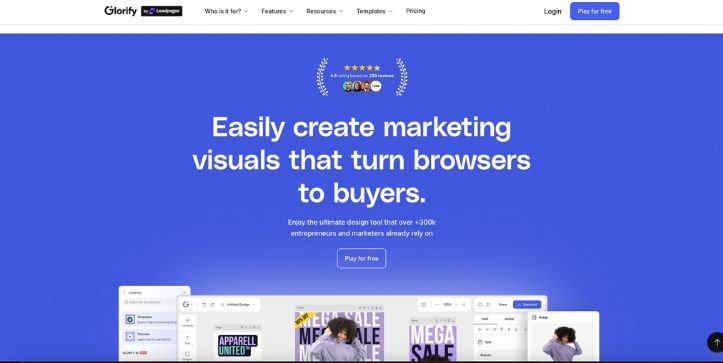
It’s made with ecommerce entrepreneurs, small business owners, and online sellers in mind. If you’re running a Shopify store, launching products on Amazon, or building a brand on social media, Glorify gives you a focused toolkit that fits those needs. Rather than forcing you to adapt to a generic design platform, it leans into the everyday tasks ecommerce owners actually do, like creating product showcases, lifestyle mockups, comparison images, and promotional graphics.
The platform revolves around a few main areas:
- Product Image Editor
- Mockup and Scene Creator
- Template Library for Ecommerce
- AI Tools for Backgrounds and Enhancements
- Brand Kit and Collaboration Features
Each of these plays a specific role in helping ecommerce businesses create visuals that look polished and ready to convert. Let’s take a closer look at what they can do.
How Glorify Works
The core workflow inside Glorify is pretty straightforward, and that’s one of the reasons it feels so easy to get comfortable with. Everything moves in a clean, logical sequence, from setting up your project to exporting the final visuals you’ll use on your product pages or ads.
Step 1: Start Your Project
Once you sign in, Glorify lands you on a clean dashboard with options like “Create Product Image,” “Create Mockup,” or “Choose a Template.” You pick what you’re working on. Maybe it’s a product photo for Amazon or a lifestyle mockup for your Shopify store. After selecting your project type, you upload your product image or pick a template that already fits your style.
Glorify takes that input and lays out the canvas so you can see exactly where your visual is headed.
Step 2: Build the Base Visual
Glorify automatically sets up your workspace with the right dimensions and tools. From there, you can start shaping your design. Most users jump into essentials like:
- Background removal
- Shadow and reflection adjustments
- Text overlays
- Color correction
- Pre-built layouts and mockup scenes
A live preview sits right in front of you so you can see changes as they happen. This is the part where your rough idea starts turning into something polished.
Step 3: Customize and Refine
This is where Glorify really earns its place in the ecommerce toolkit. You can refine your design using simple, guided tools such as:
- Adding lifestyle backgrounds
- Adjusting highlights or contrast
- Dropping your product into pre-made scenes
- Trying different fonts or brand colors
- Switching between mockup styles
You can keep experimenting until the image feels just right. The whole process stays beginner-friendly, even when you’re tweaking details that usually require advanced skills in other programs.
Step 4: Export and Use Your Design
Once your visual looks the way you want it, you’re ready to export. You can choose high-resolution formats, transparent backgrounds, or preset sizes made for platforms like Amazon, Instagram, or Shopify. After exporting, you’re free to upload it directly to your product listings, ads, or marketing materials.
A Closer Look at Glorify AI’s Features
Glorify brings a focused set of AI tools that actually make your design workflow easier. These features aren’t just there for show. They handle the tasks ecommerce owners deal with every day, like cleaning up product photos, generating fresh visuals, and speeding up the creative process when you’re short on time or ideas.
AI Image Generator
If you’ve ever had an idea in your head but no image to match it, this tool steps in. You type a simple description and Glorify creates visuals based on your prompt. You can use these generated images as backgrounds, ad creatives, or supporting design elements without needing to design anything from scratch.
AI Background Remover
This is one of the most practical tools in the platform. With a single click, Glorify cuts your product out of its original background and leaves you with a clean, isolated subject. It works fast and gives you a polished cutout that’s perfect for mockups, product listings, or comparison images.
AI Product Backgrounds
After removing the original background, Glorify can help you rebuild a scene around your product. You can pick from AI-suggested settings that match the style and tone you want, whether that’s a clean studio look or a lifestyle-themed setup. It keeps your visuals consistent and professional without requiring advanced design skills.
AI Writer Assistance
Good visuals need good copy, and this tool helps you create short text elements right inside your design. Whether you need a catchy caption, a product highlight, or a quick callout, the AI writer gives you suggestions so you don’t have to switch to another tool just to write a simple line of text.
Use Cases for Glorify
Great fit for:
✔ Ecommerce sellers who need fast, polished product images
✔ Amazon, Shopify, and Etsy store owners creating conversion-ready visuals
✔ Small businesses building a consistent brand look without hiring a designer
✔ Marketers producing social media graphics, ads, and promo creatives
✔ Entrepreneurs who want simple tools for mockups, backgrounds, and clean layouts
Not ideal for:
✖ Users who need highly advanced, Photoshop-level manipulation
✖ Teams working on complex brand campaigns with heavy custom animation
✖ Designers who prefer full manual control over every tiny detail
✖ Projects that require intricate vector editing or specialized print formats
Limitations of Glorify
1. Pricing Can Add Up for Heavy Users
Many users mention that Glorify feels affordable at first but can get expensive if you rely on it every day for multiple product images.
Some feedback you’ll often hear:
“I love how fast I can create product images, but the pricing starts to feel heavy when I’m editing lots of photos for multiple listings.”
“It’s great for quick product visuals but once you scale your usage, it becomes harder to justify the cost. Especially if you need to generate or export often.”
Bottom line: The plans work fine for light or moderate use. High-volume sellers may feel the cost rise faster than expected.
2. AI Tools Sometimes Need Manual Clean-Up
This is something many users experience when working with AI-driven design tools.
- Background removal can struggle with complex edges
• Generated images may require color or lighting corrections
• Scene suggestions occasionally miss the exact style you want
This doesn’t stop you from getting good results, but expect to fine-tune certain outputs for the best finish.
3. Limited Advanced Design Control Compared to Pro Tools
Even with all its conveniences, Glorify isn’t meant to replace full-scale design platforms.
It does not compete with:
- Pixel-level editing
• High-detail retouching
• Complex layer blending
• Advanced brush or vector manipulation
For highly refined design work, professionals often switch to tools like Photoshop or Illustrator once the basic layout is ready.
4. Template Depth Isn’t Endless
Glorify offers a strong library of templates built for ecommerce. Still, there are moments when:
- You want a very specific scene and cannot find it
• A niche product category has fewer ready-made templates
• Your brand requires a unique style that needs more manual tweaking
The library continues growing, but depending on your niche, you may need to customize more than expected.
Glorify Pricing (Updated for May 2026)
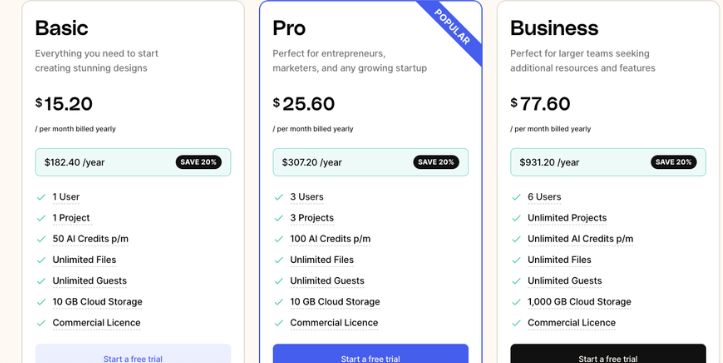
Free Plan – $0
- Always free to start
• Limited background removal credits each month
• Limited downloads
• Basic templates and essential tools
• A simple entry point for beginners or light design needs
Great for getting a feel for the platform before committing to a paid plan.
Pro Plan – $9.99/month
- Unlimited downloads
• Increased background removal credits
• Access to premium graphics and assets
• Multiple workspaces and organized project folders
• The most popular option for solo sellers who need consistent, polished visuals
This plan fits small ecommerce businesses that create product images on a regular basis.
Business Plan – $19.99/month
- Everything included in Pro
• Higher credit allocations for heavier workloads
• Priority support
• Ideal for small teams managing multiple brands or high-volume listings
A strong choice for teams that produce visuals at scale and want more flexibility.
Enterprise – Custom
- Tailored support
• Custom integrations
• Private hosting or deployment options
• Designed for organizations with high-volume creative needs
Pricing Summary
Glorify is affordable on a monthly basis, especially if you only use it for routine product visuals. Costs can rise if you rely on high-volume background removals, frequent downloads, or large design batches, so choosing the right plan depends on how much you create each month.
Final Thoughts: Is Glorify Worth It for You?
If you’re running an ecommerce business and want a simple way to create clean, professional product visuals without juggling complicated software, Glorify makes the process feel effortless. It gives you the tools you need to build mockups, polish product photos, and design marketing graphics in minutes, not hours. The workflow is friendly enough for beginners yet strong enough to support small teams producing visuals at a steady pace.
You’ll get the most value out of Glorify if your main focus is selling products and you want a design tool that understands that world. It’s not meant to replace advanced platforms, but it covers the everyday visuals that help your listings stand out. If speed, simplicity, and ecommerce-ready templates matter more to you than pixel-perfect control, Glorify is absolutely worth trying.
Frequently Asked Questions
1. Is Glorify good for creating ecommerce product images?
Yes. Glorify is built specifically for ecommerce visuals, so it handles product photos, mockups, comparison images, and ad creatives with ease. Most users find it much faster than using general design tools.
2. Can Glorify remove backgrounds automatically?
It can. The AI background remover takes your product image and isolates it cleanly so you can place it on new backgrounds or inside mockup scenes without manual editing.
3. Does Glorify have a free plan?
Yes. There is a free plan that lets you try basic features, templates, and limited credits. If you need frequent downloads or advanced tools, you’ll likely upgrade to one of the paid plans.
4. Can Glorify create mockups for Amazon and Shopify listings?
Absolutely. Glorify includes a library of mockup templates sized and styled for ecommerce platforms like Amazon, Shopify, and Etsy. This helps you create conversion-ready product displays quickly.
5. Is Glorify suitable for beginners?
Yes. Glorify is designed for non-designers, so the interface is simple, the tools are guided, and most features work with one or two clicks. If you’ve never used design software before, you can still create professional visuals.
6. Does Glorify offer AI tools?
It does. Glorify includes AI features like an image generator, automatic background removal, background suggestions, and writing assistance for quick captions or text elements.
7. Can I use Glorify for social media content?
Yes. While Glorify focuses on ecommerce, it also offers templates for Instagram posts, ads, stories, YouTube thumbnails, and other social formats.
8. Does Glorify replace advanced design tools like Photoshop?
Not entirely. Glorify is perfect for fast ecommerce visuals, but it doesn’t offer the deep manual control or advanced editing tools you’d find in Photoshop or Illustrator. Many users use both depending on the project.



