

PosterMyWall has become one of the most talked-about design and marketing tools for small businesses in 2026. Whether you’re a one-person shop trying to make your brand look sharp, a busy marketer juggling social posts and emails, or a community organizer who just wants eye-catching flyers without wrestling with pro software, PosterMyWall shows up with a simple promise: pick a template, make it yours, and publish in minutes.
But beyond the buzz, what is PosterMyWall actually built to do, how does it work behind the scenes, and what makes it different from other DIY design platforms? With new AI features rolling out, updated pricing, and a bigger focus on all-in-one marketing, is it still worth using in 2026?
This guide pulls together hands-on experience, the latest feature set, updated plans, and insights from real user feedback so you can decide whether PosterMyWall fits the way you create and manage your visual content.
What is PosterMyWall?
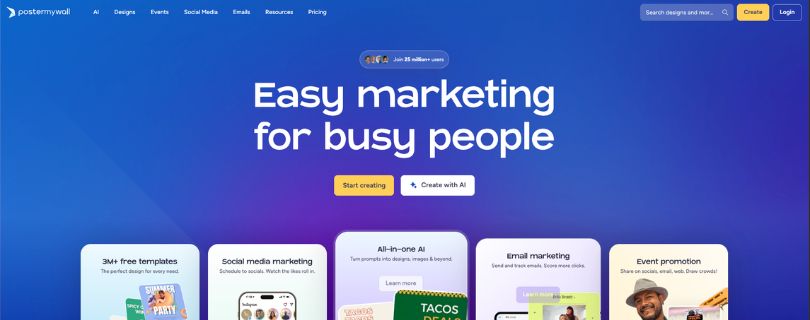
PosterMyWall is an online design and marketing platform that helps anyone create professional graphics, videos, and promotional materials without needing advanced design skills. Instead of relying on complicated software, you start with a ready-made template, make a few adjustments, and produce polished content in far less time than you’d expect.
You describe what you want to create, choose a template that fits your vision, and the editor gives you a clean workspace where you can customize text, images, colors, layouts, and animations. The platform supports thousands of templates for flyers, posters, social media posts, menus, digital signage, and short-form video, which makes it a practical tool for small businesses and community groups that need consistent visuals but don’t have an in-house designer.
Here’s what PosterMyWall typically generates once you start a project:
- A fully customizable design layout with drag-and-drop controls
- Built-in stock photos, shapes, icons, and editable layers
- Video and motion graphics tools for quick promotional clips
- Branding tools for logos, colors, and reusable design elements
- Export options that fit social media, print, and digital screens
This flexible setup is why so many non-designers rely on it. You get creative control without having to learn complex professional software, and you avoid the limits of rigid block-based editors. Visual content stays editable, reusable, and easy to update as your needs change.
Key highlights in a snapshot:
- No complicated learning curve and no pro-software barrier
- Templates for nearly every marketing use case
- AI-powered tools for image creation, background removal, and copywriting
- Social media publishing and scheduling built in
- Email campaign tools for newsletters and promotions
- Designed for creators who want speed, quality, and flexibility without technical setup
How PosterMyWall Works?
The workflow inside PosterMyWall is built for people who want professional-looking visuals without fighting complicated software. Everything follows a simple flow that takes you from a loose idea to a polished design in minutes. Here is how it usually comes together.
Step 1: choose what you want to create
You sign in and pick the type of project you need. Posters, Instagram posts, menus, short videos, event flyers, stories, and digital signage are all available.
You can search for a template or browse by industry, style, or format. Once you choose one, the editor opens a fully editable layout so you can start shaping it around your own message and branding.
Step 2: customize your design
The template becomes your working canvas. You can update text, switch images, adjust colors, add your logo, change fonts, or pull in new elements from the built-in stock library.
If you are working with video, you can trim clips, add motion elements, and fine-tune timing. AI tools help with background removal, image generation, or quick copywriting whenever you need an extra push.
Everything updates in real time, and the editor stays clean and easy to use so you never feel overwhelmed.
Step 3: refine through quick edits
As you shape your design, you can keep improving it with small adjustments. Maybe you brighten a photo, duplicate a layout for a second version, or resize everything for another social channel.
If you work with a team, collaboration tools let others comment or edit directly inside the project, which helps keep everything moving without long email threads.
Step 4: publish, share, or download
Once your design looks right, you can export it in whatever format you need. Images, PDFs, videos, and print-ready files are all supported.
You can also publish straight to your social channels, schedule posts, or send the design through an email campaign. Event creators can push designs to digital signage or embed them on their websites.
This simple flow is the reason many creators rely on PosterMyWall. It offers speed, flexibility, and clean visuals without the steep learning curve of traditional design tools.
PosterMyWall AI Features Explained
PosterMyWall comes with a growing set of AI tools that make designing faster and a lot less intimidating. When you are creating graphics or videos, these features work like a built-in assistant that helps you generate ideas, improve visuals, and move past creative blocks without slowing down.
The AI tools cover several creative steps you’d normally handle manually. You can describe what you want, and the system produces images, suggests layouts, writes captions, and even helps refine your designs. It gives you a head start when you are busy or unsure where to begin.
Here is what the AI suite can do:
- AI Text-to-Image GeneratorType what you want to see and it creates images you can drop straight into your design. It saves time you’d normally spend searching for the perfect photo.
- AI Background RemoverOne click removes unwanted backgrounds from photos so your subject stands out cleanly in your layout.
- AI Voice and Subtitles ToolsTurn your written script into a natural-sounding voiceover and generate captions automatically, which is helpful for quick promotional videos.
- AI Writer and Redesign ToolsGet help with captions, ad copy, email text, or reworking an existing design. You write a simple prompt and AI handles the heavy lifting.
All of these tools sit inside the same editor, so you can create complete marketing campaigns without bouncing between apps. Whether you are posting on social media, designing a flyer, or building a video ad, the AI features help you work faster and finish with a more polished result.
Use Cases for PosterMyWall
PosterMyWall works best for creators and businesses that need clean, professional visuals without hiring a designer or learning advanced software. It shines in fast-moving environments where you need content that looks polished but does not slow you down.
Great fit for:
✔ Small businesses that need ongoing social media graphics and promos
✔ Event organizers creating flyers, banners, and digital signage
✔ Restaurants and cafes designing menus, specials, and display screens
✔ Schools, churches, and community groups sharing announcements
✔ Freelancers who want a quick way to deliver marketing assets
✔ Local marketers who juggle posters, ads, emails, and short videos
✔ Creators who want AI help with visuals, copy, and layout decisions
Not ideal for:
✖ Designers who need advanced vector editing or fine-tuned artboard control
✖ Complex brand systems that rely on highly custom layouts
✖ Large teams that require enterprise-level versioning and workflow tools
✖ Projects that demand heavy animation or cinematic video production
Limitations of PosterMyWall
Even though PosterMyWall makes design work easier for a lot of people, it does come with a few trade-offs that are worth knowing before you rely on it for all your marketing needs.
1. Advanced features require a paid plan
This is one of the most common complaints from users.
You can create basic designs for free, but higher-quality downloads, brand kits, advanced tools, and premium templates sit behind a subscription.
For someone producing content every day, the cost may feel reasonable. For casual users, the jump from free to paid can feel steep, especially when multiple exports, videos, or high-res files become part of your workflow.
2. Limited precision for detailed or custom design work
PosterMyWall focuses on speed and simplicity, which means it is not built for pixel-perfect control.
Designers who want advanced layer manipulation, custom vectors, or highly controlled spacing sometimes run into limits.
The editor handles everyday marketing assets well, but detailed branding systems or highly specific layouts often need more advanced software.
3. Some templates feel repetitive across industries
Because PosterMyWall relies heavily on templates, you might notice pattern overlap if you create a lot of content.
A quick redesign or layout tweak usually solves it, but if your brand requires a strong original style, you may feel boxed in at times.
4. Video editing tools are helpful but not deep
Short videos, motion graphics, and simple animations work great in the editor.
However, creators who need frame-by-frame control, complex transitions, or multi-layered timelines will eventually hit the ceiling.
PosterMyWall handles light video work well but will not replace a full video editing suite.
5. Collaboration can feel basic for larger teams
The platform supports shared folders and teamwork, but bigger groups may want features like detailed version history, permission controls, or multi-stage approvals.
For small teams, the tools are enough. For agencies or organizations with structured workflows, the collaboration layer may feel limited.
PosterMyWall Pricing (Updated for May 2026)
PosterMyWall keeps its pricing fairly simple, and most people land on one of three plans depending on how often they create content and what type of downloads they need. Here is a clear breakdown of what each plan looks like going into December 2025.
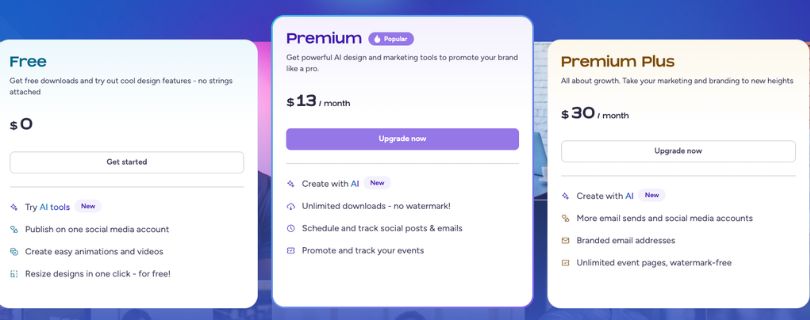
Free Plan
Price: $0
- Access to thousands of templates
- Basic editing tools
- Standard quality image downloads
- Social publishing
- Watermarked video downloads
- Great for casual use or light marketing needs
If you design occasionally or only need standard graphics, the free plan is a comfortable place to start. It gives you enough room to explore the editor and build simple projects without committing to a subscription.
Premium Plan
Price: $9.95 per month when billed annually
Price: $29.95 per month when billed monthly
- High-resolution image downloads
- Unlimited standard graphics
- No watermarks on videos
- Full access to premium templates
- Advanced editing tools
- Branding elements for a consistent look
This is the plan most small businesses and active creators use. It unlocks the features that make PosterMyWall practical for day-to-day marketing, especially if you export graphics or videos often. The annual pricing is noticeably more affordable if you produce content regularly.
Premium Plus Plan
Price: $29.95 per month when billed annually
Price: $99.95 per month when billed monthly
- Everything in Premium
- Unlimited high-quality video downloads
- Unlimited logo downloads
- Team collaboration tools
- Priority support
- File sharing and advanced branding options
This plan is built for teams, busy marketing departments, freelancers with multiple clients, or anyone who needs large volumes of video and brand assets. The bump in capability is significant if you handle consistent promotional work across many projects or platforms.
Pricing Summary
PosterMyWall is approachable for most creators, but cost can rise quickly if video is a big part of your workflow or if you rely on high-resolution exports every day. The free plan works for light use, the Premium plan fits most small businesses, and the Premium Plus plan supports teams that need more bandwidth and collaboration features.
If your workflow depends on regular content production, the annual plans offer the best value. If you only create graphics occasionally, the monthly options keep things flexible without long-term commitment.
Is PosterMyWall Worth It?
If you need good-looking visuals without the headache of learning pro design software, PosterMyWall delivers real value. It gets you from idea to finished graphic or video fast, and the built-in tools help cut down the time most people spend juggling multiple apps.
For casual creators and small teams, the free and Premium plans make a lot of sense. If you churn out a lot of high-res videos or manage complex brand assets, the cost adds up, but you still get a solid set of features that most competitors don’t pack into one place.
Frequently Asked Questions
Can PosterMyWall create designs from scratch?
Yes. You can start with a blank canvas or build from templates, then customize everything with text, images, video, and AI tools to match your brand or project needs.
Does PosterMyWall support team collaboration?
Yes. You can share projects, invite team members, and work together inside shared folders, which makes it easier to keep everyone aligned during the design process.
Is PosterMyWall good for beginners?
Yes. The editor is simple to navigate, the learning curve is light, and most people create their first design within minutes, even without prior design experience.
Is PosterMyWall free?
There is a Free plan, but high-resolution downloads, premium templates, and watermark-free videos require a paid plan if you want more flexibility and cleaner exports.
Can PosterMyWall make videos as well as images?
Yes. It supports short videos, motion graphics, and animated templates, which makes it useful for social media campaigns and digital signage content.
Can I use PosterMyWall designs for commercial work?
Yes. As long as you follow the licensing rules for stock content in the platform, you can use your designs for business marketing, client projects, and branded materials.



