Choosing the right visual AI tool isn’t just about flashy features. It’s about making sure you’re not wasting time or money on something that doesn’t actually fit your workflow. Get it right, and you’ll turn ideas into clean, shareable visuals in minutes. Get it wrong, and you’ll be stuck juggling limits, drained credits, and a tool that feels more like a chore than a shortcut.
Napkin AI is quickly becoming a favorite for anyone who wants to turn thoughts into diagrams, mind maps, and presentations without the design struggle. Creators, marketers, and educators are using it to skip the hassle and get straight to clarity. But before you jump in, it’s smart to understand how the pricing works and which plan really lines up with what you need. This guide is a simple, no-fluff breakdown of Napkin AI’s plans, what you get in each one, and who they’re actually built for.
What is Napkin?
At its core, Napkin AI is a visual thinking tool powered by artificial intelligence. It’s designed to help you turn raw thoughts, notes, or outlines into clean, structured visuals without needing to mess around with design software or templates. Think of it like your own personal diagram assistant that reads your words and instantly shapes them into flowcharts, mind maps, slides, or even concept diagrams.
Its main goal is to take messy ideas and organize them in a way that makes sense visually. Whether you’re brainstorming a project, mapping out a business process, or building a deck for a client, Napkin AI helps you make it all look good without having to start from scratch.
It’s a tool that’s built for thinkers, not just designers. And that’s why it’s gaining traction with marketers, educators, founders, and teams who want to communicate ideas quickly and clearly.
Napkin AI pulls together a lot of smart features into one workspace, including:
- AI-powered diagram generation: Just describe what you need, and it builds a visual for you.
- Mind map creation: Great for brainstorming or outlining ideas in a nonlinear way.
- Slide export: Convert your visuals into clean, ready-to-use presentation slides.
- Brand styling: Apply your fonts, colors, and logos to keep things on-brand.
- Credit-based usage: You use AI credits based on how much content you’re generating.
Now that you know what it does, let’s talk about how much it costs and which plan might actually be the best fit for how you work.
A complete breakdown of the Napkin pricing plans
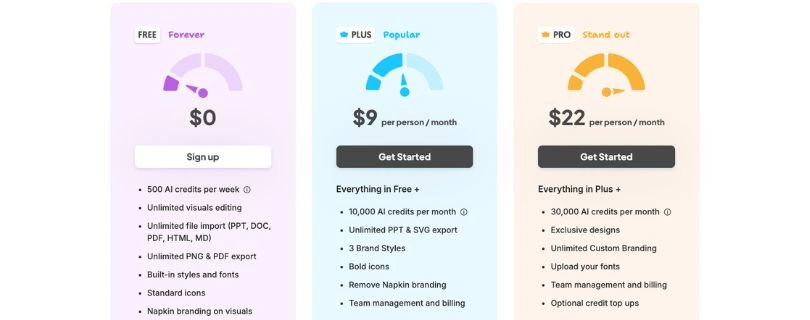
Napkin AI keeps things simple with three core plans: Free, Plus, and Pro. Whether you’re just testing the waters or building visuals daily for your business, there’s a tier designed to meet your needs. Each plan comes with a set number of AI credits, and those credits are what fuel your visual creations.
The good news is there’s a completely free option if you want to try things out without committing. And if you’re looking for more power, the paid plans are fairly priced, offering features like brand customization, high-quality exports, and team collaboration. You can also buy extra credits if you run out mid-month, so you’re never really stuck.
Let’s start with a side-by-side comparison to see how the plans stack up. These are the monthly rates, but Napkin AI also offers a discount if you pay annually.
Before diving into each plan, it helps to see everything laid out in one place. Napkin AI’s pricing is credit-based, so the biggest differences between plans come down to how many credits you get each month and which advanced features are unlocked.
A quick comparison of Napkin AI pricing tiers
| Plan | Monthly Price | AI Credits | Best For |
| Free | $0 | 500 per week | Casual users and first-time testers |
| Plus | $9/month | 10,000 per month | Solo creators and small teams |
| Pro | $22/month | 30,000 per month | Power users and businesses |
Now let’s break these down one by one, starting with the free option.
The Free Napkin AI pricing plan
Price: $0
Who it’s for:This plan is perfect if you’re just getting started with Napkin AI or only need visuals once in a while. It gives you a real feel for how the tool works without asking for your credit card upfront.
Key features:You get 500 AI credits every week, which is enough to create small diagrams, basic mind maps, or simple visual outlines. You can import text, edit your visuals freely, and export them when you’re done. The main trade-off is that exported visuals include Napkin branding, and you don’t get access to advanced styling or brand controls.
It’s not meant for heavy use, but it’s more than enough to test workflows, experiment with ideas, and decide whether Napkin AI fits the way you think and work.
The Plus Napkin AI pricing plan
Price: $9 per month (or less if you pay annually)
Who it’s for:The Plus plan is great for solo creators, freelancers, educators, and small teams who use visuals regularly and need more flexibility. If you’re creating multiple diagrams a week, doing client work, or building presentations often, this plan will feel like a big upgrade from the free version.
Key features:With 10,000 AI credits per month, you have a lot more room to generate complex visuals or work on multiple projects without constantly watching your usage. You also unlock high-quality exports in formats like PowerPoint and SVG, which makes sharing or presenting your visuals way easier and more professional.
Other nice perks include the ability to remove Napkin branding from your exports, apply brand styles to keep things visually consistent, and manage billing and usage for a small team. You also get access to bold icon sets that help make your diagrams pop just a little more.
For most active users, this plan hits the sweet spot between price and power.
The Pro Napkin AI pricing plan
Price: $22 per month (annual billing brings the price down)
Who it’s for:The Pro plan is built for high-volume users and teams that rely on visual content as a core part of their workflow. If you’re running multiple projects, creating visuals for clients, or want full creative control with custom branding, this is the plan that delivers.
Key features:You get a generous 30,000 AI credits every month, which gives you the freedom to create detailed visuals without holding back. This plan also unlocks exclusive design styles and layouts, so your visuals don’t just communicate clearly — they actually look custom-made.
On top of that, you can upload your own fonts, apply your complete brand identity, and create without limits on export quality or format. If you’re working with a team, the Pro plan includes all the collaboration tools from the Plus plan, but with more creative flexibility and fewer constraints.
And if you ever run out of credits, both Plus and Pro users can purchase extra top-ups anytime, so your workflow never hits a wall.
What key features are included in the Napkin AI pricing tiers?
Now that we’ve covered the pricing, let’s talk about what you’re actually getting at each level. Here’s a breakdown of the core features, how they work, and which plans unlock them.
Core AI diagramming and visual tools in all Napkin AI pricing plans
These are the essential features included even in the free plan, with more advanced controls unlocked as you move up.
AI-powered Visual Generation
This is Napkin AI’s signature feature. You write out your ideas in plain text, and the tool automatically turns them into visuals like flowcharts, mind maps, or slides. The AI understands your structure and creates a clean layout in seconds. Every plan includes this, but the number of visuals you can generate depends on your available credits.
Unlimited Editing and Real-Time Updates
Once a visual is created, you can jump in and move things around, change labels, tweak connections, or update your structure completely. It’s all editable, and you don’t lose credits for revisions. This is available across all plans.
Export Options
Every plan allows you to export visuals, but the format and branding control depends on your tier. Free users can export in basic formats with a Napkin watermark. Paid users unlock high-res PowerPoint and SVG export, with full control over branding.
Credit-Based Usage
Each plan gives you a set number of AI credits. You use credits when generating visuals, and the amount spent depends on how long or complex your input is. It’s a transparent way to measure usage, and it gives you more control over how much you create each month.
Advanced features unlocked in higher Napkin AI pricing tiers
As you move up to the paid plans, Napkin AI starts to feel more like a full creative workspace than just a smart diagram generator. Here’s what you get access to in the Plus and Pro plans.
High-Quality PPT and SVG Export (Plus plan and up)
This is a must-have if you’re building presentations or sharing visuals with clients. Instead of exporting flat images, you can download editable PowerPoint files and scalable SVGs. It makes collaboration easier and keeps your visuals sharp and professional in any format.
Custom Branding and Brand Styles (Plus plan and up)
If you’re working on behalf of a brand or want your visuals to match your style guide, this feature is a game changer. You can save brand colors, fonts, and layout preferences so your visuals stay consistent every time. Plus users can remove Napkin branding, while Pro users can go all-in with full custom brand control.
Bold Icon Packs and Exclusive Design Styles (Pro plan only)
Pro users unlock more advanced styling options, including bold icon sets and exclusive visual themes. These give your diagrams and presentations a polished look without having to tweak every element manually. It’s perfect for those who want high-end visuals without hiring a designer.
Custom Font Upload (Pro plan only)
For users who need full creative control, the ability to upload your own fonts makes a big difference. Whether you’re matching a client’s brand or just prefer a specific typeface, this feature gives you that extra level of customization.
Team Collaboration and Admin Controls (Plus plan and up)
Both Plus and Pro plans come with features designed for small teams or agencies. You can invite teammates, manage shared credits, and handle billing from one central place. It’s a simple but powerful way to collaborate without stepping on each other’s toes.
The hidden costs of Napkin AI pricing: Understanding AI credits
Here’s something that might not jump out right away. Napkin AI runs on a credit system. That means the number of visuals you can create each month depends on how many AI credits you have. If you’re planning to use the tool regularly, it’s important to understand how these credits work and how far they actually go.
What are AI credits in the Napkin AI pricing model?
Each time you generate a visual using Napkin AI, credits are deducted based on how much content you feed into it. Short, simple ideas use fewer credits. Longer, more complex inputs use more. Every plan includes a set amount of credits, 500 per week on the free plan, 10,000 per month on Plus, and 30,000 per month on Pro.
For casual users, this will probably be enough. But if you’re building multiple diagrams a day, working on client projects, or handling team workflows, you might find yourself running low before the month’s up.
What can credits be used for?
Credits are used specifically for the AI generation process. For example:
- Turning bullet points into a full flowchart
- Converting a written outline into a visual mind map
- Generating a deck slide based on input text
The good news is that once a visual is generated, edits are unlimited and don’t cost any credits. You only spend credits during the creation step, not when you’re moving things around or making adjustments.
What do Napkin AI credits cost?
If you run out, you can top up your credits at any time. Pricing for extra credits is straightforward at $3 for 3,000 credits. These credits don’t expire right away, so you’re not on a strict use-it-or-lose-it timeline like some other tools. Still, it’s easy to burn through them if you’re creating lots of visuals or working with detailed input.
A heads-up for heavy users
If you rely heavily on visual thinking or need to generate multiple visuals daily, it’s smart to plan for occasional top-ups or go straight for the Pro plan, which gives you the most breathing room. It’s not a sneaky cost, but it’s something worth factoring in when you’re calculating your real monthly spend.
Is Napkin AI pricing the right investment for you?
If you’re someone who thinks better in visuals, builds presentations often, or just wants a faster way to turn ideas into something that makes sense, Napkin AI is a smart investment. The free plan is great for testing the waters, but the real power shows up in the paid tiers, especially if you need cleaner exports, brand control, or more credits to keep up with your creative flow.
On the flip side, if you only need a diagram once in a while or already have a design-heavy setup that works for you, the free plan might be all you need. But for most people who work with ideas daily, like founders, educators, marketers, or creators, the price point is fair, flexible, and well worth it for what you get.
Frequently asked questions
Is there a free version available, or do I have to commit to Napkin AI pricing plans?
Yes, Napkin AI offers a free plan that you can use without entering any payment details. It’s a solid way to explore how Napkin AI works, create basic visuals, and understand the credit system. Paid plans unlock more monthly credits, branding control, and advanced export options.
What happens to my Napkin AI pricing if I choose annual billing?
Napkin AI offers both monthly and annual billing. If you choose the annual option, you pay upfront but save compared to the monthly rate. Your plan renews at the standard annual price unless you cancel before the renewal date, so it’s a good idea to review your usage before committing long term.
Does Napkin AI offer a money-back guarantee?
Napkin AI does not prominently advertise a traditional money-back guarantee. That said, the free plan lets you test the core experience without risk, which makes it easy to decide whether upgrading is worth it before spending any money.
Are AI credits included in the standard Napkin AI pricing, or are they an extra cost?
AI credits are included with every plan. The free plan comes with weekly credits, while Plus and Pro include monthly credit allowances. If you use all your credits, you can purchase additional top-ups separately. This gives you flexibility, but it’s worth keeping an eye on usage if you create a lot of visuals.
Can I change my plan or cancel at any time?
Yes, you can upgrade, downgrade, or cancel your plan whenever you like. Any changes you make will apply at the end of your current billing cycle. Canceling stops future charges, but your access continues through the period you’ve already paid for.
Which Napkin AI pricing plan is best for most users?
For most people, the Plus plan offers the best balance between cost and features. It gives you enough credits for regular use, removes branding, and unlocks professional export formats. If you’re creating visuals daily or working with teams and brand assets, the Pro plan is usually the better long-term choice.
What are AI credits?
AI credits are the core of how Napkin AI works. Every time you generate a visual using the AI, credits are used based on the length and complexity of your input. The more you create, the more credits you’ll need. Editing visuals doesn’t cost anything, so credits are only used during generation. Each plan includes a set amount of monthly or weekly credits, and you can top up anytime if you run out.
Is there a discount on annual billing?
Yes, Napkin AI offers a discount when you choose annual billing instead of paying monthly. It’s a great option if you know you’ll be using the tool long-term and want to save a bit over time. You’ll see the exact savings percentage when selecting your billing cycle during checkout.
What happens if I exhaust my AI credits?
Once you run out of credits, you won’t be able to generate new visuals until your monthly or weekly credits reset. If you need more immediately, you can buy top-up credits at a flat rate. Your existing visuals stay accessible, and you can still edit them freely without using credits.
Can I add my company branding to Napkin?
Yes, but you’ll need to be on the Plus or Pro plan. These tiers unlock the ability to remove Napkin branding from your visuals and apply your own brand styles. Pro users can also upload custom fonts and fully match their company’s visual identity across all diagrams and presentations.
How does Napkin use my data?
Napkin AI is designed with privacy in mind. Your content and data are used only to generate visuals and improve the product experience. Napkin doesn’t sell your data or use your input for training third-party models. You can check their privacy policy for full details, but rest assured your information stays secure.
What happens when I change plans?
When you change your plan, the features and credit limits of your new tier will take effect immediately, but you’ll still have access to what you’ve already paid for until the billing period ends. If you’re switching to a higher tier, you’ll be charged the prorated difference. Downgrading will lock out certain features once your current period ends.
What happens to my content if I cancel my subscription?
If you cancel, your content is still saved in your account. You won’t lose your diagrams or visuals, but you’ll lose access to paid features like high-quality exports or branding controls unless you re-subscribe. You’ll still be able to view your content, but editing and exporting options may be limited.
What payment methods are accepted?
Napkin AI accepts most major credit and debit cards. You’ll enter your payment info during checkout or in your account settings if you upgrade later. If you run into any issues or need to explore alternate payment methods, reaching out to support is your best bet.
What happens if my payment fails? Like if my credit card expires?
If a payment fails, Napkin AI will usually notify you and try the charge again after a short grace period. During that time, your access may continue, but features could be limited until payment is resolved. You can update your payment method in your account settings to prevent disruptions.