I’ve spent more hours than I want to admit bouncing between different tools to write, design, edit videos, and build social content. If you’re anything like me, you know the routine. Five tabs open. Three tools crashing. A simple idea suddenly turning into a scavenger hunt. It works, but it definitely doesn’t feel good.
A few weeks ago, I decided to try something people kept bringing up in conversations and creator groups: Simplified. It’s an AI content creation platform that claims to bring everything together in one place. Writing. Design. Video. Social scheduling. The whole creative cycle in one workspace.
I didn’t walk in expecting miracles. Ten years in this world teaches you to take big promises lightly. Most tools look incredible on the homepage, then fall apart the second you try to create something real. So I tested Simplified the same way I test every tool. Real projects. Real deadlines. Real chaos.
And the experience surprised me. Some features genuinely made my workflow smoother. Some gave me that small spark of relief you feel when something actually works the way you hoped it would. A few still need refinement, and I’ll talk honestly about those too.
This review is not sponsored. It’s just my firsthand experience of putting Simplified inside my everyday routine, seeing where it shines, where it struggles, and whether it earns a spot in a creator’s toolkit.
Let’s talk about it like two friends comparing notes after a long day of creating.
What is Simplified?
Simplified is an AI-powered content creation platform built to help creators, marketers, and teams produce everything they need in one workspace. Instead of juggling separate apps for writing, design, video editing, and social scheduling, Simplified brings all of those tools into a single ecosystem that works through natural-language prompts and intuitive editors.
When you describe what you want to create (for example, “write a product description in a friendly tone” or “design a clean Instagram carousel about morning routines”), Simplified generates:
Writing and Copy: long-form blog posts, captions, emails, ads, product descriptions, and brand-aligned messaging
Design Assets: social graphics, ads, presentations, banners, templates, and AI-generated images
Video Content: short-form videos, subtitles, animations, script drafts, timeline edits
Social Scheduling: multi-platform planning, publishing, analytics, and collaboration tools
Brand Kits and Workspaces: fonts, colors, logos, and team collaboration synced across all projects
This blend of creation tools is why Simplified attracts creators who want to move fast without bouncing between apps or learning complicated software. You can write, design, edit, and publish inside the same environment without losing momentum.
Key highlights
- No need for multiple platforms. Everything starts with a prompt or a template.
- Unified workflow for writing, design, video, and social content.
- Built for creators and teams who want speed without sacrificing quality.
- Smart AI that supports tones, styles, brand kits, and multi-step creative tasks.
- Real-time collaboration for teams that want to share, comment, and build together.
- Minimal, clean interface designed so you can create instead of configuring.
How Simplified Works (Step by Step)
The easiest way to understand Simplified is to look at how a project unfolds from start to finish. You don’t need technical skills. You don’t need advanced design experience. You just start with what you want to create, and the platform builds around you.
Step 1: Describe what you want to create
Once you sign in, you’re greeted by a clean workspace with a prompt bar and content-type options. You can type something simple like:
“Write a friendly product description for a new skincare line.”
“Create a five-slide Instagram carousel about morning routines.”
“Make a short video ad for a fitness challenge.”
Simplified reads your request, identifies your intent, and generates a starting point for the project.
Step 2: Generate your first draft
Simplified produces the core version of your content based on what you asked for. Depending on the task, that might include:
Writing: headlines, paragraphs, tone adjustments, SEO-ready structures
Design: layout, templates, color themes, image suggestions
Video: script ideas, clips, transitions, subtitles
Scheduling: draft posts with recommended hashtags and captions
You receive a ready-to-edit version that appears directly in the relevant editor. You can tweak every part of it just like you would in a traditional creative tool.
Step 3: Refine and customize through prompts
This is where the workflow gets fun. You can talk to Simplified the same way you’d talk to a creative teammate:
“Make the tone more playful.”
“Add an extra slide explaining the benefits.”
“Shorten the script to 20 seconds.”
“Change the colors to match my brand kit.”
Simplified updates your draft in real time. The AI adjusts layouts, writes new text, regenerates visuals, or edits the video timeline while keeping the rest of your project intact.
Step 4: Publish, download, or schedule
Once the content feels right, you choose how to use it:
- Schedule your posts directly to your social platforms
- Download the design or video in your preferred format
- Copy the text or export it into your existing workflow
- Share the project with your team for collaboration
Everything lives inside one workspace, so you aren’t jumping between apps or importing assets back and forth.
All AI Features of Simplified Explained
When you look at what Simplified can do, you start to see that it is more than a single tool. It is a full creative system powered by AI. Every feature is built to help you move from an idea to a finished piece of content without switching platforms. Here is a breakdown of all the major AI features and how they fit into your workflow.
AI Writer
The AI Writer is one of the most flexible tools on the platform. It helps you create blogs, product descriptions, captions, emails, ad copy, landing page text, and more. You can choose from a large collection of templates, adjust tone and length, and generate ideas quickly. It feels like having a writing partner who can fill in gaps, spark ideas, or handle repetitive writing tasks.
AI Design Tools
Simplified includes a full design studio enhanced by AI. You can build graphics, ads, presentations, banners, or social posts by choosing a template or describing what you want. The AI helps generate layouts, color ideas, and visual concepts that you can customize without needing expert design skills.
AI Image Generator
If you need original visuals, the AI Image Generator creates images based on your prompts. You can ask for illustrations, photos, avatars, logos, concept art, or themed graphics. It removes the need to hunt through stock libraries or outsource basic visuals.
AI Video Tools
Video features inside Simplified allow you to turn a script into a short video, generate subtitles, use text to speech, or make quick edits. These tools support creators who want to produce fast social-friendly videos without opening a heavyweight editing program.
AI Script Generator
This tool helps you build scripts for TikTok, YouTube Shorts, Reels, ads, product videos, or explainers. Instead of staring at a blank screen, you get a structured script you can adjust to match your voice or brand.
Social Media Planner with AI Support
The planner lets you map out your social calendar, build posts, and schedule them across multiple platforms. The AI can recommend captions, hashtags, and ideas based on the content you are creating. Everything happens inside one workspace, which simplifies planning and posting.
Brand Kit Tools
You can upload your brand colors, logos, fonts, and style elements. Simplified then applies these to your designs automatically. This keeps your visuals consistent across every project, whether you are creating a single post or a full campaign.
Collaboration Features
Teams can work together inside one shared environment. You can invite members, share projects, leave comments, and co-create in real time. AI assists throughout the process to help keep drafts clean and ideas flowing.
Use Cases for Simplified
Simplified fits a wide range of creators and marketing teams who want to move quickly without sacrificing quality. If your workflow involves writing, design, video, or social content, this platform can slot into your routine with almost no friction.
Great fit for:
✔ Creators who want to produce graphics, videos, and copy in one place
✔ Freelancers juggling multiple clients and fast turnaround deadlines
✔ Social media managers planning posts across Instagram, TikTok, YouTube, Facebook, and LinkedIn
✔ Small businesses that need consistent branding without hiring separate specialists
✔ Marketing teams that want a shared workspace for writing, designing, and scheduling
✔ Entrepreneurs building content for launches, ads, funnels, and daily engagement
✔ Anyone who wants AI help generating ideas, scripts, captions, outlines, or design concepts
Not ideal for:
✖ Creators who need highly advanced video editing similar to professional software
✖ Designers who prefer full manual control over every pixel and layer
✖ Teams with complex enterprise-level workflows that require deep integrations
✖ Users who don’t want AI assistance or prefer building everything from scratch
Limitations of Simplified
Even though Simplified covers a lot of ground, it still has areas where users may feel a bit restricted. These limitations don’t make it a bad tool, but they do matter depending on how you work and what you expect from an all-in-one platform.
1. Pricing can become limiting for heavy creators
This is one of the more common complaints you’ll see in user discussions online. The base plans feel fair, but if you create content every day or run multiple accounts, you may notice credits and usage caps catching up quickly.
Some users mention that they start a project, go through several rounds of revisions, and later realize how much of their monthly limit they’ve burned through. If you rely heavily on AI rewriting, regenerating, or producing visual assets, your usage can climb fast.
The bottom line: the pricing is fine for casual or moderate use, but high-volume creators might hit ceilings sooner than expected.
2. AI-generated drafts occasionally miss the mark
Simplified tends to produce strong first drafts, but like any AI-driven tool, it sometimes gives results that need manual polishing. You might ask for a specific tone and get something slightly off. Or you may generate a design template that feels close but still needs a few meaningful adjustments.
This isn’t a dealbreaker, but you should expect to refine your content rather than publish it as-is.
3. Limited precision compared to advanced design or video tools
Simplified is built for speed and accessibility. That’s great for most creators, but if you’re used to the granular control of pro-level tools, you may bump into some constraints.
Examples include:
- Complex masking or layering
- Very detailed timeline edits for video
- Advanced typography or layout control
- Custom animation paths
If your work requires pixel-perfect design or deep video editing, Simplified works better as a companion tool than a full replacement.
4. Collaboration tools could feel basic for larger teams
Smaller teams usually have no problem sharing assets, co-editing, and leaving comments. Larger teams, however, may need more robust systems for permissions, version control, and multi-approval workflows.
As projects grow, keeping track of revisions or who changed what can become challenging, especially when multiple people are generating and editing assets simultaneously.
5. AI sometimes produces repetitive patterns
This shows up mostly in writing. If you generate multiple posts or captions back to back, the outputs can occasionally fall into similar structures or phrases. You can work around this by tweaking prompts, but it’s still a limitation worth knowing.
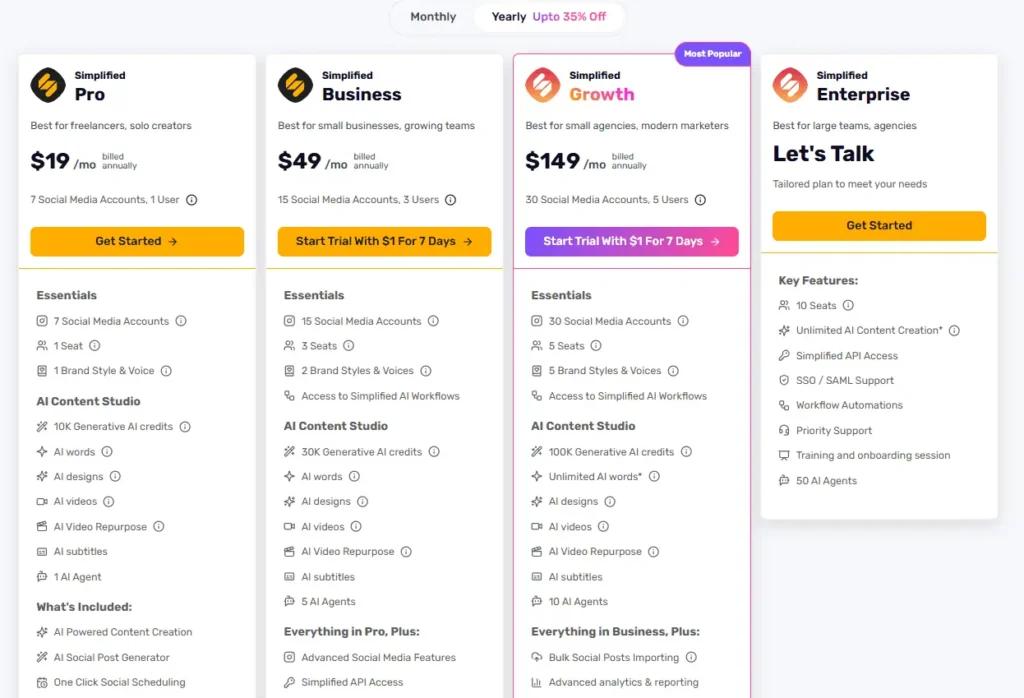
Simplified Pricing (Updated for Feb 2026)
Pricing inside Simplified is structured around AI credits and feature access. You can start for free and then move into plans designed for individual creators, small teams, and agencies who need more power and capacity.
Free Plan 0 dollars per month
- Basic access to writing, design, and social tools
- Limited AI credits
- Good for experimenting and getting a feel for the platform
- Works best for light or occasional content creation
The free plan lets you explore without committing, although the credit limits become noticeable once you start generating projects more frequently.
Pro Plan around 29 dollars per month
- Ideal for solo creators and freelancers
- Roughly 10,000 monthly AI credits
- Connect up to 7 social media accounts
- Full access to AI writing, design, video tools, and social scheduling
Most individuals land on this plan because it offers enough credits and flexibility for consistent content creation.
Business Plan around 79 dollars per month
- Higher credit limits for regular production
- Ability to connect more social accounts
- Collaboration tools for small teams
- Useful for agencies or any team that needs shared access and consistent output
This plan gives teams more breathing room, especially when multiple people are creating and reviewing content.
Growth Plan around 199 dollars per month
- Large credit pools suitable for high-volume creators
- More user seats
- More storage space
- Priority support and expanded team features
This tier fits agencies or businesses that produce content every day and need a workspace that will keep up.
Enterprise Plan custom pricing
- Unlimited or very high credit allocations
- Custom user seats
- SSO, API access, and dedicated onboarding
- Built for large companies and complex workflows
Enterprise plans scale with your needs and offer options that go beyond the standard tiers.
Pricing Summary
Simplified uses a credit-based system. Each AI action reduces your monthly pool, which is why heavier creators often choose the higher tiers. The free plan is great for testing. The Pro plan works well for consistent creators. Teams and agencies usually benefit from the Business or Growth plans so they do not hit limits during busy production cycles.
Frequently Asked Questions
Can Simplified create all types of content?
Yes. Simplified can generate written content, social media posts, videos, graphics, ads, and even full multi-slide presentations. It covers most content formats a creator or marketer needs on a daily basis.
Is Simplified good for beginners?
Yes. The platform is designed to be approachable even if you have no design or editing experience. You can start with prompts or templates and adjust everything inside a simple editor.
Is Simplified actually free?
There is a Free Forever plan that lets you try the main tools with limited credits. For consistent or heavy content creation, most people upgrade to a paid plan so they do not run out of credits.
Can Simplified schedule social media posts?
Yes. You can create your posts, plan your calendar, and schedule content across multiple platforms. It works well for creators who want writing, design, and scheduling inside one tool.
Does Simplified handle video editing?
Yes. Simplified can generate scripts, assemble clips, add subtitles, and help you create short-form videos. It is not a replacement for advanced editing software, but it is great for quick social-friendly videos.
Can I work with a team inside Simplified?
Yes. You can invite team members, share projects, leave comments, and build content together in real time. Higher-tier plans offer more collaboration features and user seats.
Does Simplified support brand kits?
Yes. You can upload your brand colors, fonts, logos, and presets so all your designs and content stay consistent across every project.
Is Simplified suitable for agencies?
Yes. Many agencies use Simplified because it reduces tool-switching and keeps writing, design, video, and scheduling in one place. Higher plans offer enough credits and collaboration tools for busy teams.