In the fast-moving world of motion design, Jitter AI is emerging as a smart, accessible tool for designers, marketers, and product teams aiming to create polished animations fast. While it may not have the legacy of traditional animation software, Jitter AI offers a fresh, AI-powered approach to motion design that lowers the barrier for both beginners and busy professionals.
With built-in intelligence that suggests animations from static designs, Jitter AI simplifies a once time-consuming process. In this article, we’ll explore what Jitter is, how it works, its key features, practical benefits, and pricing options so you can decide if it’s the right tool to speed up your creative workflow.
What is Jitter AI?
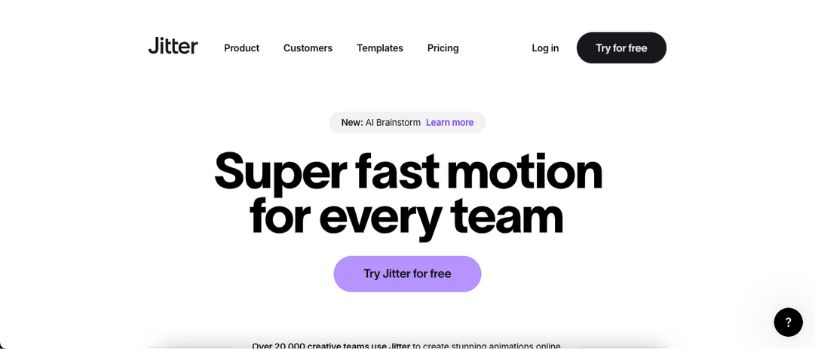
Jitter AI is an AI-powered motion design tool that helps users turn static visuals into smooth, professional animations in seconds. It’s built into the Jitter platform, which is known for its lightweight, browser-based animation editor. With Jitter AI, users can generate animation ideas instantly using simple mood prompts like “playful” or “cinematic,” then customize them as needed.
Think of it as a design-friendly alternative to complex animation software like After Effects, with a sharper focus on automation, real-time editing, and creative speed. Jitter is ideal for designers, marketers, and product teams who want to create stunning animations without deep motion design expertise.
Also Read:
Top Jitter Alternatives in 2026
Key Features of Jitter AI Motion Design Tool
Jitter AI blends automation with creative control, making motion design faster and more accessible. Whether you’re a designer, marketer, or product lead, these features help you animate with speed and confidence.
- AI Brainstorm for Quick Animation Ideas
Jitter AI includes a Brainstorm tool that turns static designs into animated drafts in seconds. Choose a mood like playful or cinematic, and the AI instantly suggests motion ideas tailored to your design.
- Simple Animation Without Keyframes
Forget complex keyframes. Jitter lets you animate elements using intuitive controls. Adjust movement, opacity, scale, and timing with just a few clicks—no animation background needed.
- Seamless Figma Integration
Import pixel-perfect designs directly from Figma. This keeps your workflow clean and consistent, saving time when preparing files for animation.
- Infinite Canvas for Multi-Scene Projects
Work across multiple scenes on a single, scalable canvas. Test different formats, experiment with ideas, and keep everything organized in one place.
- Large Template Library
Access over 300 ready-made motion design templates. From social media to UI animations, templates give you a head start and creative inspiration.
- Animation Presets and Custom Easing
Choose from built-in presets or craft your own easing curves. Smooth, consistent transitions help bring personality to your animations without extra effort.
- Text and Vector Animation Tools
Animate text by line, word, or letter. Move objects along curves and morph vector shapes to create rich, expressive animations that stand out.
- Media Support for Richer Content
Import videos, audio, and images to build dynamic, multimedia animations. Layer content to bring more depth and energy to your work.
- Flexible Export Options
Export in formats like 4K video, GIF, WebM, and Lottie. Whether you’re shipping content for social media, the web, or product UI, Jitter has you covered.
- Real-Time Collaboration
Work with teammates live on the same project. Share links for instant feedback, streamline edits, and move through approvals faster.
Pros and Cons of Jitter AI
Like any tool, Jitter AI comes with strengths and trade-offs. Here’s a balanced breakdown to help you decide if it fits your needs.
Pros of Jitter AI
AI-Powered Speed: Generate animation ideas in seconds using the Brainstorm feature. Perfect for fast-moving teams or solo designers under tight deadlines.
Beginner-Friendly Interface: No complex timelines or keyframes. The UI is intuitive, with drag-and-drop simplicity and instant visual feedback.
Smooth Figma Integration: Easily import your static designs from Figma and start animating without rebuilding layouts or components.
Real-Time Collaboration: Work with teammates in a shared space. Comment, edit, and iterate together without switching platforms.
Template-Driven Workflow: Over 300 templates help you get started fast. Great for inspiration or quick project turnarounds.
Flexible Export Options: Export your animations in high-resolution formats like 4K, GIF, WebM, and Lottie, ready for web, apps, or social media.
Browser-Based and Lightweight: No heavy software or downloads. All animation happens in the browser, making it easy to access and fast to use.
Cons of Jitter AI
Limited Advanced Motion Control: Jitter AI works best for simple and mid-level animations. It lacks deep timeline and scripting features found in advanced tools.
Still an Evolving Platform: Some advanced animation styles, such as 3D or physics-based effects, are not available yet.
Internet Dependency: Jitter AI runs fully online. A stable internet connection is required at all times.
Free Plan Restrictions: The free plan includes watermarks and export limits. Full access requires a paid subscription.
Growing Community: The user base and plugin ecosystem are expanding but remain smaller than long-established motion design platforms.
How Much Does Jitter Cost? Full Pricing Breakdown
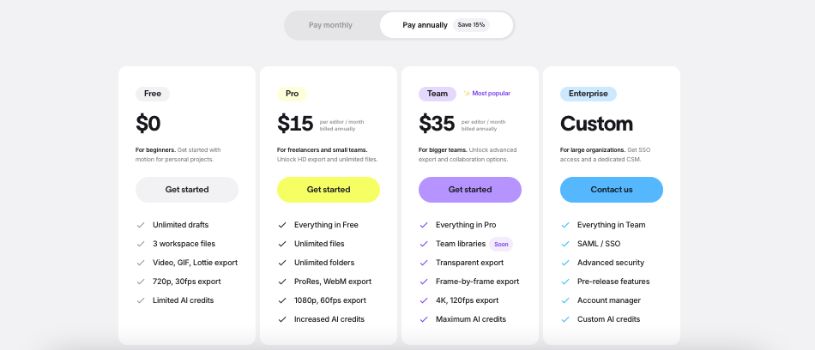
Jitter offers flexible pricing options designed for individuals, teams, and enterprises. Whether you’re exploring motion design for the first time or scaling production across teams, there’s a plan that fits.
Free Plan
The Free plan is a great starting point for personal projects and learning. It includes:
- Unlimited drafts
- Export to video, GIF, and Lottie
- Up to 720p resolution at 30fps
- Collaboration with up to 3 editors
- Public links for sharing projects
This tier is ideal for hobbyists, students, or anyone testing the waters with motion design.
Pro Plan
Built for freelancers and creative professionals, the Pro plan unlocks more power and flexibility:
- High-resolution exports up to 1080p at 60fps
- Removes Jitter watermark
- ProRes, WebM, and transparent background export formats
- Unlimited folders for organizing files
- Unlimited workspace files
Pro gives you more control over quality, brand presentation, and asset management.
Team Plan
The Team plan is designed for agencies and larger teams managing complex projects:
- 4K exports at up to 120fps
- Frame-by-frame and transparent exports
- Shared team libraries for assets, styles, and templates
- Advanced folder organization
- More editors and improved collaboration
This plan helps streamline production and maintain consistency across team output.
Enterprise Plan
The Enterprise plan offers advanced functionality and custom support for large organizations:
- Single Sign-On (SSO) integration
- Enhanced security and permissions
- Priority support and training
- Early access to new features
- Custom contract and invoicing options
Enterprise plans are fully tailored to meet business needs at scale.
Education Discounts
Jitter supports the creative community by offering free Pro access to students and educators. This makes it easier to integrate animation into learning environments.
How Billing Works
- Monthly and annual billing options are available
- Annual plans offer cost savings over time
- Workspace billing is based on the number of editors
- Editors can be added or removed as your team grows or shifts
Is Jitter AI Right for You? Here’s the Bottom Line
If you’re looking for a motion design tool that combines speed, simplicity, and smart automation, Jitter AI is a strong contender. It’s built for people who want to bring ideas to life quickly—without diving into the complexity of traditional animation software.
Jitter AI is a great fit for:
- Designers who want to add motion to their UI, branding, or marketing visuals without learning After Effects
- Marketers who need to produce scroll-stopping animations for social media, product launches, or campaigns
- Product teams that want animated walkthroughs, feature highlights, or UI interactions for demos
- Agencies and freelancers who want high-quality motion content with fast turnaround times
- Beginners exploring animation without needing technical experience
It might not be for you if:
- You need deep timeline control, scripting, or complex visual effects
- You work in 3D or cinematic animation that requires advanced tools
- Your team depends on offline software or doesn’t have stable internet access
Jitter AI is built for creators who want to move fast and stay creative. It lowers the learning curve, speeds up production, and makes animation feel approachable—even for first-timers. If you’re tired of staring at a blank timeline, Jitter AI might be exactly what you need.