

TL;DR: Economic Intelligence at a Glance
| What is it? | An AI decisioning layer inside Whop that looks at your business and recommends the single next action to take, then runs it for you if you accept |
| Best for | Owners already running checkout, subscriptions, a website or ads on Whop who want to stop guessing what to do next |
| Where you use it | The Whop dashboard, the Whop CLI, or inside Grok, Cursor, Claude and ChatGPT through the Whop MCP |
| Pricing | No separate price is listed in the announcement. Whop’s standard card rate is 2.7% + $0.30 per domestic transaction |
| Reported results | Across 14,905 businesses, sales up 31.8% month over month, per Whop’s own figures |
| My verdict | Worth switching on if your business already lives on Whop. Set your own baseline first |
What Economic Intelligence actually is
Most of the AI features bolted onto business software give you the same advice you could get from any chatbot. Post more often. Try an ad. Email your list.
Whop, a place to start and run an online business with checkout, subscription billing, payouts, website hosting and ads in one dashboard, is taking a different swing with Economic Intelligence. Whop describes it as an AI decisioning system built on a proprietary context layer that understands how businesses operate and what they should do next.
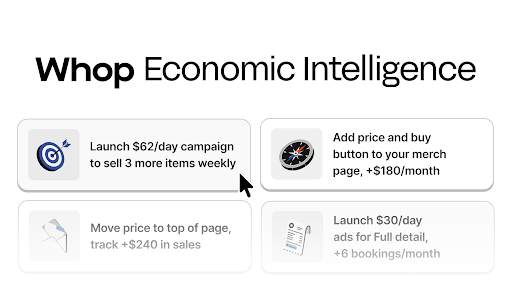
The pitch is specificity. Whop says the system is built from millions of business actions taken on Whop, so instead of a generic tip it recommends one concrete action for your business, chosen for the highest expected return. Whop’s examples range from big moves, like optimizing your website with a Whop Blueprint or launching a campaign in Whop Ads, down to small ones, like setting up a recurring weekly DM to your top clients.
The second half of the product is execution. Accept a recommendation and Whop AI carries it out on your behalf with minimal input. Whop frames it as an execution layer guided by an intelligence layer, and the dashboard flow is built around exactly that split.
My Verdict: the recommendation part is interesting. The part that made me pay attention is that it does the work after you say yes.
How to use Economic Intelligence in the dashboard
There is no setup wizard. If you already have a business on Whop, the whole thing takes about a minute.
- Open your business dashboard at whop.com and turn on Economic Intelligence.
- Look for the recommended actions panel. Each card is one suggested next step for your business.
- Click a recommendation to see what it proposes.
- Hit Run. Whop AI implements it right away.
Treat the first few recommendations as a test of judgment. Read what each one would change before running it, especially anything that touches pricing, checkout or ad spend. The system proposes and you decide, so the decision is still yours to get right.
A practical tip from my own workflow with AI tools: write down your current month’s numbers before you switch anything on. Whop’s dashboard shows revenue, customers and transactions, and you will want a clean before-and-after of your own.
How to use it from the terminal
This is the part most reviews skip, and it is where Economic Intelligence stops being a dashboard widget.
Whop ships a command line tool, and the CLI docs list a recommended-actions command group under Tracking. It is described as suggested next-step action chains for an account, with four commands: list, get, create to execute a chain, and executions to see what has already run.
Install the CLI with one line on macOS or Linux, or through Homebrew or npm:
curl -fsSL https://whop.com/install.sh | sh
whop login
whop quickstart
whop quickstart picks the business the CLI acts on. From there, whop recommended-actions list shows the current suggestions, and the same commands work for an AI agent because every CLI command runs non-interactively and accepts –format json.
Two warnings from the docs deserve repeating. The CLI has no sandbox, test or dry-run mode, so every command runs in production and some can move real money. And Whop tells you to read its auth scoping guide before handing an API key to an agent. Start with the read-only commands, like list and get, before you let anything call create.
For a baseline, the stats group does the job:
whop stats time-series get net_revenue –from 2026-09-01 –to 2026-09-30
Run it for the month before you turned Economic Intelligence on and the month after, and you have a comparison built from your own business.
My Verdict: the CLI turns recommendations into something you can script, log and audit. That is more useful than the button for anyone who runs more than one business.
Using it inside Grok, Cursor, Claude and ChatGPT
The announcement places Economic Intelligence alongside the Whop MCP, which exposes the same business controls to AI assistants. Whop’s partnership with SpaceXAI brings it into Grok and Cursor, and Whop says the MCP also works with agent harnesses like Claude and ChatGPT.
In Grok, Whop is added as a connector in the connector settings and authorized once. After that, Grok can pull live data from the business and take action inside the conversation. In Cursor, Whop appears as a plugin so a developer can launch a site, accept payments or run ads without leaving the editor.
If you spend your day in one of those tools, this is probably how you will end up using Economic Intelligence. Ask what the business should do next, read the recommendation, approve it, and keep working.
What the early numbers say, and what they do not
Whop has published one month of results. Businesses using Economic Intelligence, compared with their previous month, grew combined sales by 31.8%, unique paying customers by 26.3% and transactions by 26.5%. The sample was 14,905 businesses and Whop notes the figures are approximate.
Those are strong numbers, and they are also vendor numbers. The comparison is each business against its own prior month, with no control group named, so seasonality and businesses that were already growing are mixed in. I would read it as a reason to test, and I would measure my own lift with the baseline above before repeating the headline figure to anyone.
Pricing
The announcement does not list a separate price for Economic Intelligence, and it tells owners to turn it on from the dashboard, so check what applies to your account there. For context, Whop’s published fee for accepting payments is 2.7% + $0.30 per domestic card transaction, with 1.5% added for international cards and 1% for currency conversion.
Pros and cons
What I like
- One concrete next step instead of a list of generic ideas
- Execution is included, so accepting a recommendation finishes the task
- Available in the dashboard, the CLI and the AI assistants people already use
- The CLI makes it scriptable and auditable
Where I would be careful
- It only works for businesses that run on Whop, so there is nothing here for a Shopify store or a Stripe account
- The published results are month over month with no control group
- No sandbox in the CLI, so an agent with a broad API key can make expensive mistakes
- The announcement is light on detail about how recommendations are ranked
Who it is for, and who should skip it
Economic Intelligence makes sense for owners who already take payments, bill subscriptions, host a website or run ads on Whop. The more of the business that lives there, the more context the system has to work with, and the more it can actually execute.
Skip it if your stack is elsewhere and you are not planning to move. It is a feature of running a business on Whop, and it has no standalone version you can point at another platform.
Final verdict: Is Economic Intelligence worth using?
Yes, with a baseline. If your business is on Whop, Economic Intelligence on Whop costs you a minute to turn on and gives you a ranked next action with the execution built in. That is a better deal than most AI features I have tested this year, where the output is a paragraph of advice and the work is still yours.
Record your numbers first, read every recommendation before you run it, and keep agents on read-only commands until you trust them. Do that and the feature earns its place in the dashboard.
Frequently Asked Questions
What is Whop Economic Intelligence?
An AI decisioning system inside Whop that analyzes your business and recommends the single highest-return action to take next, then executes it if you accept.
How do I turn on Economic Intelligence?
Open your business dashboard at whop.com, turn on Economic Intelligence, and use the recommended actions panel. Click a recommendation and hit Run.
Can I use Economic Intelligence from the command line?
Yes. The Whop CLI includes a recommended-actions command group with list, get, create and executions commands. Install the CLI, sign in, run whop quickstart, then whop recommended-actions list.
Does Economic Intelligence cost extra?
The announcement lists no separate price. Whop’s standard payment fee is 2.7% + $0.30 per domestic card transaction. Check your dashboard for what applies to your account.
Does it work with Grok or ChatGPT?
Yes. The Whop MCP connects the business to Grok and Cursor through Whop’s SpaceXAI partnership, and Whop says it also works with Claude and ChatGPT.
