What if building an app were as simple as describing it in plain language? No setting up development environments. No fighting configuration files. No wasting hours just to get a project running.
For many people, turning an idea into a working app is frustrating. Installing dependencies, configuring databases, and fixing deployment issues often slow progress before real development even begins. Even experienced developers lose time on these repetitive tasks.
That’s where Replit Agent tries to make a difference.
Replit Agent is an AI-powered development tool that goes beyond writing code. From a single prompt, it sets up the environment, creates the project structure, connects databases, and deploys the app.
In this article, I’ll explain what Replit is, how it works, its core features, and its pricing. By the end, you will have what you need to decide whether it fits your workflow.
What Is Replit AI?
Replit AI is not a single tool. It is a suite of AI-powered features built directly into Replit’s cloud-based development environment. Its goal is simple to reduce the friction of building software by letting developers use plain language to generate, modify, and deploy applications.
Instead of writing every line of code manually, you can describe what you want to build, and Replit AI helps translate that intent into working software.
Also Read:
What is Emergent AI?
How to Build Apps with Replit AI
Replit AI helps you turn ideas into apps quickly. You describe your vision, let Replit build it, refine the result, and then deploy it.
1. Describe Your Idea Through the Prompt
Start by explaining your idea to Replit using clear, plain language. Include details about the purpose of the app, its design, and its core functionality.
The more specific your description is, the better the results will be. Clear instructions help Replit AI understand your requirements and expectations accurately.
Describe features such as pages, colors, navigation, and content to guide Replit AI toward generating an app that matches your vision.
2. Replit AI Builds Your App
Replit allows you to either generate the full application immediately or create a prototype to review before continuing development.
Replit AI converts your request into a complete application with front-end, back-end, and database structure automatically. It connects all essential components correctly, ensuring the app runs smoothly without requiring manual setup.
By simplifying complex development tasks, Replit AI enables even users with no prior programming experience to build functional applications.
3. Refine and Iterate
Once the initial version of your app is ready, you can ask Replit AI to add new features such as login systems, contact forms, or image galleries.
You can also request changes to layout, color schemes, or functionality until the app meets your exact requirements.
This iterative approach lets you improve the app incrementally, reducing rework and saving time as the product evolves.
4. Deploy and Share
When your app is complete, you can deploy it instantly using Replit Deploy with a single click.
Each app includes hosting, which removes setup costs and technical barriers while allowing you to reach users faster. Replit also offers custom domains and sharing options, making it easy for others to access your app worldwide.
Key Features of Replit AI App Builder
Replit AI is packed with smart tools that help you build software fast and with less effort. It combines natural language prompts, real-time coding help, and deployment tools in one place. Here are the key features that make it powerful and flexible for both beginners and seasoned developers.
1. Natural Language App Creation
You can describe what you want in plain English and Replit AI starts building it right away. This feature turns ideas into working code, user interface, and backend logic without requiring you to write everything manually.
2. Integrated Online IDE
Replit provides a full coding environment in your browser. You can write, run, test, and refine code without installing software locally. It supports many programming languages and handles server setup on your behalf.
3. AI Coding Assistant
The built-in AI assistant offers real-time suggestions as you type. It can explain code logic, suggest improvements, and help you learn as you build. This works whether you want to fix bugs or understand complex parts of your project.
4. Automatic Backend Setup
Replit AI automatically configures backend components like databases, authentication, and server logic. You do not need to manually set up these layers, which makes prototyping much faster.
5. Built-In Deployment and Hosting
Every app you build can be deployed with one click. Replit provides hosting and custom domain support so your project goes live quickly and securely without extra configuration.
6. Real-Time Collaboration
Multiple people can work on the same project together. The experience feels like Google Docs where edits, comments, and code changes appear instantly for everyone.
7. Flexible Refinement and Iteration
After the AI generates your app, you can refine it. Just tell the AI what you want added or removed, and it updates your project accordingly.
8. Mobile Development Support
You can build apps on your phone or tablet using the Replit mobile app. That means you are not tied to a desktop for coding, testing, and deployment.
9. Multiple Platform Builders
Replit supports building different types of applications. You can build web apps, APIs, and even Android apps with AI guidance, without needing extra tools.
10. Managed AI Integrations
Replit AI offers access to leading AI models and tools without requiring separate API keys or external billing. Replit handles integration and billing under one system.
Replit: Pricing Explained
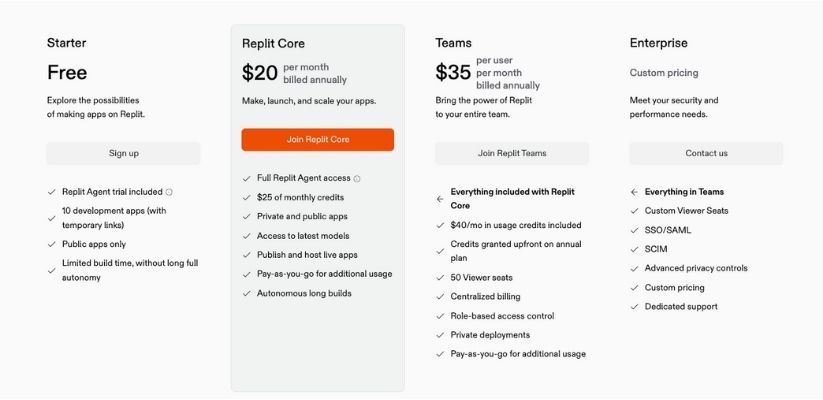
Replit offers several pricing tiers that fit different types of developers and teams. Each plan includes monthly usage credits and access to Replit AI features. Below is a clear breakdown.
Starter Plan (Free)
Replit’s free plan is perfect for beginners and hobby coders. It lets you explore the platform, learn coding basics, and try out AI features with some limits. You get a trial of the AI agent, the ability to create up to 10 development apps with temporary links, and restricted build time. Projects are public by default.
Core Plan ($20/month billed annually)
The Core plan is designed for solo developers and serious builders. It unlocks full access to Replit AI tools, including the Agent and advanced coding models. You also receive $25 in monthly usage credits that cover computing, AI usage, deployments, and data transfer. You can create both public and private apps, host them live, and push projects to production.
Teams Plan ($35 per user/month billed annually)
If you work with others, the Teams plan adds collaboration and management features. It includes everything in the Core plan plus $40 in usage credits per user, centralized billing, role-based access control, and 50 viewer seats. This makes it easier to coordinate work, manage access, and deploy private applications with your team.
Enterprise Plan (Custom Pricing)
For large organizations with stricter security and performance needs, Replit offers custom Enterprise plans. These include all the Teams features plus advanced enterprise controls like single sign-on, SCIM integration, custom viewer seats, and dedicated support. Pricing is tailored to each organization.
How Usage Credits Work
- Monthly Credits Included
Each paid plan comes with a set amount of usage credits every month. - Covers Key Resources
These credits act like a prepaid balance and can be used for:
- AI coding assistance
- Compute power
- Data transfer
- App deployments
- AI coding assistance
- Track Your Usage
As you use Replit features, credits are automatically deducted based on what you consume. - Pay-As-You-Go After Limit
If you use more than your monthly credit limit, Replit charges for the extra usage separately. - Flexible and Scalable
This system gives you cost control while allowing your projects to scale smoothly as needed.
Which Replit AI Plan Is Right for You?
- Beginners and learners: The free Starter plan lets you start exploring coding and AI tools without any cost.
- Solo developers: The Core plan gives you enough credits and tools to build, test, and host full applications.
- Teams and startups: The Teams plan combines collaboration features with stronger resource limits.
- Large enterprises: Tailored Enterprise pricing supports security, compliance, and organizational scale.
Also Read:
Replit Pricing Explained: Everything you Need to Know
Limitations and Considerations of Replit AI
Lastly, it is important to address the limitations of Replit Agent and understand where human oversight is still required.
Free vs Paid Access
- Replit offers a free plan, but Replit Agent is only available to Core subscribers.
- The Core plan provides full access to the agent and advanced features such as project scaffolding, multi-step task execution, and integrated deployment.
- Usage limits may apply to API calls or specific features depending on the pricing tier selected.
- Reviewing plan details carefully is important to ensure they align with your needs.
Data Privacy
- Code generated using Replit Agent remains within the Replit platform and is stored securely in the user’s workspace.
- Replit maintains strict privacy policies to protect user data.
- Generated code is not used for training models or shared with third parties without consent.
- Industry-standard encryption is used to safeguard data and prevent unauthorized access.
Accuracy and Reliability
- AI-generated code may occasionally contain errors or lack optimization for specific use cases.
- Replit Agent is designed to accelerate development, not replace review and testing.
- AI-generated output should be validated, especially for security, performance, and scalability.
- Developers remain responsible for the quality and reliability of the final product.
Final Thoughts
Replit AI is a great fit for anyone who wants to build software quickly and efficiently. Whether you’re a beginner learning to code, a solo developer launching prototypes, an educator guiding students, or a team collaborating on projects, Replit AI keeps things simple and accessible.
Its browser-based setup, built-in AI coding support, and one-click deployment make it ideal for users who value speed, ease of use, and flexibility without relying on complex local environments.
If you’re looking for an all-in-one development platform that removes friction and helps you bring ideas to life, Replit AI is worth exploring.