Workflow automation has become essential for teams that want to move faster without adding operational complexity. From syncing data between tools to running multi-step business processes automatically, automation reduces manual effort and improves consistency across systems.
Most automation platforms, however, force teams to choose between ease of use and flexibility. Script-based solutions offer full control but require ongoing maintenance, while many no-code tools are easy to start with yet struggle as workflows become more complex or scale over time.
n8n automation takes a different approach. It is an open-source workflow automation platform that combines a visual, node-based workflow builder with the ability to add custom logic when needed. This guide explains what is n8n is, how it works, and when it makes sense to use it for building reliable, scalable automations.
What Is n8n?
n8n (pronounced “n-eight-n”) is an open-source workflow automation tool that helps you connect apps and automate repetitive tasks. You build workflows visually by connecting blocks, called nodes, where each node performs a specific action like sending data, triggering an event, or transforming information.
Instead of writing long scripts, you design how data flows from one step to the next. You can stay fully no-code for most use cases, or add JavaScript when workflows need more control. This makes n8n flexible enough for beginners, but powerful enough for complex, real-world automation.
At its core, n8n is built for people who want automation that does not break the moment things get complicated.

Key Features of n8n
n8n is a powerful workflow automation platform designed to simplify even the most complex automation tasks:
- Intuitive Visual Workflow Builder
Design sophisticated workflows using a drag-and-drop interface that’s accessible to both technical and non-technical users. - Extensive Integration Ecosystem
Seamlessly connect with 300+ applications, including Google Sheets, Gmail, Slack, Trello, HubSpot, Notion, and more—without complex setup. - Self-Hosting Capabilities
Deploy n8n on your own infrastructure to maintain full control over security, privacy, and compliance with internal data policies. - Powerful Conditional Logic
Build dynamic, flexible workflows using advanced triggers, branching conditions, and custom code for complex business logic. - Fair-Code Business Model
Free and open-source at its core, making n8n cost-effective for organizations of all sizes while supporting sustainable development. - HTTP Request Flexibility
Extend functionality beyond native integrations by making direct API calls to virtually any external service.
How Does n8n Work?
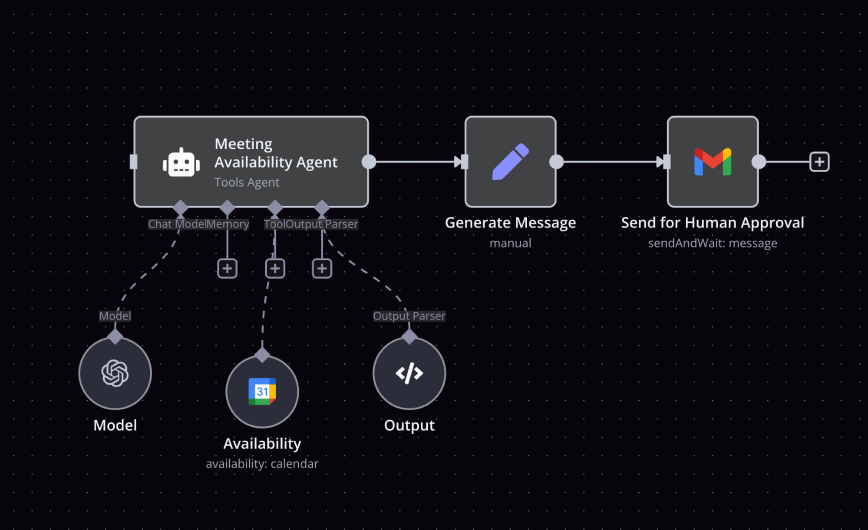
n8n automation works through a visual editor where you build workflows by connecting nodes. Each node represents a specific step in the automation. Each workflow is made up of:
- Triggers: Events that start a workflow, such as receiving a new email, a form submission, or a webhook call.
- Actions: The steps that follow the trigger, sending a Slack message, updating a Google Sheet, creating a task in Notion, and more.
Think of it like digital LEGO blocks: easy to assemble at first, yet powerful enough to build complex automations as your needs grow.
Example: First Workflow
Let’s say you want to receive a Slack notification whenever someone fills out a Typeform survey. Here’s how it works in n8n:
Step1: Add a Trigger Node
Select Typeform as your trigger. Every time someone submits the form, n8n is instantly notified.
Step2: Add an Action Node
Choose Slack, connect your workspace, and select the channel where notifications should appear.
Step3: Customize the Message
Dynamically insert form responses such as the user’s name, email, or feedback into the Slack message.
Step4: Save & Activate
That’s it! Your Slack channel lights up instantly whenever a new response comes in. No manual checking. No copying data. The workflow just runs.
Why Are Businesses Choosing n8n?
n8n is gaining traction because it offers open-source, self-hosted automation with broad integration options, flexible workflow logic, and transparent cost models. Here’s a concise overview of why many businesses are adopting it.
- Open-source and self-hosted: gives control over data and environment, reduces vendor lock-in, and enables custom modifications. This appeals to teams prioritizing security and governance.
- Cost transparency and scalability: no per-task or per-user pricing in the self-hosted option, and scalable workflows that can handle growing automation needs without escalating bills. This makes it attractive to startups and scale-ups alike.
- Rich integration ecosystem: hundreds of built-in integrations and ability to connect via APIs or HTTP requests, enabling automation across CRM, email, collaboration, finance, and more. This supports end-to-end process automation across tools.
- Flexible logic for complex workflows: supports loops, conditions, sub-workflows, and error handling, allowing both simple automations and sophisticated multi-step processes. This is useful for operations, IT, and product teams.
- Team-friendly design: combines no-code usability for operators with full-code flexibility for developers, enabling collaboration across teams without sacrificing power.
Practical Use Cases That Justify n8n
Marketing Automation
Lead capture, CRM syncing, reporting, SEO audits, social listening. n8n handles high-volume marketing workflows without pricing panic.
E-Commerce Automation
Orders, inventory, shipping, customer notifications, fraud checks. n8n connects systems that were never designed to talk.
Email and Social Media Automation
Scheduled campaigns, monitoring, automated responses, performance tracking. All centralized.
Browser Automation
Scraping, form filling, monitoring sites without APIs. This alone eliminates dozens of manual tasks.
AI-Powered Workflows
Summaries, classification, enrichment, sentiment analysis, content drafting. AI adds judgment where rules fail.
Pros & Cons of Using n8n
An at-a-glance overview of n8n’s pros and cons.
Pros of Using n8n
Large library of pre-built nodes
n8n comes with an extensive collection of ready-made nodes that cover common apps, APIs, and services. This allows non-developers to build complex workflows without starting from scratch or wiring everything manually.
Open-source flexibility and transparency
Because n8n is open source, you are not locked into a black-box platform. You can inspect how workflows run, extend functionality when needed, and avoid vendor dependency. This is especially valuable as automations grow in importance.
Powerful customization without heavy coding
Most n8n workflows can be built visually using the drag-and-drop interface. While advanced users can add JavaScript, many customizations are possible without writing code, making the platform usable beyond just developers.
Cost-efficient at scale
Self-hosting allows unlimited workflows without per-task pricing. For teams running high-volume automations, this quickly becomes more economical than closed platforms.
Cons of Using n8n
Limited official customer support
n8n relies heavily on community support and documentation. While the community is active, users who expect instant, hands-on support may find this frustrating.
Documentation gaps for edge cases
Basic use cases are well covered, but documentation can feel thin when workflows become complex. Troubleshooting often requires experimentation or community searching.
Steeper initial learning curve
The first setup, especially for self-hosted environments, can be intimidating for non-technical users. n8n assumes some comfort with concepts like data flow, APIs, and logic, which may slow down beginners.
Comparing n8n With Other Automation Tools
When teams evaluate workflow automation platforms, the comparison usually comes down to three names: n8n, Zapier, and Make.
All three solve automation problems, but they do it with very different philosophies.
Below is a clear side-by-side view, followed by what actually matters in practice.
| Aspect | n8n | Zapier | Make |
|---|---|---|---|
| Setup | Moderate learning curve | Very easy | Easy |
| Pricing | Free self-hosting, lower cost at scale | Gets expensive as usage grows | Mid-range, scales with usage |
| Open Source | Yes | No | No |
| Hosting | Self-hosted or cloud | Cloud only | Cloud only |
| Workflow Power | Very high, handles complex logic | Best for simple workflows | Good for multi-step workflows |
| Customization | High, flexible, extendable | Limited | Moderate |
| Data Control | Full control when self-hosted | Data passes through Zapier | Data passes through Make |
| AI Workflows | Strong AI and advanced logic support | Limited | Limited |
| Best For | Teams that want control and scalability | Quick, basic automations | Visual, structured automations |
When businesses start evaluating workflow automation tools, the comparison usually comes down to n8n, Zapier, and Make. All three are capable platforms, but they are built with different priorities. Zapier and Make focus on quick setup and ease of use within a closed system, while n8n takes a different approach by emphasizing open source flexibility, deployment choice, and the ability to scale without losing control.
Conclusion and Next Steps
By now, it should be clear why n8n automation continues to stand out. It is not just another automation tool. It is a platform built for teams that want flexibility, control, and the ability to scale without getting boxed in by pricing or platform limits.
The open-source foundation, combined with flexible hosting options and powerful workflow capabilities. What makes n8n especially compelling is that it does not force a tradeoff between no-code usability and technical depth. Non-developers can build meaningful automations visually, while developers can extend and customize workflows when the business demands it.
That balance is rare and increasingly important. The next step is simple. Start small, automate one real workflow, and build from there. That is how automation stops being an experiment and starts becoming an advantage.