Google is investing heavily in artificial intelligence, and one of its newest experiments is changing how apps get built. What if you could create a full application simply by describing your idea?
That is exactly what Google Opal AI, an experimental platform from Google Labs, is designed to do. It is an experimental no-code platform that lets anyone build AI-powered apps without writing code. Instead of programming, you describe what you want, and Opal turns that idea into a working app using visual workflows and Google’s AI models.
This shift matters because building software is still slow, expensive, and dependent on engineering teams. Opal removes much of that friction. Small businesses can automate workflows, creators can build custom content tools, and teams can test ideas quickly without waiting for development resources.
Throughout this blog, you will learn what Google Opal AI is, how it works, its key features, and real-world use cases so you can decide whether it is worth using today.
What is Opal in Google?
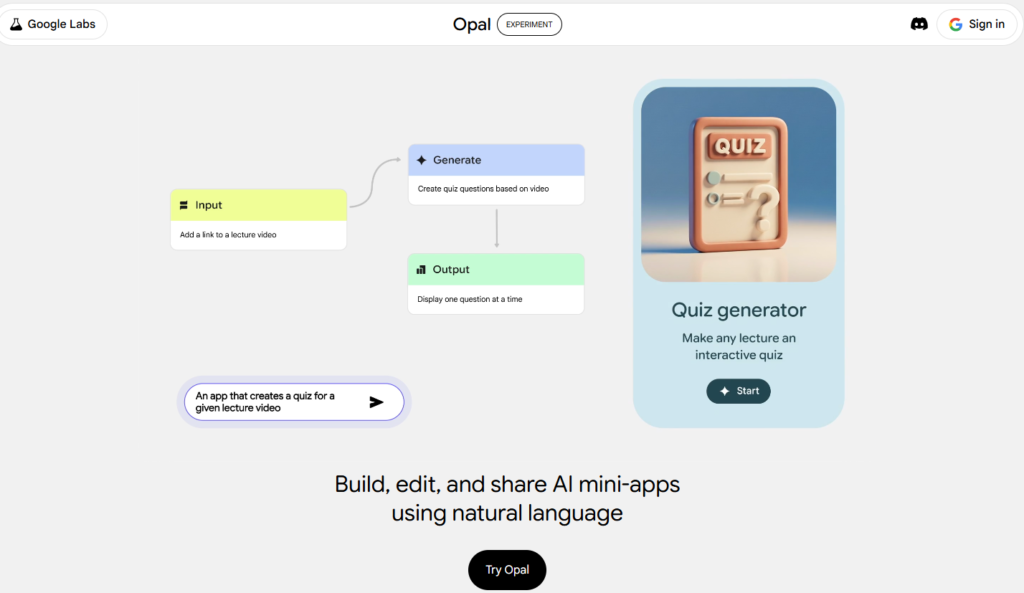
Google Opal AI is an AI-powered app builder developed by Google Labs that lets users create applications using plain language instead of traditional coding. This approach, called vibe coding, focuses on intent-based development rather than manual configuration or technical setup.
At its core, Google Opal AI allows you to build smart, AI-driven micro apps using simple English instructions. There is no coding, no complex setup, and no technical overhead. You type what you want, and Opal translates that intent into a visual workflow you can see, edit, and publish.
Opal connects directly with Google’s leading AI models:
- Gemini AI for writing, reasoning, and research
- Imagen AI for image creation
- Veo 3 AI for video and audio generation
All of this power is wrapped inside a clean, drag-and-drop workflow editor. Whether you are building ad creatives, blog tools, internal CRM utilities, or content generators, Google Opal AI is designed to turn ideas into working apps quickly, without requiring a development team.
Key Features That Set Opal Apart
No-Code Access
Google Opal AI lets anyone build apps without writing code. You describe what you want, and the platform handles the technical work. This makes it easy for non-technical users to create useful AI tools quickly.
AI-Generated Workflows
Opal turns your prompts into ready-to-use workflows. It understands intent and connects logic automatically, removing the need for manual setup.
Ready-Made Templates
Opal includes starter templates for common use cases. You can use them as they are or customize them to save time and get results faster.
Visual Workflow Editor
All app logic is shown visually. You can see how things work, make changes easily, and refine your app without technical knowledge.
How to Get Started With Google Opal
Getting started with Google Opal AI is simple. You do not need technical skills or special setup.
Step 1: Access Google Opal
Google Opal is currently in beta and available in around 160 countries. As of now, it is free to use. You only need a Google account and a modern web browser such as Chrome, Firefox, Edge, or Safari.
To access Opal:
- Visit the Google Opal website
- Sign in using your Google account
- Accept the beta access terms and required permissions
Once completed, you will land on the Opal dashboard.
Step 2: Explore the Opal Dashboard
Once you land on the dashboard, you will see a section called Your Opal Apps. This is where all the apps you create will be listed. You will also find a gallery of example ideas that you can use as inspiration or starting points.
To begin building your own app, click Create New. This opens the main workspace where you can start creating your app step by step using prompts and visual workflows.
Step 3: Understand the Main Interface
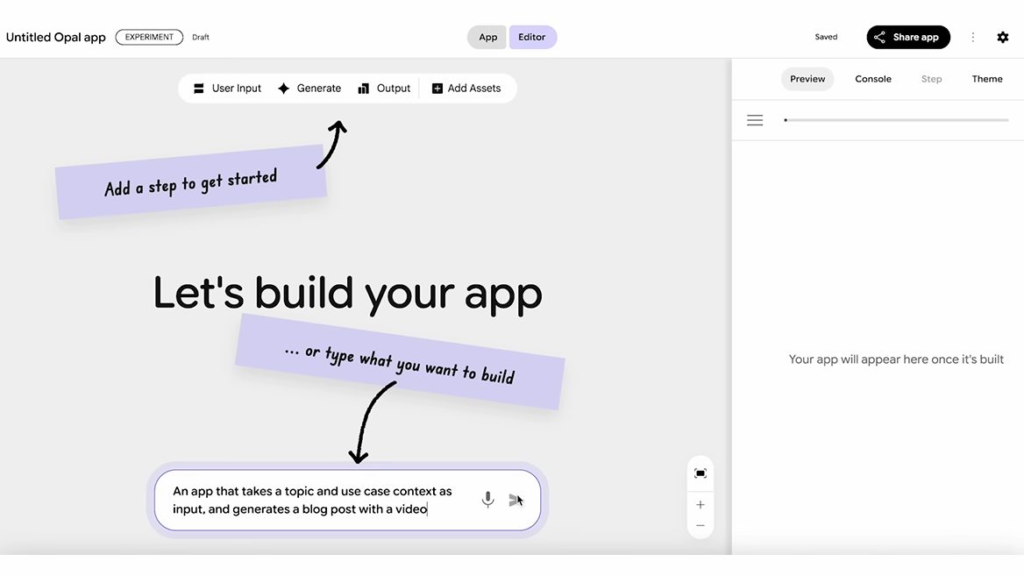
Inside the editor, you will notice three key areas:
- A canvas where your workflow is built
- A prompt box at the bottom where you type what you want to build
- A side navigation panel with tools that change based on what you select
You can either add steps manually, such as User Input, Generate, or Output, or simply describe your app in the prompt box and let Opal build the workflow automatically.
Step 4: Learn the Visual Workflow Editor
Every app in Opal is built using a visual workflow. Each workflow contains three main types of nodes:
Input nodes
These collect information from users. Examples include text input, file upload, video input, or drawing pads.
Generate nodes
These are where AI does the work. They handle tasks like content generation, transformations, logic, or embeddings.
Output nodes
These show the final result. Outputs can be text, images, media, web pages, or downloadable files.
Opal does not rely on traditional condition-based logic. Instead, information flows from one step to another. Inputs feed into generate nodes, and generate nodes pass context to later steps.
Step 5: Build Clean and Stable Workflows
Always build workflows from left to right. Name each step clearly so you can reference it later without confusion. Avoid connecting steps in a circular way, as this can cause your app to run endlessly.
If something breaks or behaves unexpectedly, you can simply ask Opal to help fix the workflow. The system is designed to guide you, not punish mistakes.
Pros and Cons of Google Opal AI
Pros
- Google Opal AI lets anyone build functional apps without writing code, lowering the barrier for non-technical users.
- The visual workflow canvas makes app logic easy to understand and modify using simple drag-and-drop actions.
- Prompt-based workflows automate tasks based on user intent, which speeds up experimentation and productivity.
- Native integration with Google tools like Docs and Sheets creates smooth internal workflows.
- Built-in access to Google services reduces setup time and technical overhead.
Cons
- Google Opal AI is still in beta, and availability is limited in some regions.
- Apps cannot be exported as source code, which restricts customization and backend control.
- API and third-party integrations are currently limited, making complex builds harder.
- The platform depends entirely on internet access and does not support offline use.
- It works best for small to mid-scale apps and is not ready for highly complex enterprise systems.
Real-World Use Cases of Google Opal AI
Google Opal AI is best used where speed, experimentation, and low technical dependency matter. These are the scenarios where it actually delivers value.
Startup MVPs and Idea Validation
Founders can turn product ideas into working prototypes in hours. Instead of pitching slides or mockups, teams can test real apps, gather feedback, and decide what is worth building further. This reduces wasted development time and early-stage risk.
Marketing and Content Automation
Opal can power tools like blog generators, ad copy creators, campaign planners, or social media assistants. Marketers can create custom utilities tailored to their workflow instead of relying on generic SaaS tools.
Education and Training Apps
Educators and trainers can build quiz apps, learning assistants, summarizers, or interactive study tools. These apps help deliver content faster without needing technical support.
Rapid Experiments and Prototypes
Product teams can test features, user flows, or automation ideas quickly. Opal works well for proof-of-concept apps that do not justify a full development cycle yet.
Google Workspace Automation
Opal integrates smoothly with tools like Docs and Sheets, making it useful for building apps that generate reports, process documents, or manage internal data workflows.
Conclusion: Is Google Opal Worth Trying?
Yes, Google Opal is worth trying, if you understand exactly what problem it solves.
Opal is not a replacement for traditional software development. It will not give you full control, deep customization, or long-term architectural guarantees. Anyone expecting that is misunderstanding the product.
What Opal does exceptionally well is eliminate friction at the earliest stage of building. It allows ideas to become working applications fast enough that decisions are based on reality instead of assumptions.
The smart way to use Google Opal is as a thinking tool, not a final destination. Build fast. Learn faster. Then decide what deserves real engineering effort. That is where Opal earns its place.
Frequently Asked Questions
Is Google Opal free to use?
Yes, for now. Google Opal is in an experimental phase, so access is limited and pricing can change anytime.
Do I need coding skills to use Google Opal?
No. It is a no-code platform. You build apps using natural language and visual workflows.
How is Google Opal different from ChatGPT?
ChatGPT handles single responses. Opal builds multi-step apps and workflows. One talks. The other builds.
Can I use Google Opal for commercial projects?
Maybe. It depends on Google’s terms. Do not assume full commercial rights without checking.
What AI models does Google Opal use?
It uses Google’s AI models for text, images, and more, mainly from the Gemini family.