
If presentations are part of the job, the process probably feels familiar. Something important needs to be presented, PowerPoint or Google Slides is opened, and the blank screen just sits there. What should be a simple task turns into hours of moving text boxes, testing templates, and searching for images that do not look outdated.
Designers are often pulled into the process, and that can mean long back-and-forth discussions over layout details. In the end, the presentation looks fine, but far too much time and energy have been spent getting there.
This workflow has been accepted for years, even though it is inefficient. Gamma approaches the problem differently. Instead of asking users to build slides piece by piece, it focuses on turning ideas into structured, finished presentations with minimal manual effort.
That shift is why Gamma stands out and why it has become one of the most talked-about tools for modern presentation creation.
TL;DR
Gamma helps teams create presentations, documents, and web pages without the usual PowerPoint struggle. It handles most of the heavy lifting, is used by more than 50 million people, and saves a huge amount of time every year. The free plan is generous and easy to try.
What Is Gamma AI?
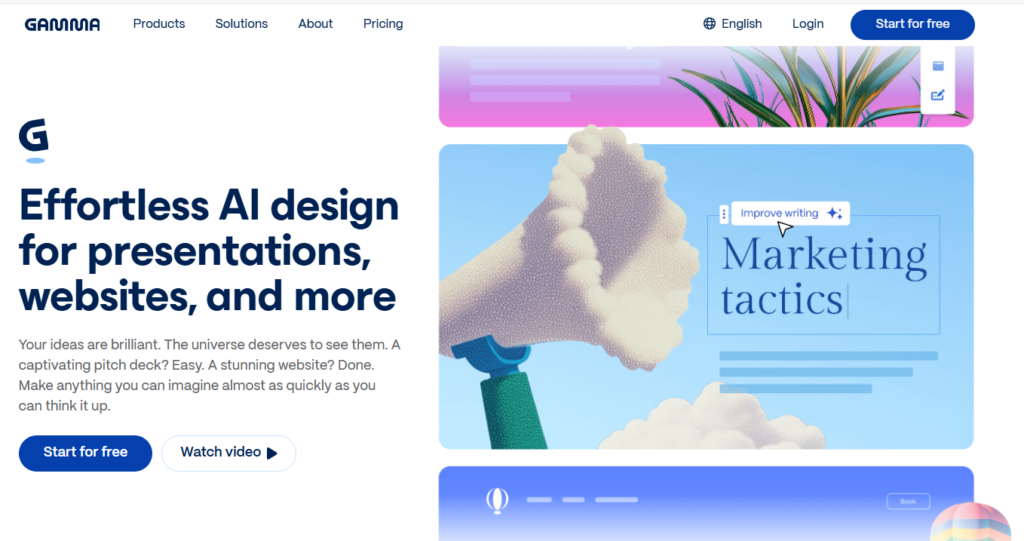
Gamma is a web-based, AI-powered tool that helps you share your thoughts and transform them into beautiful presentations, websites, social posts, and any other visual content you dream of. Instead of traditional slide-by-slide decks, it uses a continuous, scrollable layout. You describe what you want, and Gamma produces a structured, well-designed result that’s ready to share, no design or writing skills required. The result is clean, engaging, and ready to share—no templates to fight with and no blank-page stress.
How Gamma Found Its Breakthrough and Scaled Fast?
Gamma’s growth was driven by a clear problem and strong execution. Co-founder Grant Lee built the product after years of dealing with the same presentation challenges faced by marketers, founders, and executives. It originally launched as an alternative to PowerPoint. The major shift came in March 2023, when the team rebuilt the product around automated content generation. That change unlocked rapid adoption.
Within nine months, Gamma attracted more than 10 million users. Today, with a team of roughly 30 people, Gamma serves over 50 million users and is estimated to generate around $50 million in annual recurring revenue. This growth reflects strong product market fit.
At its core, Gamma succeeds because it removes the blank page problem and replaces it with a fast, structured starting point that users can refine instead of build from scratch.
Key Features That Set Gamma Apart
Gamma’s growth comes from solving the most common frustrations people face with traditional presentation tools. Each feature is designed to reduce setup time, remove design friction, and make sharing content easier.
1. Content and Layout Generation
Gamma creates a complete first draft from a single prompt. It generates structured sections, headings, and supporting points, then applies a clean layout and visual hierarchy automatically. Instead of starting from a blank slide, users begin with a clear, usable structure that can be refined in minutes. Themes can be switched instantly without reformatting individual sections.
2. Interactive, Web-First Content
Gamma presentations are built for the web rather than static slides. Users can embed:
- YouTube or Loom videos
- Figma design files
- Airtable databases
- GIFs and other rich media
This makes presentations more engaging and allows viewers to explore content directly rather than passively reading slides.
3. Sharing, Publishing, and Analytics
Gamma is designed to be shared through live links or published as standalone web pages. Content automatically adapts to different screen sizes, including mobile. Built-in analytics show who viewed the presentation and how much time they spent on each section, which is especially useful for sales decks, investor updates, and internal reports.
4. Real-Time Team Collaboration
On paid plans, Gamma supports real-time collaboration. Multiple users can edit content, leave comments, and make updates simultaneously. This makes it well suited for remote teams that need fast feedback and fewer revision cycles.
5. Integrations and Platform Expansion
Gamma is expanding beyond a single use case. Integrations with tools like Zapier allow users to automate workflows, such as creating presentations from meeting notes or form submissions. A beta API also enables developers to generate and manage Gamma content programmatically, positioning it as part of a broader content automation stack.
Also Read:
What is Jitter AI? Everything You Should Know Before You Start
Practical Use Cases for Gamma AI
Gamma is an AI tool for creating presentations, documents, and simple websites from prompts or existing content, so its main use cases revolve around rapid visual storytelling and sharing information online.
Business and Startup
Gamma is strongest when speed matters more than perfection. Startups use it to crank out pitch decks, investor updates, and partnership proposals fast, especially in early stages where ideas change weekly and nobody wants to babysit slides. It also works well for internal reports like quarterly reviews or product roadmaps, turning messy docs into structured, scrollable decks that are easier to read and share than traditional slide files.
Marketing and Content Creation
For marketing teams, Gamma is a repackaging machine. Blog posts, PDFs, and strategy docs can be turned into visual presentations or mini-sites without redesigning from scratch. It is useful for campaign planning, launch decks, and go-to-market presentations where clarity and speed beat pixel-perfect design. Simple landing pages and one-pagers can be created without code, but don’t pretend this replaces a real marketing site. It doesn’t.
Education and Training
In education, Gamma saves time, not pedagogy. Teachers and trainers use it to convert notes, lesson plans, or manuals into visual sequences that are easier to follow than walls of text. It works for onboarding, internal training, and revision summaries where the goal is comprehension and structure, not deep interaction or assessment. Students benefit most when using it to summarize and organize content, not to magically “learn” for them.
Operations and Internal Communication
Gamma shines in internal communication where nobody wants to open another PDF. Teams use it for weekly updates, all-hands decks, SOPs, and process documentation that lives as a shared link instead of a forgotten attachment. Onboarding guides for employees or customers are easier to navigate when presented as step-by-step pages rather than static documents that nobody reads past page two.
Personal, Portfolio, and Freelance Use
For individuals, Gamma is a shortcut to looking organized online. Freelancers and consultants use it for quick portfolios, service pages, and proposal decks without touching web builders. It also works for personal projects like event pages, trip itineraries, or thought-leadership decks shared publicly.
How to Make a Presentation Using Gamma AI (Step-by-Step)
Creating a presentation with the Gamma AI presentation maker is designed to be fast and frictionless. You start with an idea, and the platform handles structure, layout, and visuals for you.
Step 1: Create Your Gamma Account
Visit gamma.app and sign up using your email or Google account. Once verified, you land on a simple dashboard where all presentations, documents, and pages are managed in one place.
Step 2: Choose How You Want to Create
Click Create New AI and select one of four creation paths based on your starting point:
- Generate: Describe what you want and let Gamma create the first draft
- Paste text: Turn existing notes or scripts into a presentation
- Import a file: Convert PDFs or Word documents into structured decks
- Blank presentation: Start from scratch with full control
This flexibility makes Gamma useful whether you are brainstorming or repurposing existing content.
Step 3: Guide the AI With a Strong Prompt
If you use Generate mode, your prompt determines the quality of the output.
Instead of vague inputs, be specific.
For example:
“Create a go-to-market presentation for a productivity app targeting small businesses.”
Before generation, review the suggested outline. Adjust section order, remove unnecessary slides, or add missing points. This step prevents wasted credits and keeps the AI aligned with your intent.
Step 4: Apply Visual Style and Generate
Choose from over 100 professional themes that automatically manage layout, spacing, fonts, and colors. If you want variations, use the Shuffle option to explore different styles.
Click Generate and Gamma builds the presentation in real time, applying design logic without manual formatting.
Step 5: Edit and Enhance With AI
Gamma functions as both a generator and an editor. Use the Edit with AI option to:
- Change layouts or content density
- Replace images with more professional visuals
- Apply global design updates such as a minimalist or branded look
You can also embed interactive elements using slash commands, including YouTube videos, live websites, or Figma designs.
Step 6: Present, Share, or Export
Once complete, you can:
- Present directly from your browser in full-screen mode
- Share a live link with teammates or clients, with built-in view analytics
- Export the presentation as a PDF or PowerPoint file for offline use
This makes Gamma AI suitable for both web-first presentations and traditional meetings.
Presentation Design Quality and Template Experience in Gamma AI
Gamma delivers a strong visual standard that goes beyond typical do-it-yourself PowerPoint decks. Gamma replaces traditional slides with a modular card system, where each card functions as a structured content block in a smooth, scrollable layout.
Design and Template Capabilities
Gamma’s design system includes:
- Built-in dark mode with full mobile and tablet responsiveness
- Professionally designed themes optimized for readability and hierarchy
- Automatic text alignment and spacing to maintain visual consistency
- Branding controls for fonts, colors, and logos without manual styling
- Native embeds for YouTube, Loom, Figma, charts, and interactive media
The result is a presentation format that feels closer to a modern web page than a traditional slide deck. This makes Gamma especially effective for async sharing, remote collaboration, and presentations that are meant to be read, not just shown.
Gamma Pricing Plans
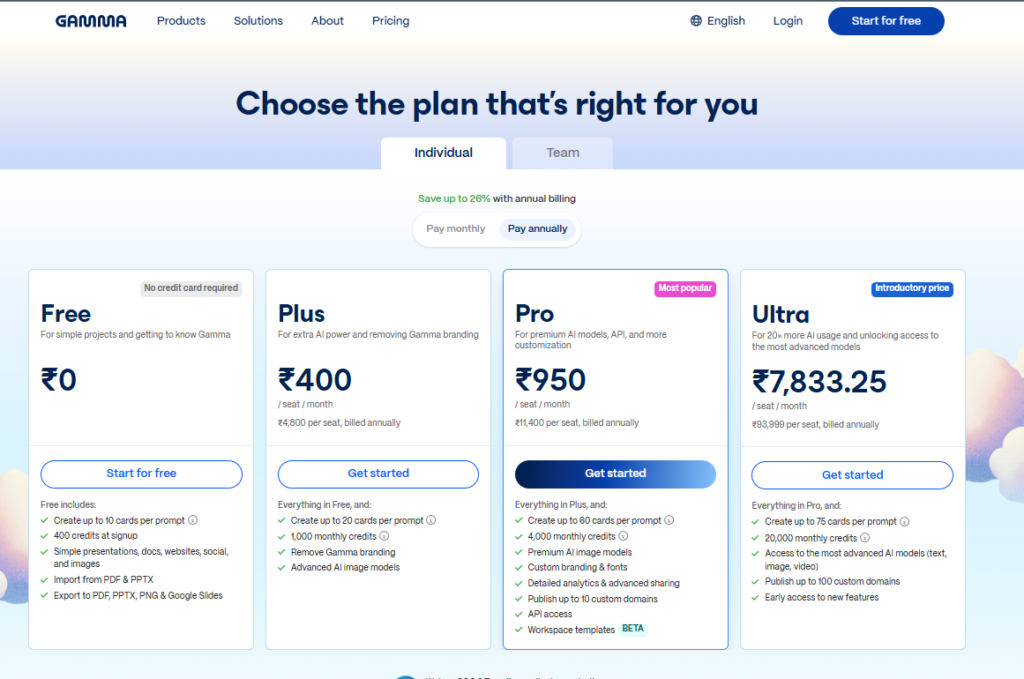
Here’s a Gamma’s plans for individuals. Team and Enterprise plans are also available, offering extra collaboration features and admin controls, but these are the main options on their pricing page.
Final Verdict: Is Gamma Worth Using?
Gamma is a strong choice for marketers and teams who need to produce presentations, documents, and web-ready content quickly. Its usefulness extends beyond decks, making it suitable for visual blogs, social content, and early-stage creative mockups.
It is important to see Gamma as a support tool rather than a replacement for human judgment or strategy. Strong results still depend on clear thinking, audience understanding, and marketing experience. When used thoughtfully, Gamma helps reduce production time, streamline workflows, and deliver polished content that resonates with stakeholders.
Frequently Asked Questions
1. What is Gamma AI?
Gamma is an AI-powered tool that turns natural language prompts into presentation decks, documents, and web content. You type. It builds. Simple.
2. Is Gamma AI free to use?
Yes, but don’t kid yourself. The free plan is limited by credits. Once they’re gone, the tool is basically neutered unless you upgrade to a paid plan.
3. Is Gamma the best AI presentation maker?
Gamma is one of the better AI presentation tools, especially for speed and ease of use, but it is not perfect for every use case.
4. How do you download presentations from Gamma AI?
Create your presentation, click Export in the top navigation bar, and choose PPT/PPTX or PDF. Pro users get extra export options and customization. Files keep their formatting and open cleanly in traditional presentation software for further editing.
5. Is gamma AI safe to use?
Yes. All requests and interactions with Gamma are encrypted using HTTPS and secure communication protocols to safeguard your data.