In today’s fast-moving content creation world, Adobe Express has quietly become a go-to option for people who want to design eye-catching visuals without dealing with complex software. It is built for speed, simplicity, and everyday creators who work on social media posts, marketing graphics, and short videos. Instead of trying to replace advanced tools like Photoshop, Adobe Express focuses on making design easy, fast, and accessible for everyone. In this article, I will break down what Adobe Express is, how it works, its key features, real pros and cons, and a quick look at pricing so you can decide whether it is the right tool for your needs.
What is Adobe Express?
Adobe Express is a web-based design and content creation tool built by Adobe for people who want to create professional-looking visuals without a steep learning curve. It allows you to design social media posts, flyers, logos, videos, and presentations using ready-made templates and simple drag-and-drop tools.
It is designed for speed and ease of use, making it a practical choice for beginners, marketers, small businesses, and creators who need quality designs without spending hours learning complex software.
Key Features of Adobe Express
Adobe Express focuses on making design fast, simple, and practical. Instead of overwhelming you with complex controls, it gives you the exact tools you need to create polished content in minutes.
Ready-Made Templates for Every Use Case
Adobe Express comes with thousands of professionally designed templates for social media posts, stories, flyers, posters, thumbnails, resumes, and more. You can start from a blank canvas, but most people save time by customizing templates that already follow proper design rules.
Easy Drag-and-Drop Editor
The editor is clean and beginner-friendly. You can add text, images, icons, shapes, and videos using simple drag-and-drop actions. Everything snaps into place, so you do not need design experience to make things look balanced and neat.
Built-In Photo Editing Tools
Adobe Express includes basic but powerful photo editing features like crop, resize, filters, brightness adjustments, and background removal. These tools are quick to use and perfect for everyday content needs without opening Photoshop.
Video and Animation Support
You can create short videos, animated posts, reels, and stories directly inside Adobe Express. It lets you trim clips, add text animations, transitions, music, and voiceovers, which is ideal for social media creators.
AI-Powered Creative Tools
Adobe Express uses Adobe Firefly to power AI features such as text effects, background removal, image generation, and quick enhancements. These tools help you create visuals faster while keeping results clean and professional.
Brand Kits for Consistency
For businesses and creators, Adobe Express allows you to create brand kits with logos, fonts, and color palettes. This makes it easy to keep all designs consistent across platforms without manually adjusting styles every time.
Cloud-Based Access and Sync
Because Adobe Express is cloud-based, you can access your projects from any device. Your designs are saved automatically, making it easy to switch between desktop and mobile without losing progress.
Social Media Publishing and Resizing
Adobe Express helps you resize designs for different platforms in one click. You can also schedule and publish content directly to social platforms, which saves time for marketers and content creators.
Integration with Adobe Ecosystem
If you already use Adobe tools, Adobe Express fits naturally into that workflow. You can import assets from Creative Cloud libraries and reuse them across projects without extra steps.
Pros and Cons of Adobe Express
✅ Pros of Adobe Express
- Beginner-Friendly Interface: Clean layout and drag-and-drop tools make it easy for anyone to start designing without prior experience.
- Strong Template Library: Thousands of ready-made templates help you create social posts, flyers, videos, and more in minutes.
- AI-Powered Tools: Smart features like background removal, text effects, and image generation save time and effort.
- Cloud-Based Access: Designs are saved online, so you can work from different devices without losing progress.
- Adobe Ecosystem Support: Works smoothly with other Adobe tools and Creative Cloud assets.
❌ Cons of Adobe Express
- Limited Advanced Control: It does not offer deep editing or pixel-level control like Photoshop or Illustrator.
- Template Customization Limits: Some templates feel restrictive once you try to heavily customize them.
- Premium Features Locked: Many useful tools and assets require a paid plan.
- Not Ideal for Complex Designs: Best suited for quick content, not detailed or high-end professional design work.
Adobe Express Plans and Pricing
Adobe Express offers flexible pricing that works well for individuals, teams, and even educators. Whether you are just getting started or managing a brand with multiple people, there is a plan that fits different needs and budgets.
Individual Plans (USD)
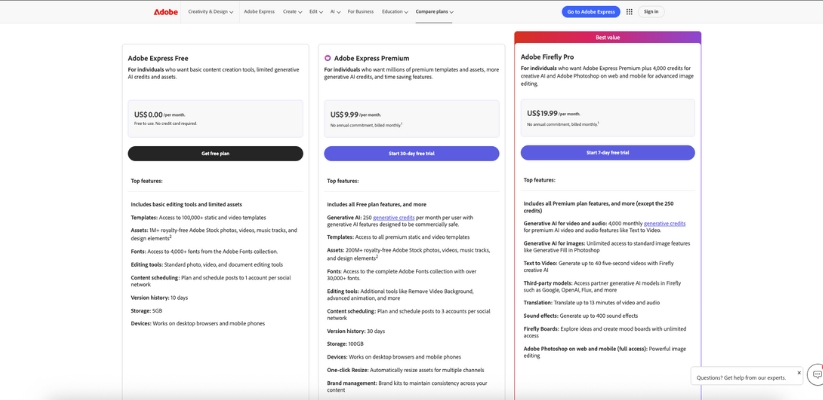
The Free plan costs nothing and is a good starting point. It includes basic design tools, a limited set of templates and assets, and restricted access to AI features. This plan works well if you only need simple designs occasionally.
The Premium plan is priced at $9.99 per month with monthly billing. If you choose annual billing, it comes down to around $8.33 per month, billed yearly at $99.99. This plan unlocks premium templates, millions of design assets, advanced AI tools, background removal, brand kits, and other time-saving features.
Business and Team Plans (USD)
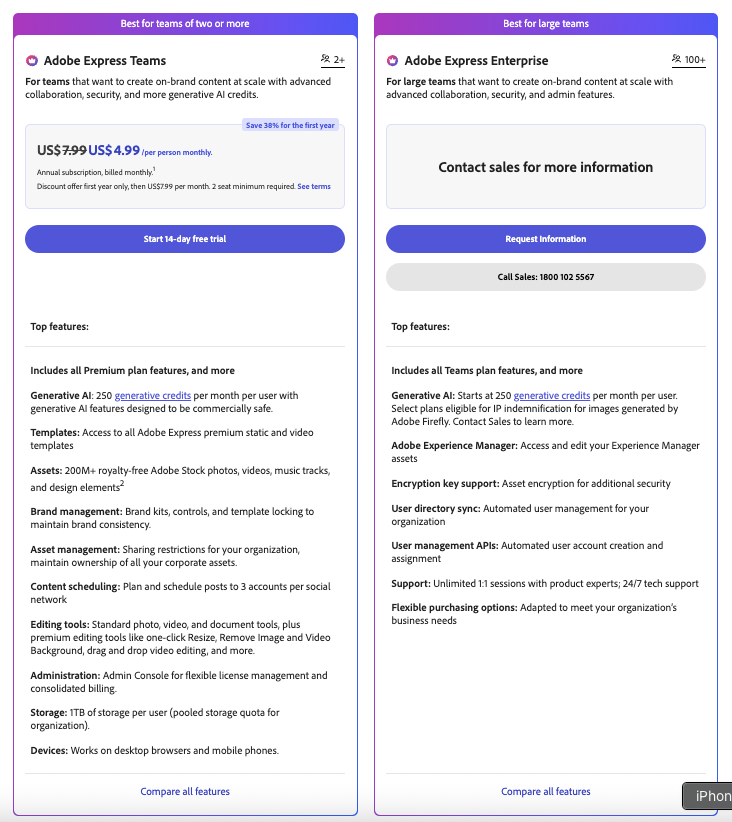
Adobe Express also offers plans for teams. The Teams Introductory plan starts at $4.99 per month per license for the first year, billed monthly. After the first year, it renews at $7.99 per month per license. This plan is designed for collaboration, shared brand assets, and better control.
There is also a standard Teams plan that focuses on advanced collaboration, security features, and expanded AI usage, making it suitable for growing businesses.
Other Pricing Options
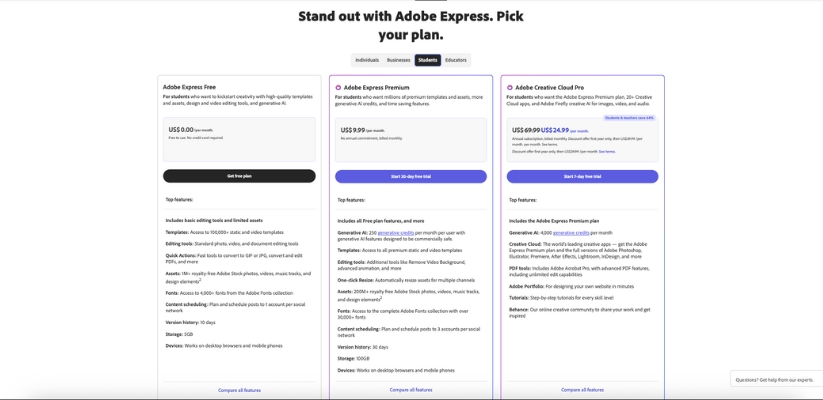
If you already plan to use multiple Adobe apps, Adobe Creative Cloud Pro includes Adobe Express Premium along with tools like Photoshop and Illustrator. It is priced at around $19.99 per month and also provides more Firefly AI credits.
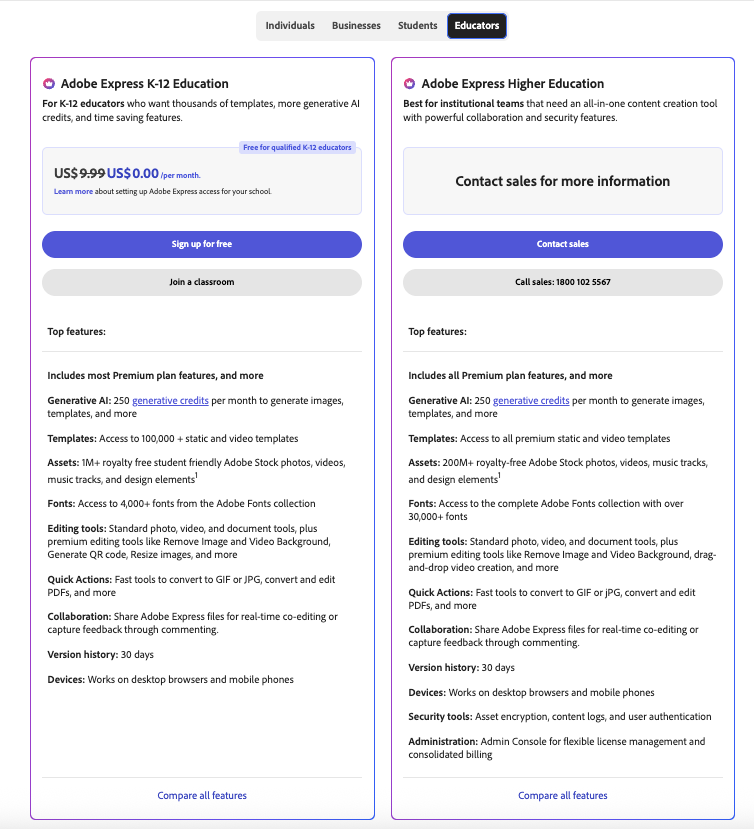
For education, Adobe Express is free for K-12 students and teachers, which makes it popular in classrooms. Eligible nonprofit organizations can also access a free version with useful features.
Also Read:
What is Jitter AI?
What is Genmo AI?
Final Thoughts: Who is Adobe Express for?
Adobe Express is best suited for people who want to create good-looking content quickly without spending time learning complex design software. If you are a content creator, small business owner, student, teacher, or marketer who regularly works on social posts, flyers, presentations, or short videos, this tool fits naturally into your workflow.
It is especially useful if speed matters more than deep customization. You can open it, pick a template, make a few changes, and publish without friction. On the other hand, if you need detailed design control or advanced editing, tools like Photoshop or Illustrator will still make more sense.
In short, Adobe Express is for anyone who wants clean, professional visuals with minimal effort and a very short learning curve.