Replit AI is transforming how developers write, debug, and deploy code right from their browser. Powered by the same company behind the popular cloud-based IDE, Replit AI blends real-time code generation with an always-on development environment. But how much does it actually cost to use Replit AI? And how do usage-based credits, plan tiers, and core subscriptions factor into your monthly bill? In this guide, we break down Replit AI pricing, what you pay, what you get, and how it stacks up for solo devs, teams, and startups alike.
Replit AI Pricing Explained
Here i have explained this pricing in the simplest manner. its in the table formate and side by side, so you can compare plans easily.
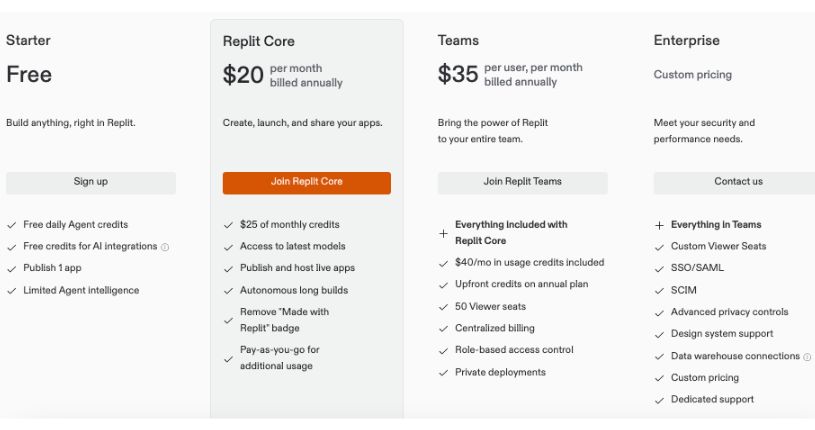
Starter Plan — Free
Best for: Beginners, students, hobby coders
Price: $0
AI Access: Limited Replit AI Agent
Included Credits: Daily free AI credits
Key Features:
- Build in-browser
- Publish 1 public app
- Basic compute (1 vCPU, 2 GB RAM)
- Basic code generation and debugging
- 1 collaborator
- No private projects
Core Plan — $20/month (billed annually)
Best for: Solo devs, freelancers, indie hackers
Price: $20/month
AI Access: Full Replit AI Agent
Included Credits: $25/month
Key Features:
- Access to latest AI models
- Publish and host live apps
- Long builds and faster compute (4 vCPUs, 8 GB RAM)
- Private apps and projects
- Remove “Made with Replit” badge
- Static and autoscale deployments
- Up to 3 collaborators
- SSH access and PostgreSQL database support
Teams Plan — $35/user/month (billed annually)
Best for: Startups, dev teams, technical co-founders
Price: $35/user/month
AI Access: Full Replit AI Agent
Included Credits: $40 per user/month
Key Features:
- Everything in Core
- Private deployments
- Role-based access control
- Centralized billing
- 50 viewer seats
- PostgreSQL support
- Up to 8 vCPUs, 16 GB RAM per workspace
- Unlimited development time and collaborators
Enterprise Plan — Custom Pricing
Best for: Large teams, enterprise orgs, compliance-heavy environments
Price: Custom
AI Access: Full Replit AI Agent
Included Credits: Custom allocation
Key Features:
- Everything in Teams
- SSO / SAML, SCIM
- Advanced privacy controls
- Custom viewer seats
- VPC support (coming soon)
- Data warehouse integrations
- Custom storage and compute scaling
- Dedicated support and onboarding
Also Read:
Boba AI Pricing Explained: Find the Best Plan for Your Content Goals
Which Plan is Right for You?
Choosing the right Replit AI plan depends on how you code, what you’re building, and whether you work solo or in a team. Each tier is built for a different stage in your development journey. Let’s break it down.
Starter Plan
This is the best option if you’re just getting started with Replit or experimenting with AI-assisted coding. It’s completely free and gives you a taste of what the platform can do, including daily AI credits and access to basic tools. Use it to learn the interface, build public apps, and test out Replit AI. Just keep in mind that it comes with limited compute, storage, and Replit Agent capabilities. It’s ideal for students, hobbyists, and curious tinkerers.
Best for: Beginners, students, hobby projects
Not ideal for: Private apps, complex builds, professional use
Core Plan
If you’re a freelancer, solo developer, or someone shipping real projects, the Core plan is the sweet spot. You get full access to Replit AI, faster compute, private projects, and more credits to run longer builds. Features like live app deployment and the ability to remove the Replit badge give your projects a more polished feel. It’s built for daily use without the limitations of the free plan.
Best for: Freelancers, indie hackers, side projects
Not ideal for: Team collaboration or enterprise-level control
Teams Plan
This plan is built for startups, dev teams, and small companies that want to collaborate inside Replit. You get everything in the Core plan plus team features like role-based access, centralized billing, and private deployments. Viewer seats make it easy to include non-technical team members too. If you’re building with others, this plan saves time and adds structure to your workflow.
Best for: Small teams, technical startups
Not ideal for: Solo builders or large enterprises
Enterprise Plan
Large organizations with strict security and performance needs should look at the Enterprise plan. It’s fully customizable, supports SSO and SCIM, and comes with advanced compliance options. You also get access to premium support, custom resource scaling, and onboarding assistance. This tier is all about control, flexibility, and enterprise-grade reliability.
Best for: Mid-size to large companies, regulated industries
Not ideal for: Individual developers or small teams
Student Discount
If you’re currently a student, Replit occasionally offers student benefits and credit grants through special programs or partnerships. While there isn’t a fixed student tier, it’s worth checking with Replit for learning-focused discounts or educational credits. Getting access to Core-level features at a lower price is a solid way to start coding with AI while you’re still learning.
Best for: Students looking to explore Replit AI affordably
Final Thoughts
Replit AI pricing is flexible, but it rewards users who understand how credits and plans work. The free plan helps you explore, while paid tiers unlock real productivity. Choosing the right plan comes down to how often you build, deploy, and collaborate.
If you code casually, Starter is enough. If you ship products or work with a team, Core or Teams makes more sense. Start small, track your usage, and upgrade only when the value is clear.
Frequently Asked Questions Replit Pricing
What happens when I run out of Replit credits?
Once you use up your monthly included credits, Replit switches to pay-as-you-go billing. You’ll be charged based on your additional usage, including compute, AI interactions, and deployments. To avoid surprises, you can monitor your credit usage from your Replit dashboard.
Do unused Replit credits roll over to the next month?
No, Replit credits do not roll over. Any unused credits at the end of your billing cycle will expire. Make sure to plan your development and AI usage to get the most out of your monthly allocation.
Can I downgrade or cancel my Replit plan anytime?
Yes, you can downgrade or cancel your plan at any time from your account settings. If you cancel mid-cycle, your plan will stay active until the end of the billing period. Replit does not offer prorated refunds.
How are AI features different between free and paid plans?
The Starter plan offers limited access to Replit AI Agent, with basic code generation and limited daily credits. Paid plans like Core and Teams unlock full access to the latest AI models, longer autonomous builds, and faster responses from the Agent.
Is there a discount for students or educators?
Replit occasionally runs educational programs and partnerships that provide free credits or discounted access. While there’s no official student pricing tier, you can check Replit’s educational page or contact support for eligibility.
Does Replit offer a trial for Core or Teams?
Currently, Replit does not offer a formal free trial for Core or Teams. However, you can start with the free Starter plan to test the platform and upgrade as your needs grow.
What’s the difference between “credits” and “plan price”?
The plan price is your fixed monthly or annual fee. The credits are usage units included with that fee. Credits are used for compute time, AI interactions, and deployment tasks. If you exceed your included credits, you’ll be billed extra.
Can I use Replit AI without a subscription?
Yes, but only with limited functionality. The free plan gives you a small number of AI credits per day, with limited access to the Replit AI Agent. For full features, a Core or Teams plan is required.