Design tools like Adobe Express are everywhere right now, and honestly, it’s kind of amazing. You can start with zero design experience and end up with polished social posts, logos, flyers, or even full-on marketing campaigns. It’s the kind of tool that makes you feel like a creative genius, even if you’re just messing around on your lunch break.
But here’s the thing no one really talks about until you’re halfway through your first project: the pricing.
Sure, the free plan gets you in the door. But once you start layering in custom branding, scheduling content, or trying out those fancy AI tools, you’re hit with upgrade prompts and choices that aren’t always super clear. Premium? Teams? Firefly? What’s included, what’s not, and is it even worth paying for?
That’s exactly what we’re going to break down here. This guide walks you through the full Adobe Express pricing model, plan by plan, feature by feature, so you’re not stuck guessing. We’ll look at what you get for free, what you’re actually paying for with the paid plans, and how it all stacks up depending on what you’re trying to create.
By the end, you’ll know exactly which plan (if any) makes the most sense for you and what to expect before clicking that “Start Free Trial” button.
Adobe Express Pricing Explained
Adobe Express pricing is built around different types of users. Some people just want to create quick social posts. Others need branded content, AI tools, or team collaboration. Instead of forcing everyone into one plan, Adobe splits pricing into individual, team, student, and education plans.
Let’s start with the individual plans, since that’s where most people begin.
Adobe Express Individual Plans
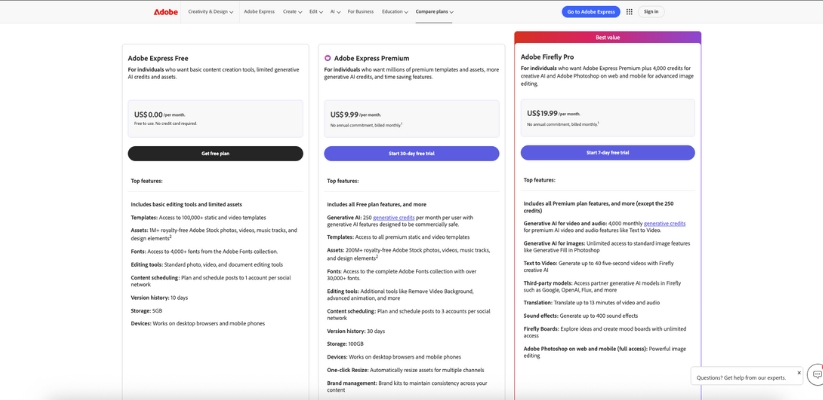
These are the three plans most creators and small businesses look at first.
Individual Plan Comparison
| Feature | Free | Premium | Firefly Pro |
| Monthly Price | $0 | $9.99 | $19.99 |
| Free Trial | No card required | 30 days | 7 days |
| Templates | 100,000+ | All premium templates | All premium templates |
| Stock Assets | 1M+ | 200M+ | 200M+ |
| Fonts | 4,000+ | 30,000+ | 30,000+ |
| Generative AI Credits | Limited | 250 per month | 4,000 per month |
| Content Scheduling | 1 account per network | 3 accounts per network | 3 accounts per network |
| Brand Kits | No | Yes | Yes |
| One-click Resize | No | Yes | Yes |
| Storage | 5GB | 100GB | 100GB |
| Photoshop Access | No | No | Yes (web + mobile) |
How to think about these plans
The Free plan is great if you want to experiment or create basic designs without spending anything. It covers the essentials, but the limits show up quickly once you start working on branded or frequent content.
Premium is the most popular choice for a reason. It unlocks advanced tools, removes watermarks, adds brand kits, and gives you enough AI credits for regular use. For most creators, freelancers, and small businesses, this plan hits the sweet spot.
Firefly Pro is for people who lean heavily on AI or want Photoshop without buying the full Creative Cloud. If text-to-video, image generation, and sound effects are part of your workflow, this plan saves time fast.
Adobe Express Plans for Teams and Businesses
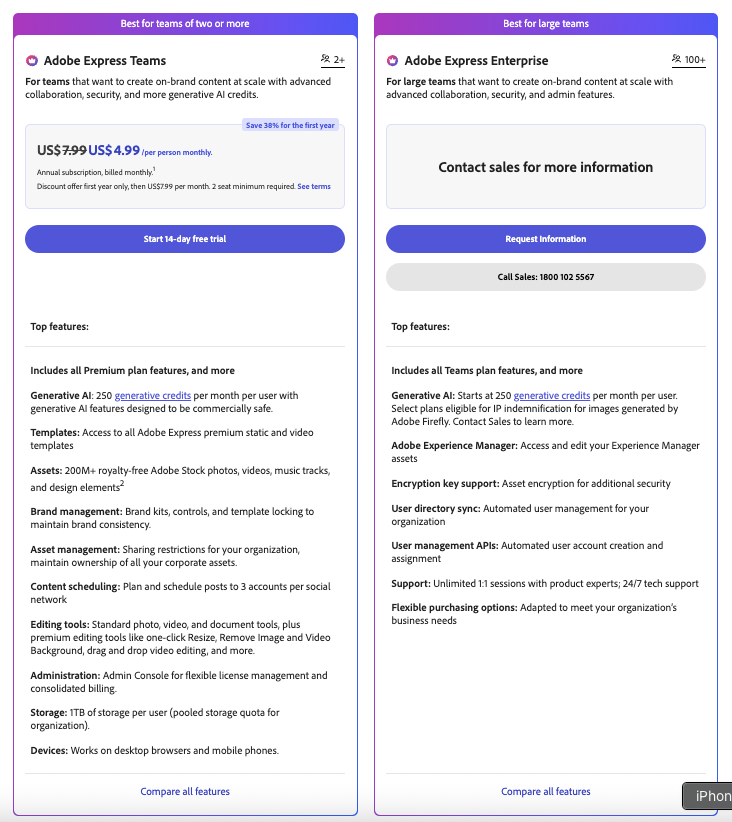
Once more than one person is involved, individual plans stop making sense. That’s where Adobe Express for Teams and Enterprise comes in.
Business Plan Comparison
| Feature | Teams | Enterprise |
| Price | $4.99 per user per month (first year) | Custom pricing |
| Minimum Seats | 2 | 100+ |
| Storage | 1TB per user | 1TB per user |
| Generative AI Credits | 250 per user per month | Starts at 250 per user |
| Brand Controls | Yes | Yes |
| Admin Console | Yes | Yes |
| Asset Ownership | Organization-owned | Organization-owned |
| Collaboration | Real-time editing, comments | Advanced collaboration |
| Security & Compliance | Standard business controls | Advanced security, encryption, APIs |
| Support | 24/7 support | 24/7 + 1:1 expert sessions |
Who these plans are for
The Teams plan works well for marketing teams, agencies, and growing companies that need brand consistency and shared assets. Everyone works from the same templates, colors, and logos, which cuts down mistakes and saves time.
Enterprise is designed for large organizations that need tight control over users, data, and security. This is also the plan that offers IP indemnification for Firefly-generated content, which matters for big brands.
Adobe Express Pricing for Students and Educators
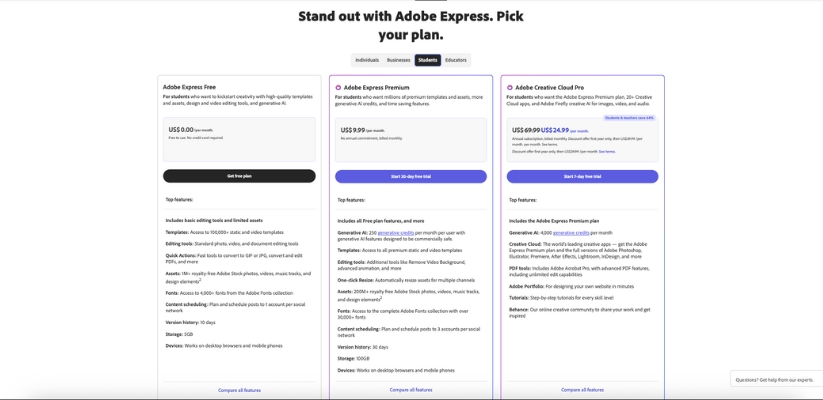
Adobe is surprisingly generous with education pricing, especially for K–12.
Student and Education Plans
| Plan | Price | Best For | Key Benefits |
| Student Free | $0 | Basic student use | Templates, assets, basic editing |
| Student Premium | $9.99/month | Active student creators | Premium templates, AI tools, brand kits |
| Creative Cloud Pro (Students) | $24.99/month (first year) | Design-heavy students | Express + 20+ Adobe apps |
| K–12 Educators | $0 | Teachers and classrooms | Premium features, student-safe assets |
| Higher Education | Custom | Universities | Admin tools, collaboration, security |
If you’re a student, there’s a good chance you already have access through your school. Logging in with a .edu email is always worth trying before paying.
Also Read:
Best Adobe Express Alternatives in 2026
Free vs Premium vs Teams: What’s the Real Difference?
At a glance, Adobe Express Free, Premium, and Teams might look like they offer similar tools — but when you actually start creating, the differences get loud real fast. Whether you’re just messing around with graphics or running content for a brand, knowing what each plan unlocks helps you avoid roadblocks mid-project.
Let’s break it down by use case and feature so you know exactly what you’re signing up for.
If You’re Just Starting Out or Creating for Yourself
Free Plan is built for you. It’s the no-commitment option for individuals who want to explore the basics without pulling out a credit card.
You get:
- A solid template library (100,000+)
- Basic photo and video editing
- 1M+ royalty-free assets
- Standard fonts
- 5GB cloud storage
- Schedule content to one social account
- Limited AI use (just enough to experiment)
What’s missing?No advanced editing tools, no brand kits, and you’ll quickly notice watermarks on premium content. If you’re creating casually or trying the platform for the first time, it’s a great place to begin — but you’ll outgrow it if you’re posting regularly or doing anything client-facing.
If You Create Often and Care About Branding
Premium Plan is where most individual creators, marketers, and freelancers land once they realize they need more than the basics.
You unlock:
- All templates and assets (200M+)
- Advanced tools like background removal, one-click resize, and animation
- Brand kits to keep fonts, logos, and colors consistent
- 250 AI credits every month
- Full access to Adobe Fonts (30,000+)
- 100GB of cloud storage
- Schedule to 3 social media accounts per platform
Why it matters:This plan removes the limits that hold back professional-looking content. You can build branded campaigns, speed up your workflow with resize tools, and batch-schedule posts across multiple platforms. No watermarks, no second-guessing file sizes. Just clean, polished content, ready to go.
If You’re Collaborating With a Team
Teams Plan adds everything from Premium, plus collaboration and admin features that are built for businesses and creative teams.
Here’s what you get beyond Premium:
- 1TB of storage per user
- Admin Console to manage users and licenses
- Shared brand kits and asset control
- Template locking for brand consistency
- Content and asset permissions
- Real-time co-editing and commenting
- 250 AI credits per user, per month
Why it matters:Teams need structure. They need to stay on-brand. And they need a way to manage access, ownership, and workflows across multiple users. With Teams, you can create content at scale without losing control of your branding or your assets.
Quick Summary
| Feature | Free | Premium | Teams |
| Monthly Price | $0 | $9.99 | $4.99/user (first year) |
| Templates | 100,000+ | 200M+ | 200M+ |
| AI Credits | Limited | 250/month | 250/user/month |
| Brand Kits | ❌ | ✅ | ✅ (shared + controlled) |
| Schedule Posts | 1 social account | 3 accounts | 3 accounts |
| Team Collaboration | ❌ | ❌ | ✅ (real-time, admin tools) |
| Storage | 5GB | 100GB | 1TB/user |
| License Control | ❌ | ❌ | ✅ |
So Which One Should You Pick?
- Choose Free if you’re just getting started and don’t need fancy features or storage.
- Go with Premium if you post regularly, run a small brand, or want AI tools and polish without breaking the bank.
- Upgrade to Teams if you’re working with others, need centralized asset control, or manage multiple content creators.
Adobe Express Pricing Tips: How to Save Money and Get the Most Out of Each Plan
Adobe Express gives you a lot of flexibility, and if you learn a few tricks, you can stretch your budget a long way without sacrificing what you need. These tips are practical and honest, with no pressure or gimmicks.
Let’s walk through some smart ways to save money and squeeze maximum value out of whichever plan you choose.
Start with the Free Plan First
This sounds obvious, but a lot of people skip the Free plan and jump straight to Premium. That’s a mistake if you’re just testing the waters.
Why it helps:
- You learn the basics before paying for stuff you might not use.
- You get a feel for the interface, templates, and editing tools.
- You avoid paying for features that sound cool but aren’t critical for your workflow.
If you’re unsure whether Adobe Express fits your workflow, starting free is low risk and full of insight.
Use the Free Trial Before Committing
Before you pay anything, try the 30-day Premium trial or the 7-day Firefly Pro trial. These trials aren’t just short previews. They let you use premium tools and assets as if you already paid.
How to make the most of trials:
- Start a real project during your trial, not just clicking around.
- Download and save templates and assets you like.
- Explore advanced tools like background removal and auto resize.
- Batch schedule posts to see how your workflow changes.
If you get all your heavy work done in the trial window, you might even decide not to subscribe monthly after all.
Pay Annually (When It Saves You Money)
Most Adobe Express plans give you a choice between paying monthly or annually. If you’re pretty sure you’ll use the tool regularly, paying yearly can save you a chunk overall.
Why annual can be better:
- Lower average monthly cost
- Less hassle with monthly renewals
- Encourages consistency in publishing and design
Just make sure you’re comfortable with the commitment before you lock in an annual plan.
Keep an Eye on AI Credit Usage
Generative AI is fun and powerful, but those credits add up fast if you’re not careful. Whether you’re on Premium or Firefly Pro, credits matter.
Tips for smart AI use:
- Use simple prompts the first time around.
- Batch similar ideas in one session instead of spreading them across days.
- Save outputs you like early so you don’t repeat prompts.
- Set realistic expectations for image or video generation. It’s not always perfect on the first try.
Getting comfortable with prompts and AI workflows will help you stretch those credits farther.
Use Brand Kits and Template Saving
If you’re creating a bunch of similar content for social posts, promotions, or announcements, you want to save time, not redo the same work.
Ways this helps:
- Brand kits keep colors, fonts, logos consistent.
- Saved templates mean you don’t start every design from scratch.
- Workflow gets predictable and faster over time.
These features are in the Premium and Teams plans, and they quickly pay for themselves in time saved.
For Teams: Manage Storage and Users
If you’re on a Teams plan, storage and asset control are your best friends.
Best practices:
- Use shared folders and libraries instead of personal ones.
- Archive old content to keep active storage manageable.
- Assign roles so your designers and editors aren’t stepping on each other’s work.
- Keep one central brand kit that everyone pulls from.
Storage may seem unlimited early on, but once a team ramps up, space and order matter a lot more.
Check for Education or Group Discounts
If you’re a student, teacher, or part of an organization, you might already qualify for discounts or free access you haven’t activated yet.
Where to look:
- Your university or school email login page
- IT announcements from your organization
- Adobe’s education licensing options
Schools often offer Creative Cloud access, which includes Express plus all the big apps like Photoshop and Illustrator at a massive discount or free. Don’t pay full price if you qualify for something better.
Cancel or Downgrade Before Renewal
It happens. You sign up thinking you’ll use a plan all year, and suddenly you don’t need it anymore. Most people forget to manage their subscriptions.
Here’s how you save:
- Mark your calendar a few days before renewal.
- Ask yourself if you actively used the paid features.
- If not, downgrade to Free or cancel before the next billing cycle.
Smart timing here can save you entire months of unwanted charges.
Is Adobe Express Worth the Price?
This is the real question most people ask themselves once they stop looking at feature lists and start thinking about actual work. After all, you’re not just paying for access to tools. You’re paying for productivity, speed, simplicity, and peace of mind.
Let’s talk about the value you’re getting and whether it’s worth your hard‑earned money.
Free Plan Feel Check
If you’re using Adobe Express Free, you’re getting more than most free tools offer. You can create posts, flyers, and simple videos without paying a cent. There are plenty of templates and assets to build pretty cool content.
Is it worth it?
For personal projects, school work, or casual social posts, the Free plan is absolutely worth it. You don’t feel boxed in right away, and you get a real sense of what the tool can do without spending anything.
Where it falls short:
- Limited storage
- Watermarks on premium content
- You can only schedule to one social account at a time
- No brand kits or advanced AI features
If you find yourself bumping into those limits often, you’re at the point where paying for more makes sense.
Premium Plan: Practical Value for Creators
Now we’re talking about the plan most people end up choosing.
Here’s what Premium unlocks that Free doesn’t:
- Massive stock library (200M+ assets)
- 30,000+ fonts from Adobe Fonts
- Brand kits to keep your colors and logos consistent
- 250 generative AI credits each month
- Schedule posts to three social accounts
- Advanced editing tools like one‑click resize and background removal
- 100GB of cloud storage
Is that worth $9.99 a month?
Yes, for most creators and small businesses, it absolutely is.
Why? Because it doesn’t just give you more stuff. It saves time, boosts quality, and takes away repetitive work. When you can resize a design for Instagram, Facebook, and TikTok in one click instead of manually redoing it, that adds up to real minutes saved. And minutes turn into productivity and, eventually, revenue.
If you run content regularly, have a brand to protect, or simply want to look more polished without doing more work, Premium feels like a solid investment.
Firefly Pro: Worth It for Heavy AI Users
Firefly Pro bumps your AI power way up.
You get:
- 4,000 generative AI credits per month
- Text to video and audio generation
- Unlimited standard image AI tools
- Photoshop web and mobile access
- Third‑party AI model integration
- Firefly Boards for ideation
Is that worth $19.99 a month?
It depends on what you’re doing.
If you’re a power creator who leans on AI regularly, works with video, or needs Photoshop access without a full Creative Cloud subscription, Firefly Pro delivers serious value. You’re not just getting more credits. You’re unlocking capabilities that keep you creative instead of wrestling with the limitations of other plans.
For people who make frequent AI‑generated content, it’s not just worth it — it can be a real workflow booster.
Teams Plan: Worth It for Collaboration
Once you’re not the only person creating content, the Teams plan starts to make financial sense fast.
With Teams, you get:
- 1TB of storage per user
- Admin tools and brand controls
- Shared asset libraries
- Real‑time collaboration and commenting
- Content scheduling across multiple accounts
- 250 AI credits per user, per month
Is it worth paying for every user?
If your team produces content frequently, yes. The time savings from shared assets and consistent branding alone can justify the monthly cost. And the admin tools mean you’re not dealing with chaotic shares or lost files.
Teams is where Adobe Express starts to feel less like a design tool and more like a small business content engine.
Who Gets the Most Value?
Here’s a quick guide to whether Adobe Express is worth the price for your situation:
You’ll likely feel it’s worth it if:
- You post content regularly on social media
- You’re building or managing a brand
- You need polished designs but aren’t a designer
- You want generative AI for images, templates, video, or audio
- You’re collaborating with others
It might not be worth it if:
- You only create once in a while
- You’re happy with basic free tools
- You don’t care about branding consistency or scheduling
- You never use AI features
My final thought
Adobe Express isn’t just another design tool. It’s a practical content engine that grows with you. If you’re serious about creating content consistently and you want to look professional without spending hours learning complicated software, the price feels fair and often feels like a bargain.
And if you’re still unsure, remember you can always start free, use a trial, and upgrade when you know what you need.
Frequently Asked Questions About Adobe Express Pricing
1. Is Adobe Express really free forever?
Yes, Adobe Express offers a completely free plan with no time limit and no credit card required. You can create designs, access a huge collection of templates, and use basic editing tools at no cost. Just know that some premium content may show watermarks, and features like brand kits, advanced AI, and scheduling multiple posts require a paid plan.
2. Does Adobe Express offer discounts for students, veterans, or nonprofits?
Yes, Adobe does offer special pricing for students and educators, and there are nonprofit licensing options available through Adobe’s sales team or education channels. For students, plans like Creative Cloud Pro bundle Adobe Express with Photoshop, Illustrator, and other apps at a significant discount. Veterans and nonprofits may need to contact Adobe support or check with a reseller for eligibility and pricing.
3. Can I use Adobe Express for commercial projects?
Yes. Content created using Adobe Express, including generative AI features powered by Adobe Firefly, is designed to be safe for commercial use as long as you’re using tools that are out of beta and covered under the standard license terms.
If you’re running a business or creating client work, the Premium or Teams plan is usually the right fit.
4. What happens after the free trial ends?
If you started a Premium or Firefly Pro free trial, Adobe will automatically begin billing you once the trial ends unless you cancel before that date. To avoid surprise charges, set a reminder to review your plan before the trial expires.
5. Can I cancel my Adobe Express subscription anytime?
Yes, you can cancel your subscription anytime from your Adobe account dashboard. If you cancel during the free trial period, you won’t be charged. For paid plans, check Adobe’s terms — you may still be billed for the current month if you’re on a monthly subscription.
6. Can I switch plans later if my needs change?
Absolutely. You can upgrade or downgrade between Free, Premium, and Firefly Pro plans. Business users can also move from individual plans to Teams or Enterprise plans as their organization grows.
7. Is Adobe Express part of Creative Cloud?
Yes. Adobe Express is part of the Adobe Creative Cloud ecosystem. While it can be used as a standalone app, it also integrates with other Adobe tools like Photoshop, Illustrator, and Creative Cloud Libraries. If you’re already subscribed to Creative Cloud All Apps, you may already have access to Express.
8. Do I get access to Photoshop or Illustrator with an Adobe Express subscription?
Not by default. However, if you’re on the Firefly Pro plan, you get access to Photoshop on the web and mobile. If you need the full versions of Photoshop, Illustrator, or other desktop apps, you’ll want to look into a Creative Cloud bundle like Creative Cloud Pro.
9. How many AI credits do I get each month?
It depends on your plan:
- Free plan: Limited monthly credits (enough to explore basic AI features)
- Premium plan: 250 AI credits per month
- Firefly Pro plan: 4,000 AI credits per month
- Teams and Enterprise: 250+ credits per user per month
These credits are used when generating images, text effects, templates, video, and audio with AI.
10. Does Adobe Express support collaboration or team use?
Yes, but collaboration features are only available in the Teams and Enterprise plans. These plans include tools like real-time co-editing, shared brand kits, commenting, and user management through an Admin Console.
11. Can I try Adobe Express Premium before buying it?
Yes, Adobe offers a 30-day free trial of the Premium plan and a 7-day free trial of the Firefly Pro plan. These trials give you full access to all features, including premium templates, brand kits, advanced AI tools, and more.
12. How is Adobe Express different from Canva?
Both tools are built for quick and easy design, but Adobe Express stands out with its integration into the Adobe ecosystem, stronger photo/video editing features, and access to Adobe Fonts and Stock. Firefly’s AI tools also give Express an edge in generative content.