So, you’ve probably come across InVideo AI. It’s that flashy video creation platform everyone’s been talking about. It promises fast, high-quality videos made with just a few clicks, thanks to its AI smarts. And honestly? It is pretty impressive. Whether you’re a content creator, marketer, or someone just trying to make a solid explainer video, it can seriously cut your editing time in half.
But here’s the part that’s tripping people up, that is the pricing.
On the surface, it looks simple enough. Free, Plus, Max, Generative, Team. But start poking around, and suddenly you’re knee-deep in AI credits, generative minutes, watermark rules, and feature caps that feel more like landmines. One day you’re generating videos like a pro, and the next you’re staring at an alert saying you’re out of credits. Again.
And that’s exactly why this guide exists. We’re going to break down exactly how InVideo AI’s pricing works. No jargon, no confusion, just the plain truth. Whether you’re on the fence about upgrading or already paying and wondering if you chose the right plan, this article will help you figure it out so you can focus on creating without second-guessing your invoice.
InVideo AI Pricing Explained
InVideo AI splits its pricing into several tiers, each designed to suit a different kind of creator. Whether you’re just testing the waters or managing content at scale, there’s a plan built for you. Let’s break them down, one by one, and figure out what you’re actually getting for your money.
The Free Plan
Cost: $0/month. No credit card, no commitment.
Features: This plan gives you 2 video minutes and 1 AI credit per week. You get access to one Express avatar and can export up to four videos weekly, though each one comes stamped with an InVideo watermark.
Ideal User: Great for curious beginners, hobbyists, or anyone who wants to take the platform for a spin without spending a dime. It’s enough to test out the core AI features and see if InVideo fits your workflow.
Limitations: You’ll hit the ceiling quickly. No access to generative video features, limited credits, and watermark restrictions mean this isn’t going to cut it for anything beyond basic testing. Think of it as a demo, not a working toolkit.
The Plus Plan
Cost: $35/month or $28/month if you pay annually.
Features: Includes 10 credits, 50 video minutes, 95 iStock media clips, 2 UGC-style product ad templates, 30 seconds of generative video, and 2 express clones. You also get 100GB of cloud storage, support for 3 users, and unlimited exports with no watermark.
Ideal User: This plan is ideal for solo creators and small content teams who are producing semi-regular content. If you need premium stock footage and just a bit of AI magic, Plus gives you a balanced toolset.
Analysis: While it’s a solid entry-level paid plan, 10 credits can go faster than you’d think — especially if you’re experimenting with generative tools or longer videos. That said, the iStock media access alone makes it worthwhile for folks focused on visual polish.
The Max Plan
Cost: $60/month or $50/month when billed annually.
Features: You get 40 credits, 200 video minutes, and a beefy 320 iStock clips each month. It also ups the ante with 8 UGC product ads, 120 seconds of generative video, 5 express clones, and 400GB of storage. Like Plus, it supports 3 users and includes unlimited exports.
Ideal User: This one’s for creators with a consistent content schedule — YouTubers, marketers, small agencies. If you’re putting out multiple videos a week and need flexibility with media and AI tools, Max gives you room to breathe.
Analysis: The jump from Plus to Max is all about scale. At $1.5 per credit (or less annually), it’s more cost-effective if you know you’ll be using AI features often. Definitely worth it if you’re producing content at volume.
The Generative Plan
Cost: $120/month or $100/month annually.
Features: Comes with 100 credits, 200 video minutes, and 320 iStock assets. But here’s where it leans in — 5 generative UGC ads, 300 seconds of generative video time, and 8 express clones. You also get 3-user support, 400GB of storage, and, again, unlimited exports.
Ideal User: Designed for high-end creators, ad makers, and teams doing storytelling-heavy or brand-centric videos. If you need to push creative boundaries with longer generative clips, this is the plan that gives you that creative headroom.
Analysis: This is where InVideo shows off its AI muscle. It’s more expensive, sure, but the generative capacity you unlock here is serious. Also, the cost per credit drops to around $1, which stretches your budget a bit further.
The Team Plan
Cost: $999/month or $899/month annually.
Features: 1000 credits, 2000 video minutes, and 3200 iStock media files. You also get 50 generative UGC ads, 50 minutes of generative video, 40 express clones, and a massive 4TB of cloud storage. This plan is limited to one seat, but it’s designed for high-powered workflows.
Ideal User: Enterprise teams, agencies, or production houses. If you’re managing content at scale with clients, deadlines, and high creative demand, this plan gives you both volume and control.
Analysis: Yes, it’s pricey. But if you’re producing dozens of videos a week or managing large client portfolios, the credits and storage alone might justify the cost. Just be aware that adding more team seats means custom pricing.
The Enterprise Plan
Cost: Custom. You’ll need to contact their sales team for details.
Features: Think of this as the Team Plan on steroids. You get everything in the Team plan, plus advanced security features, personalized support, and custom configurations for storage, user roles, and access.
Ideal User: Large organizations with strict compliance needs or complex production pipelines. If you need SSO, dedicated onboarding, or very specific limits, this plan is your playground.
Analysis: The flexibility is nice, but the lack of public pricing makes it harder to plan ahead. Still, for teams that need full-scale support and customization, it’s the only real choice.
InVideo AI Pricing (Yearly)
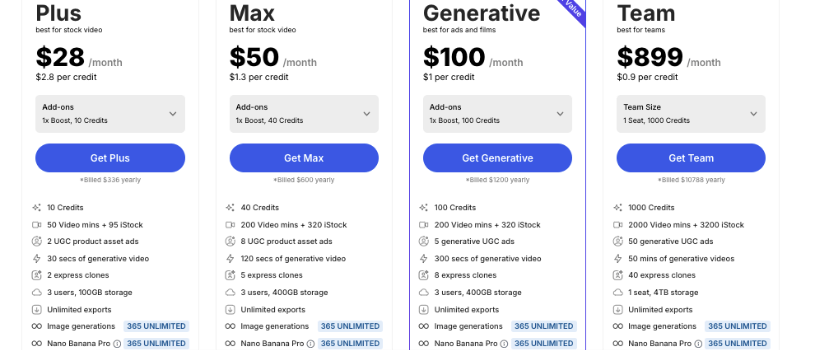
Up to 20% off when billed annually
| Plan | Best For | Price | Credits | Key Features |
| Free | Trying it out | $0 | 1 AI credit/week | 2 video mins/week, 1 Express avatar, 4 exports/week with watermark. No generative features. |
| Plus | Stock video users | $28/month (billed $336 yearly) | 10 credits ($2.8/credit) | 50 video mins + 95 iStock, 2 UGC ads, 30 secs generative video, 2 express clones, 3 users, 100GB storage, unlimited exports, unlimited image generations. |
| Max | Power users | $50/month (billed $600 yearly) | 40 credits ($1.3/credit) | 200 video mins + 320 iStock, 8 UGC ads, 120 secs generative video, 5 express clones, 3 users, 400GB storage, unlimited exports, unlimited image generations. |
| Generative | Ads & filmmaking | $100/month (billed $1200 yearly) | 100 credits ($1/credit) | 200 video mins + 320 iStock, 5 generative UGC ads, 300 secs generative video, 8 express clones, 3 users, 400GB storage, unlimited exports, unlimited image generations. |
| Team | Agencies & teams | $899/month (billed $10,788 yearly) | 1000 credits ($0.9/credit) | 2000 video mins + 3200 iStock, 50 UGC ads, 50 mins generative video, 40 express clones, 1 seat, 4TB storage, unlimited exports, unlimited image generations. |
| Enterprise | Custom solutions | Custom | Custom | Tailored plans for large orgs. Includes advanced security and scalable features. |
InVideo AI Pricing (Monthly)
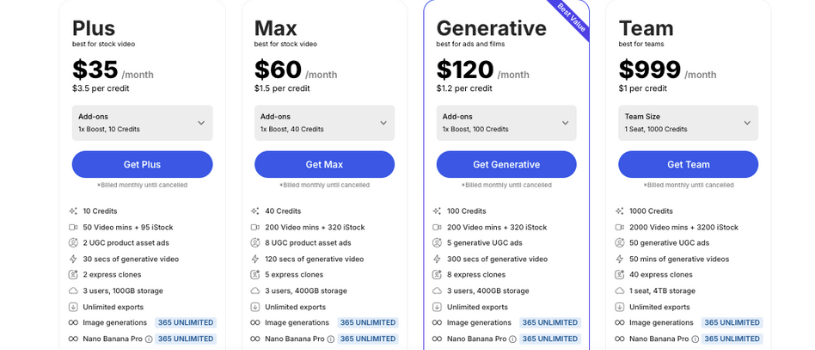
Flexible billing with cancel-anytime options
| Plan | Best For | Price | Credits | Key Features |
| Free | Trying it out | $0 | 1 AI credit/week | 2 video mins/week, 1 Express avatar, 4 exports/week with watermark. No generative features. |
| Plus | Stock video users | $35/month | 10 credits ($3.5/credit) | 50 video mins + 95 iStock, 2 UGC ads, 30 secs generative video, 2 express clones, 3 users, 100GB storage, unlimited exports, unlimited image generations. |
| Max | Power users | $60/month | 40 credits ($1.5/credit) | 200 video mins + 320 iStock, 8 UGC ads, 120 secs generative video, 5 express clones, 3 users, 400GB storage, unlimited exports, unlimited image generations. |
| Generative | Ads & filmmaking | $120/month | 100 credits ($1.2/credit) | 200 video mins + 320 iStock, 5 generative UGC ads, 300 secs generative video, 8 express clones, 3 users, 400GB storage, unlimited exports, unlimited image generations. |
| Team | Agencies & teams | $999/month | 1000 credits ($1/credit) | 2000 video mins + 3200 iStock, 50 UGC ads, 50 mins generative video, 40 express clones, 1 seat, 4TB storage, unlimited exports, unlimited image generations. |
| Enterprise | Custom solutions | Custom | Custom | Tailored plans for large orgs. Includes advanced security and scalable features. |
InVideo AI Pricing Plan Comparison
To make it easier to see what you’re actually getting, here’s how the different InVideo AI plans compare side by side.
| Feature | Free | Plus | Max | Generative | Team | Enterprise |
| Monthly Cost | $0 | $35 | $60 | $120 | $999 | Custom |
| Annual Cost (billed yearly) | $0 | $28/month | $50/month | $100/month | $899/month | Custom |
| Ideal User | Beginners, Hobbyists | Solo Creators, Freelancers | Agencies, High-Volume Creators | Ad Creators, Filmmakers | Teams, Studios | Large Enterprises |
| Monthly Credits | 1/week | 10 | 40 | 100 | 1000 | Custom |
| Video Minutes | 2/week | 50 | 200 | 200 | 2000 | Custom |
| iStock Assets | None | 95 | 320 | 320 | 3200 | Custom |
| Generative Video Time | None | 30 secs | 120 secs | 300 secs | 50 mins | Custom |
| Express Clones | 1 | 2 | 5 | 8 | 40 | Custom |
| Users | 1 | 3 | 3 | 3 | 1 seat | Custom |
| Storage | Limited | 100GB | 400GB | 400GB | 4TB | Custom |
| Exports | 4/week with watermark | Unlimited, no watermark | Unlimited, no watermark | Unlimited, no watermark | Unlimited, no watermark | Unlimited |
| Access to Generative Features | No | Yes | Yes | Yes | Yes | Yes |
The Hidden Costs: What You Really Need to Know About Usage
When you first look at InVideo AI’s pricing, you see the monthly or yearly cost and the number of credits included with each plan. That’s helpful, but it doesn’t tell the whole story. On a deeper level, your credits, video minutes, and stock assets are like fuel in a tank. Once they run out, your ability to generate or export videos changes in ways worth understanding.
Credits and Video Minutes Aren’t Just Numbers
Every video you generate uses up two types of limits:
- Video minutes: These are linked to how long your finished videos can be within a billing cycle. If your plan gives you 200 video minutes, every minute of finished video deducts from that quota.
- AI credits: These are used when you create videos that include generative media. The longer or more complex your video, the more credits you burn. For example, creating a one-minute generative video can cost around seven credits.
Here’s the tricky part. You don’t get a warning before your credits run out as you build videos. You often only see the deduction after you hit generate. Because of that, credits can vanish faster than you expect, especially if you’re working on longer videos or experimenting with different generative features.
That makes budgeting credits feel unpredictable if you’re new to the tool.
What Happens When You Run Out
Once you’ve used up all the credits or video minutes included in your plan, you don’t suddenly lose access to your account or editing tools. Instead:
- Your monthly quotas reset on your billing date each month
- If you keep creating videos that require credits, some users find they need to purchase add-ons to continue without hitting limits
- If you build long or complex videos that consume credits quickly, you might find yourself scrambling for extra credits mid-month or nudged toward a higher plan earlier than expected
There isn’t a strict pay-per-use model where your card gets charged automatically per extra minute or credit. But the system is tied to your monthly quota. Once that quota is gone, your ability to generate or export simply stops until it resets or you add more credits.
Why This Matters for Your Budget
Most people focus on the headline price, like how much you pay per month or per year. But the real cost of InVideo AI often depends on:
- How many videos you’re making each month
- How long those videos are
- Whether they include generative elements that use more credits
- How quickly your credits and video minutes are consumed
That means two creators on the same plan could have very different experiences. Someone making short social snippets might cruise through a month with plenty of buffer. Another person trying to make longer, generative content might burn through credits early and feel like the plan doesn’t stretch far enough.
What You Should Watch For
Here’s what to keep in mind as you’re planning:
- Credits don’t roll over. Once the month is over, your unused credits and video minutes reset based on your billing cycle
- Generative videos use up credits quickly, much faster than simple stock-based edits
- Monitoring usage matters. Check your usage dashboard regularly to see how fast your credits are being consumed
Being aware of these details helps you choose the right plan with confidence and avoid feeling like you’re running out unexpectedly mid-month.
How to Choose the Right Plan
Picking the right InVideo AI plan really comes down to how often you create, how advanced your videos need to be, and who you’re creating them for. There’s no one-size-fits-all here, but if you’ve got a general idea of your workflow, this will help you land on the right fit.
If you’re just getting started…
Go with the Free Plan.No commitment, no pressure. You’ll get a weekly dose of video minutes and AI credits, enough to explore the platform and see what’s possible. Great for students, hobbyists, or anyone who just wants to test the waters.
What to watch out for: Watermarks and feature limits. If you’re creating anything public-facing, you’ll probably outgrow this plan pretty quickly.
If you’re a solo creator or small business…
Plus is your sweet spot.You get access to premium stock, a few generative features, and just enough credits to stay productive. If you’re putting out a few videos a month for YouTube, Instagram, or ads, this plan gives you a good mix of control and affordability.
Pro tip: Go for the annual billing if you can — it cuts the monthly price and stretches your credits a bit further.
If you’re making content regularly or managing client work…
Max is where it gets serious.The jump in credits and storage means you can work faster without constantly checking your usage. It’s ideal if you’re producing several videos a week or managing content for brands, especially if you rely on stock footage and advanced edits.
If you’re building video ads or storytelling content with AI…
Generative is built for you.This plan unlocks deeper AI capabilities, longer generative video time, and more room to experiment with avatars and voice. Perfect for marketers, ad creatives, and filmmakers who want to scale production without compromising quality.
If you’re running a team or agency…
Team is the move.It’s pricey, but you’re getting enterprise-level volume. With 1000 credits, massive storage, and team-ready features like multiple express clones and high export limits, it’s designed for large-scale production workflows.
Heads up: It only includes one seat by default. If you’ve got multiple team members, expect to talk to sales about a custom setup.
If you’re part of a large organization with strict needs…
Enterprise is your go-to.Custom pricing, dedicated support, and the flexibility to scale everything also storage, users, exports, you name it. You’ll need to reach out directly, but for companies that need compliance, security, or custom workflows, it’s the only real option.
Also Read:
A complete guide to Replit pricing in 2026
Jitter Pricing Explained: Which Plan is Right for You in 2026?
Boba AI Pricing Explained: Find the Best Plan for Your Content Goals
Adobe Express Pricing Explained: Pick the Right Plan for You
Final Thoughts
InVideo AI offers a powerful set of tools for creators, but understanding its pricing is key to getting the most out of it. Between credits, video minutes, and generative features, the right plan depends on how often you create and how advanced your content needs to be.
If you’re just starting out, there’s zero risk in testing the waters with the free plan. But if you’re building content regularly, investing in a paid plan gives you the freedom to create without constantly hitting limits. The more you understand how credits work, the better you can plan, budget, and create without interruption.
Frequently Asked Questions
How predictable is InVideo AI pricing for regular users?
InVideo AI is more predictable than pure pay-as-you-go tools, but it still depends on how you use credits. Your plan gives you fixed monthly limits for credits and video minutes, so costs will not suddenly spike. That said, generative videos and longer projects can consume credits faster than many people expect, which is where surprises usually come from.
What are the main differences between the Free plan and paid InVideo AI plans?
The Free plan is mainly for testing. You get very limited video minutes, one AI credit per week, watermarked exports, and no access to advanced generative features. Paid plans remove watermarks, unlock premium stock assets, add generative video tools, and significantly increase credits, storage, and export freedom.
What do InVideo AI credits actually cover?
Credits are used when you generate AI-powered content. This includes generative video creation, certain avatar features, and advanced AI workflows. Simple edits using stock clips may rely more on video minutes, while AI-heavy features burn through credits faster.
What happens if I run out of credits or video minutes?
When your credits or video minutes are used up, you cannot generate new AI content that depends on them. Your account does not get charged automatically for overages. You either wait for your monthly reset or purchase add-ons to continue working without interruption.
Who is InVideo AI pricing a good fit for, and who should be careful?
InVideo AI works well for creators, marketers, and teams who have a clear idea of how much content they produce each month. Users who frequently experiment with long generative videos should pay closer attention to credit usage, as those limits can feel tight on lower plans.
Are there ways to control usage and avoid hitting limits?
Yes, but it requires staying aware of your usage. Regularly checking your dashboard, keeping video lengths reasonable, and choosing the right plan based on monthly output helps a lot. InVideo AI does not silently charge extra, but it will stop generation once limits are reached, which is why planning ahead matters.