In a world where content moves fast and attention spans move faster, InVideo AI is quickly gaining ground as a go-to tool for creators, marketers, and businesses who want to turn ideas into videos without touching a traditional editing timeline. While it hasn’t hit household-name status just yet, InVideo AI is carving out a strong spot for itself with its prompt-based video creation and beginner-friendly interface that takes the pressure off of editing.
In this article, we’ll walk you through exactly what InVideo AI is, how it works behind the scenes, what features make it stand out, where it shines (and where it doesn’t), and how pricing plays into the mix.
What is InVideo AI?
InVideo AI is an online video creation tool that uses artificial intelligence to turn simple text prompts into fully edited videos. You tell it what you want, and it handles the scripting, visuals, voiceovers, and editing for you.
It’s built for people who want to create videos quickly without needing editing experience or complicated software. Whether you’re making content for social media, marketing, or tutorials, it’s designed to make the process fast and beginner-friendly.
Also Read:
What is Pika Labs AI? AI Video Creator
Key Features of InVideo AI
If you’ve ever wished video creation could be as easy as writing a sentence, InVideo AI might be exactly what you’re looking for. It’s packed with smart, time-saving tools that make turning ideas into videos feel effortless.
Here’s a closer look at the features that make it stand out.
Text to Video Generation
With just a simple text prompt, InVideo AI can turn your idea into a full video, complete with scenes, visuals, and transitions. You don’t need to know editing software or timelines. Just type what you want and watch it come to life.
Multiple Video Formats
Whether you need a TikTok clip, a YouTube short, a product promo, or a full explainer, InVideo AI adapts. It offers format presets so your video fits the platform you’re targeting perfectly.
AI Generated Voiceovers
You can add voice narration without recording yourself. InVideo offers a range of human-sounding voices and supports multiple languages. That means you can reach a broader audience without extra tools.
AI Avatars and Characters
Want a talking host in your video? Pick from AI avatars that act out the message you describe in your prompt. It’s an easy way to add personality and on-screen presence.
Automatic Subtitles and Captions
Once your video is generated, InVideo AI can automatically add subtitles. That’s huge for accessibility and engagement, especially on social platforms where many people watch without sound.
Built-in Stock Media Library
No need to hunt for clips or photos elsewhere. InVideo connects to millions of stock videos, images, and audio tracks right inside the app, so your video feels polished from the first draft.
AI Animation Tools
For those moments where still images just won’t cut it, you can generate animated scenes straight from text. It’s perfect for storytelling or making your content stand out.
On-Browser Editing
Since everything runs in your browser, you don’t have to download or install software. That makes the whole process faster and more accessible, especially when you’re on the go.
Magic Text Editing
Want to tweak something after your video is done? Just type a text command like “change the voice tone” or “shorten this clip” and let the AI handle it. It’s like editing by conversation.
Pros and Cons of InVideo AI
Here’s a quick breakdown of where it shines and where it still has room to grow.
✅ Pros of InVideo AI
Fast Content CreationGenerates fully edited videos in minutes using just a text prompt, saving hours of manual work.
Beginner-Friendly InterfaceNo editing skills required. The tool is designed for non-tech users, creators, and marketers alike.
Built-In AI Voice and AvatarsLets users add realistic voiceovers and on-screen AI characters without third-party tools.
Wide Format SupportOptimized for multiple platforms like YouTube, TikTok, Instagram, and LinkedIn.
Massive Media LibraryAccess to millions of royalty-free clips, images, and music directly inside the editor.
Browser-Based ToolNo downloads or installations needed, which makes it accessible from anywhere.
❌ Cons of InVideo AI
Limited Creative ControlEditing flexibility is basic. Users looking for precision or timeline-based editing may feel restricted.
Output Can Feel GenericSome videos may look templated or lack a unique visual style unless manually refined.
Credit-Based SystemOn free and lower-tier plans, features are limited by monthly credit usage.
Dependent on Prompt QualityResults heavily rely on how well you craft your text prompt — vague inputs lead to weak videos.
No Deep Custom CodingLacks support for advanced scripting or backend integrations for power users.
Also Read:
Pros and Cons of Jitter AI
InVideo AI Plans and Pricing
InVideo AI offers flexible plans whether you’re just getting started or need to create videos regularly for clients, marketing, or business content. You can try it for free or upgrade to a paid plan to unlock more credits, higher limits, and advanced features.
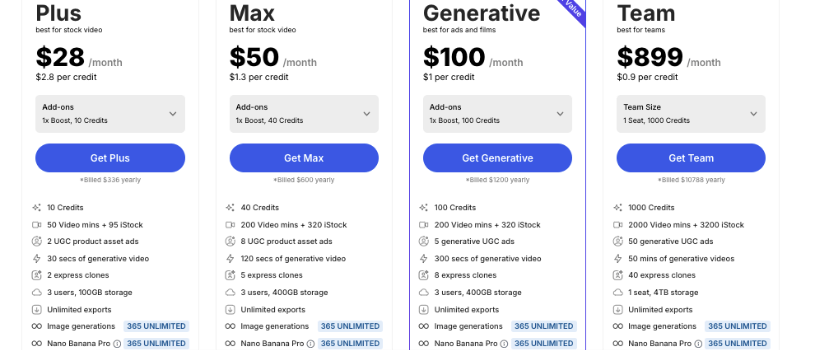
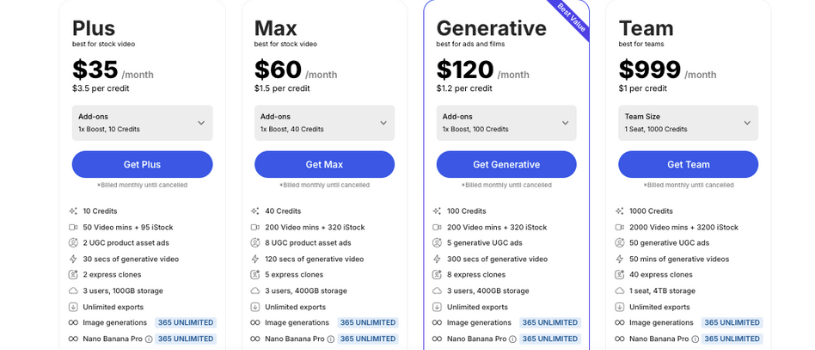
Free Plan – $0/month
Perfect for exploring the platform. Includes 2 AI video minutes and 1 AI credit per week, along with 4 weekly exports. Videos on this plan come with an InVideo watermark, making it ideal for casual or first-time users who want to get a feel for how it works.
Plus Plan – $25/month (billed monthly) or $20/month (billed yearly)
Designed for creators who need more flexibility. This plan gives you access to more AI generation minutes, higher export limits, and some premium features. With the yearly billing option, you save around 20 percent.
Max Plan – $60/month (billed monthly) or $48/month (billed yearly)
Best suited for power users or businesses producing content frequently. Offers higher AI limits, more storage, and access to premium assets. Yearly billing provides better value for users producing content at scale.
Enterprise Plan – Custom Pricing
Ideal for large teams or companies with specific workflow and support needs. This plan includes custom usage limits, collaborative tools, and dedicated support tailored to your organization’s goals.
Also Read:
Jitter Pricing Explained: Which Plan is Right for You in 2026?
Boba AI Pricing Explained: Find the Best Plan for Your Content Goals
Adobe Express Pricing Explained: Pick the Right Plan for You
Final Thoughts: Who is InVideo AI for?
When I think about who will get the most out of InVideo AI, one thing comes to mind: it’s for the person who wants to create videos without the headache of traditional editing.
If you’re a content creator juggling platforms, a marketer trying to crank out social clips, or a small business owner who needs promos without hiring an editor, this tool feels like a reliable partner. It takes the guesswork and grunt work out of video production, so you can focus on your ideas instead of wrestling with software.
Now, if you’re someone who thrives on precise editing controls or who builds videos with pixel‑perfect detail, you might still want to pair it with a more advanced editor down the line. But for quick, polished video content that doesn’t require a steep learning curve, InVideo AI fits comfortably into your workflow.