
In the fast-growing world of AI-powered video creation, Domo AI is quickly becoming a favorite for creators who want studio-quality visuals without dealing with complicated editing tools. It’s not as widely recognized as some of the bigger AI platforms yet, but it has built a strong following because of its animation options, stylistic transformations, and simple workflow. Many people like how easily Domo AI can take a text prompt, a single image, or a short video clip and turn it into something that looks thoughtfully crafted.
In this article, we’ll break down what Domo AI is, how it works, the features that make it stand out, the pros and cons you should know about, and a quick overview of pricing.
What is Domo AI?
Domo AI is an AI video and animation generator AI tool that turns simple inputs like text, images, or raw footage into animated or stylized videos in just a few minutes. It’s designed for creators who want eye-catching visuals without complex editing skills. The platform focuses on making video production faster and more accessible, while still giving users the freedom to create in different styles ranging from anime to realistic motion.
Also Read:
What is Jitter AI? Everything You Should Know Before Start
How Domo AI Works
Domo AI keeps the workflow simple, even if you’ve never created a video before. You give it an idea or a file to start with, and the platform handles the technical side for you.
Step 1: Choose your creation modePick what you want to make, like text-to-video, image-to-video, character animation, or style transformation.
Step 2: Add your inputUpload a video, drop in an image, or type a prompt. This becomes the base for your animation.
Step 3: Select a visual styleChoose from anime, cartoon, realistic, or any of the other style filters available.
Step 4: Adjust optional settingsFine-tune motion, reference styles, or extra details if you want a more tailored result.
Step 5: Generate your videoClick the generate button and let Domo AI process your request in the background.
Step 6: Review and downloadOnce the video is ready, you can download it, redo it, or run a new variation until it feels right.
Key Features of Domo AI Video Generator
Here’s a closer look at the features that make it such a flexible tool for video generation and animation.
AI Video Style Transformation
Domo AI can take any video clip and restyle it into anime, cartoon, realistic, or artistic looks without manual editing. The platform offers a wide range of preset styles, so creators can experiment until they find the vibe that fits their project.
Text to Video Creation
You can start with a simple prompt and let the system generate an entire video around it. This feature works well for people who want quick visuals without recording footage or designing scenes from scratch.
Image to Video Animation
A single photo can turn into a moving clip with smooth motion and expressive details. It’s helpful for storytellers who want to add life to still characters, portraits, product shots, or concept art.
Character and Talking Avatar Animation
Domo AI allows you to animate characters and create talking avatars from uploaded images. You provide the script or audio, and the tool handles the facial movement and speech alignment.
Frames to Video Generation
If you have multiple frames or sketches, Domo AI can stitch them into a continuous animation. This is useful for artists who prefer frame-based drawing but want fluid motion without manual clean-up work.
AI Upscaling and Enhancement
The upscaler boosts clarity and sharpness so your final output looks polished. It’s a simple option inside the platform that improves quality without requiring external tools.
Background Removal
You can remove backgrounds from videos or images with a single click. This makes it easier to place characters or objects into new scenes without working through complicated masking tools.
Style Reference and Customization
You can upload a reference image or choose from the existing style library to guide the look of your video. This helps maintain a consistent aesthetic across multiple pieces of content.
Pros and Cons of Domo AI
Pros
Easy for Beginners: The interface is simple enough for anyone to start creating videos without prior editing or animation experience.
Versatile Generation Tools: Supports text to video, image to video, character animation, style transfer, and more inside one platform.
Wide Style Library: Offers a large collection of anime, cartoon, realistic, and artistic filters that give creators plenty of creative freedom.
Fast Output: Produces stylized videos quickly, which helps when you need content on a tight schedule.
Helpful Editing Extras: Built-in tools like upscaling, background removal, and lip sync save time and reduce the need for external software.
Cons
Output Consistency Varies: Some styles work better than others, and results may need multiple attempts for a polished look.
Credit-Based System: Frequent users can run through credits quickly, which may feel limiting for creators who produce daily content.
Limited Fine Control: You can’t tweak motion or styling at a granular level the way you can in professional animation software.
Occasional Artifacts: Fast generation sometimes introduces small distortions or mismatched details, especially in complex scenes.
No Desktop App: Everything runs in the browser, so performance depends on internet speed and server load.
Domo AI Plans and Pricing
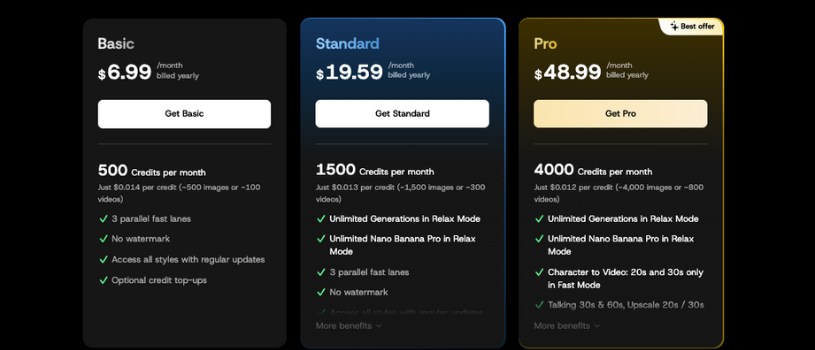
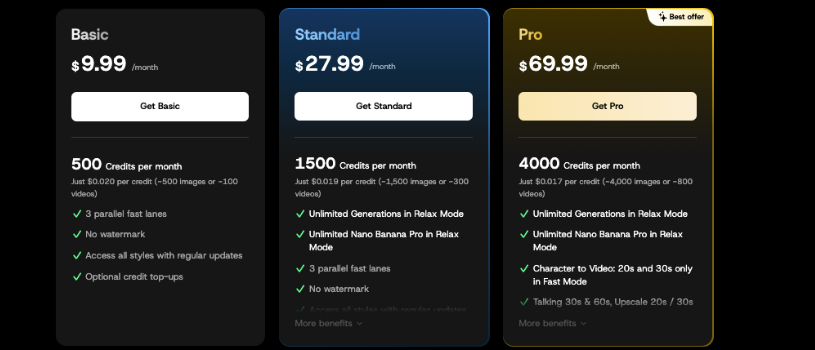
Domo AI’s pricing is built around a simple credit system, and each plan gives you more room to create depending on how often you make videos or animations. Here’s a clear breakdown of the current plans from the official pricing page.
Free Plan
- Completely free to start
- Enough credits to test basic features
- Good for exploring the platform before upgrading
Basic Plan
- About $6.99 per month when billed yearly
- 500 monthly credits
- No watermark on outputs
- Access to all available styles
- Three fast generation slots
Standard Plan
- Around $19.59 per month on yearly billing
- 1,500 monthly credits
- Unlimited relaxed-mode generations
- No watermark
- Three fast lanes for quicker processing
Pro Plan
- About $48.99 per month when billed annually
- 4,000 monthly credits
- Up to six fast generation slots
- Talking avatars, longer character videos, and additional pro features
- Access to all styles and upscaling tools
Also Read:
What is Genmo AI? Complete Guide
Final Thoughts: Who is Domo AI for?
Domo AI is a great fit for anyone who wants to create animated or stylized videos without spending hours learning professional software. If you’re a content creator, marketer, or someone who just loves experimenting with visuals, the platform gives you enough tools to turn simple ideas into polished videos in a short amount of time. The mix of text-to-video, image animation, character tools, and style filters makes it easy to stay creative even when you’re short on time or resources.
It also works well for beginners who want an accessible place to start, as well as more experienced users who need quick drafts, concept animations, or social-ready content. Whether you’re building short clips for social media, bringing characters to life, or trying out new visual styles, Domo AI offers a straightforward way to create without overthinking the technical side.
FAQs
Q1. What is Domo AI and who is it designed for?
Domo AI is an AI video generator that turns text, images, and video clips into animated or stylized videos. It’s designed for creators, social media marketers, artists, beginners who want fast results, and anyone who wants to produce eye-catching visuals without learning complex editing software.
Q2. How does Domo AI work?
You start by uploading an image, inserting a video, or typing a text prompt. Domo AI processes your input with its built-in models and transforms it into a completed animation or stylized video. The platform handles everything from character motion and lip sync to style transfer and enhancement, making the creation workflow simple even for beginners.
Q3. What are the pricing tiers for Domo AI?
Domo AI offers a Free plan with basic credits, a Basic plan at about $6.99 per month, a Standard plan at roughly $19.59 per month, and a Pro plan at around $48.99 per month when billed yearly.
Each upgrade unlocks more monthly credits, faster generation slots, and advanced features like talking avatars and upscaling.
Q4. How does Domo AI compare to other AI video generators?
While many platforms focus on one type of output, Domo AI stands out for offering multiple generation methods in one place, including text-to-video, image animation, character creation, and style transfer. It’s also easier to use than many professional tools, which makes it more accessible for everyday creators.
Q5. What are the main limitations of Domo AI?
Domo AI can produce inconsistent results at times, especially with complex scenes or very specific styles. The credit system may feel limiting for heavy users, and there’s less fine-grain control compared to advanced animation software. Some outputs may also require a few attempts before reaching the desired quality.