Pika AI (by Pika Labs) has quickly become one of the most talked-about AI video tools in the creative tech world. Whether you’re a content creator experimenting with short-form storytelling, a marketer trying to boost engagement, or just someone curious about turning ideas into motion, Pika offers something that feels almost unreal: type a prompt, get a fully animated video in seconds.
But beyond the buzz, what is Pika AI, how does it actually work, what’s new in version 1.0 and beyond, and is it really worth using in 2026?
This friendly guide will tell you what is pika AI, its real-world use cases, Pika’s most powerful features, current pricing to help you figure out if Pika deserves a spot in your creative toolkit.
What is Pika AI?
Pika AI is a generative video platform that turns simple text, image, or video prompts into high-quality, animated video clips. Built by Pika Labs, it’s designed for creators who want to produce short-form visual content without needing professional editing skills or complex tools.
Key Features of Pika AI Video Generator
Pika AI isn’t just about turning prompts into video. It gives you real creative control without the usual complexity. Here’s a closer look at the features that make it stand out.
1. Text-to-Video Generation
At its core, you type what you want to see and Pika turns that text into a short video clip. Whether it’s a fantasy scene, a quick social post, or a descriptive prompt with camera movement suggestions, the AI interprets your words and builds motion around them.
2. Image-to-Video Animation
Upload a photo and watch it come alive. Pika can animate static images, adding movement, effects, and transitions that turn a flat picture into a dynamic clip.
3. Pikaffects – Playful Visual FX
This is one of the most fun parts of Pika. Pikaffects are creative effects you can apply to elements in your video, like inflate, melt, explode, squish, or even cake-ify objects. These let your videos feel less mechanical and more expressive.
4. Pikaframes – Guided Animations
With this feature you set a starting and ending frame, and Pika fills in the motion between them. It gives you a little more control than just pure text prompts, especially when you want a smooth transition between visuals.
5. Pikaswaps – Swap Things Around
Want to replace a character, object, or style in your clip? Pikaswaps makes it possible to switch elements inside the video, giving you flexibility without redoing the whole generation.
6. Pikascenes – Layered Scene Building
Instead of a single flat prompt, this tool lets you mix multiple prompts, styles, or images to construct more layered scenes. It’s great for storytelling or multi-part visuals.
7. Custom Styles & Presets
Choose different visual vibes, from cinematic and realistic to cartoonish or experimental. Pika adapts the look of your video to fit your creative goal.
8. Editing Tools & Output Controls
You can tweak details like duration, aspect ratio, framing, and even motion intensity. Output options include social media-ready formats up to 1080p, depending on your plan.
9. Easy Sharing & Workflow Integration
Once your video is ready, Pika makes it simple to download and share — ideal if you’re pumping out content for TikTok, Instagram, or YouTube Shorts.
10. Browser-Based and Quick to Start
No heavy software installs. Pika runs in your browser or via their Discord bot commands, so you can experiment right away after signing in.
Pros and Cons of Pika AI
Like any creative tool, Pika AI has its strengths and its trade-offs. Here’s a quick look at where it shines and where it might fall short.
✅ Pros of Pika AI
Fast and Simple Video CreationGenerate animated videos from text or images in seconds, no editing skills required.
Creative Effects and ToolsFeatures like Pikaffects, Pikaswaps, and Pikaframes give users control over motion, style, and visuals.
Web-Based and AccessibleRuns directly in your browser or via Discord, with no software installation needed.
Supports Multiple Input TypesAccepts text, image, and video inputs, making it versatile for different creative needs.
Free Tier AvailableGet started with basic features at no cost, with upgrade options for higher-quality outputs and more credits.
❌ Cons of Pika AI
Limited Video DurationCurrently better suited for short-form content; longer scenes may require multiple generations.
Occasional Output InconsistenciesAI-generated results can sometimes miss the mark, requiring prompt tweaks or retries.
No Deep Editing TimelineLacks a full-featured editor for precise frame-by-frame adjustments or manual edits.
Performance Depends on PromptsResults vary heavily based on how detailed and clear the prompt is. Vague inputs often produce generic clips.
Not Ideal for High-End ProductionsGreat for social and creative content, but not yet a replacement for professional animation software.
Pika AI Plans and Pricing
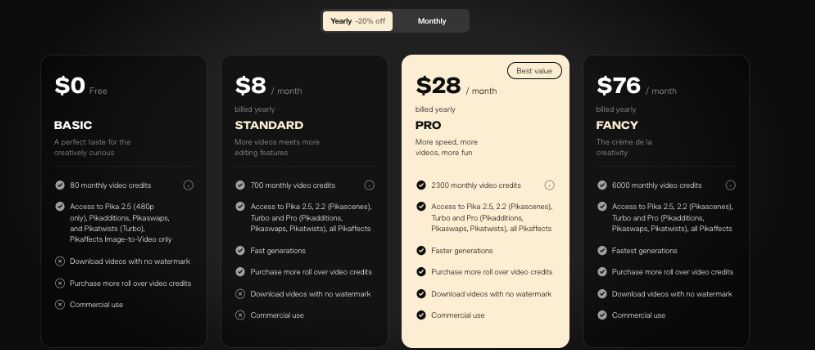
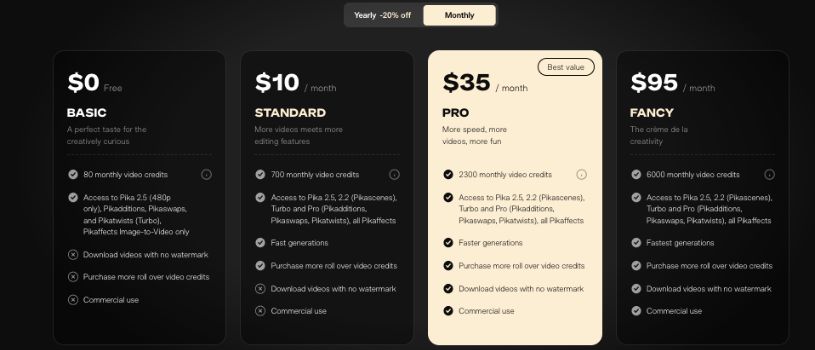
Pika AI uses a credit‑based subscription system, so you pick a plan based on how much creative freedom you want each month. The core idea is simple: the more credits you get, the more clips you can generate and the bigger your creative playground becomes.
Free Plan
If you’re curious and just want to test the waters, the Free plan gives you a taste of what Pika can do without spending a dime. You get a set number of monthly video credits that let you experiment with text‑to‑video and basic effects. It’s great for getting familiar with prompt writing and seeing how the tool responds before committing financially.
Standard Plan – $8/month
This is the sweet spot for most solo creators or hobbyists. You get significantly more video credits each month and access to most of Pika’s creative models and features. Videos export without watermarks, and you can use them commercially, which makes this plan much more than just a playground.
Pro Plan – $28/month
Stepping up to Pro unlocks even more credits and faster generation speeds. If you’re regularly creating content or using Pika for client work, this plan gives you the breathing room to push past basic experimentation and start producing higher‑volume or higher‑quality clips.
Fancy Plan – $76/month
At the top tier, Fancy is for creators, teams, or brands that want the biggest monthly budget of credits. You get the largest allotment of credits and priority rendering, which means less waiting and more making. If you live in video creation and rely on Pika daily, this plan makes that lifestyle smoother.
Pika AI Pricing Plans at a Glance
| Plan Name | Price (Monthly) | Best For | Credits | Watermark-Free | Commercial Use | Priority Rendering |
| Free | $0 | Testing & beginners | Limited | ❌ | ❌ | ❌ |
| Standard | $8 | Casual creators | Moderate | ✅ | ✅ | ❌ |
| Pro | $28 | Frequent users & freelancers | High | ✅ | ✅ | ✅ (Faster speeds) |
| Fancy | $76 | Power users & small teams | Very High | ✅ | ✅ | ✅ (Highest priority) |
Also Read:
What is Jitter AI?
What is Genmo?
What is Gamma AI? AI Presentation Maker Explained
Final Thoughts: Who is Pika AI for?
Pika AI is for anyone who wants to turn imagination into motion without diving into complex editing software. Whether you’re a creator making short videos for TikTok, a marketer testing out bold visual ideas, or just someone curious about AI tools, Pika gives you a fast, fun, and surprisingly flexible way to bring ideas to life.
It’s especially great for people who think visually but don’t have the time or skills to produce polished clips from scratch. If you enjoy experimenting with prompts, love the idea of playful visual effects, or want to add something eye-catching to your content in minutes, Pika fits right into your workflow.