Most automation pricing pages lie by omission. They show you numbers but hide the trade-offs. n8n does the opposite. It exposes the trade-offs so clearly that buyers get uncomfortable. That is why people searching for “n8n pricing” often walk away confused. They are expecting a simple SaaS answer. What they get instead is a choice between control, responsibility, and convenience.
In 2026, automation is no longer a side hustle tool for moving emails into spreadsheets. It runs sales ops, syncs financial systems, triggers customer actions, and powers internal workflows. When automation fails, the impact is real. Downtime costs money. Bad data breaks decisions.
This guide breaks down n8n pricing and plans for 2026 the way buyers actually need to understand them. Not as a feature list, but as an economic and operational decision. By the end, you will know not only how much n8n costs, but whether it fits the way your team works.
Why n8n Pricing Confuses Buyers in 2026?
n8n pricing confuses buyers because it breaks the mental model most automation tools have trained them to expect.
Instead of charging per step or per action, n8n prices cloud plans based on workflow executions and offers a self-hosted edition that is free but operationally demanding. On the surface, this looks cheaper and more flexible than competitors. In practice, it forces buyers to think about automation as a system, not a checklist of tasks.
The confusion does not come from the execution-based model alone. It comes from the coexistence of two radically different cost paths. Most buyers try to compare these options using the same pricing logic they use for Zapier or Make, and that is where they get lost.
In 2026, this matters more than ever. Automation workflows are longer, more interconnected, and more business-critical. A broken workflow is not a mild inconvenience anymore. It is a production incident. Evaluating n8n purely on monthly price without factoring in operational responsibility is the fastest way to make the wrong decision.
That is why buyers feel lost. They are comparing numbers when they should be comparing ownership models.
What Is n8n and How Its Pricing Model Actually Works?
n8n is an open-source workflow automation platform built for complex, logic-driven automation. Unlike consumer-first tools that prioritize ease of use above all else, n8n prioritizes flexibility, extensibility, and control. The automation engine itself remains largely the same across self-hosted and cloud offerings. What changes is who manages the operational layer and how collaboration and governance are handled.
In self-hosted n8n, you own everything. Infrastructure, uptime, scaling, security, and execution limits are all your responsibility. The software is free, but the system is yours to operate
In n8n Cloud, that responsibility shifts to the vendor. You pay a subscription not just for executions, but for reliability, updates, security hardening, and collaboration features that teams need once automation moves beyond experimentation.
This is why comparing n8n pricing directly with Zapier or Make often leads to bad conclusions. Those tools sell convenience at scale and charge heavily as usage grows. n8n sells control and lets you decide how much responsibility you want to take on.
If your automation needs are simple, n8n may feel heavy. If your workflows resemble backend services more than task chains, n8n pricing starts to make structural sense.
n8n Pricing Models Explained
Community Edition – Free (Self-Hosted)
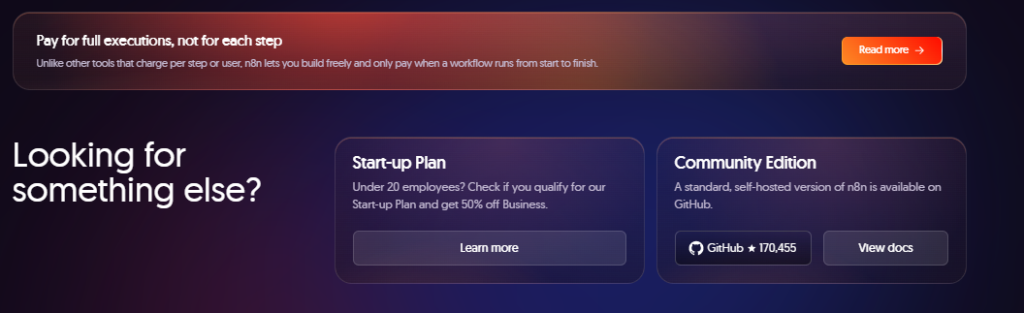
n8n’s Community Edition is free, but only if you are willing to run it yourself.
You get unlimited workflows, unlimited executions, and full access to the automation engine. What you do not get is managed hosting, automatic scaling, or vendor support when things break.
Self-hosting works best for teams with real technical maturity. If you already manage cloud infrastructure and have clear ownership, this option avoids usage-based pricing and keeps costs predictable.
Where teams get burned is underestimating operational work. Hosting, monitoring, security updates, backups, and debugging all take time. As automation grows, that time cost grows with it.
Self-hosted n8n is not cheap automation. It is owned by automation. It pays off only if you are ready for that responsibility.
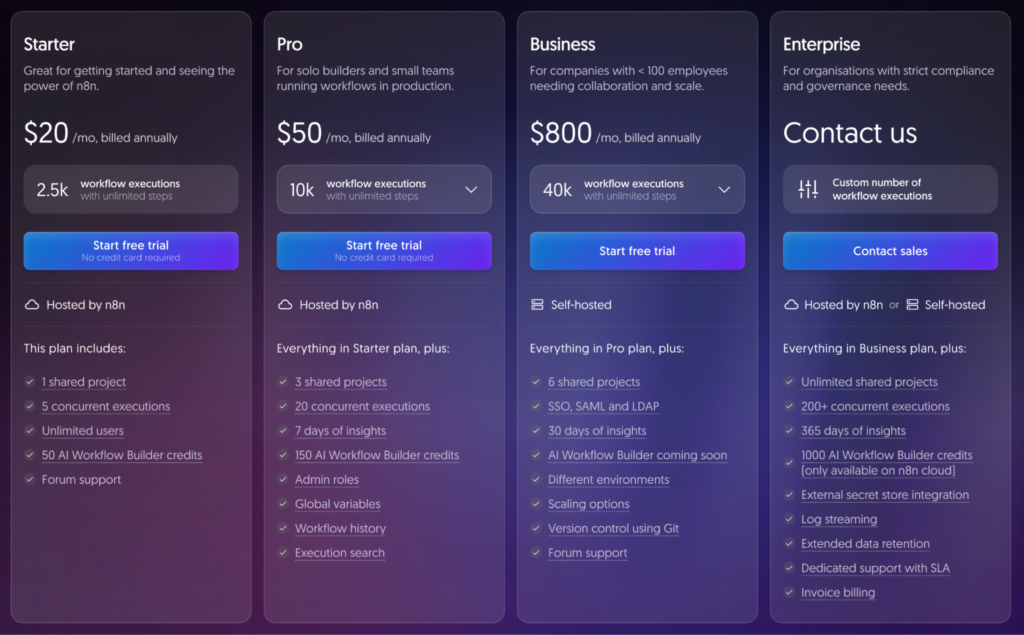
Starter – $20 per Month (Billed Annually)
Starter exists to remove infrastructure headaches. It is built for freelancers and solo users who want reliable automation without running servers. You get a limited number of executions and basic collaboration through a single shared project.
Starter is ideal for low-volume, non-critical workflows. Once automations run frequently or support important business processes, the limits show up fast. This plan is not meant to scale. It is a safe place to start, not a place to stay.
Pro – $50 per Month (Billed Annually)
Pro is where n8n becomes a proper team tool.
Workflow history and higher execution limits make automation manageable instead of guesswork. Teams can debug failures, track behavior over time, and collaborate without stepping on each other.
For small teams, Pro often delivers better value than self-hosting. You avoid infrastructure work while gaining enough visibility to run automation responsibly. If your workflows touch revenue, customers, or internal operations, Pro is usually the minimum viable choice.
Business – $667 per Month (Billed Annually)
Business pricing looks high if you focus only on execution numbers. That is the wrong lens. This plan exists for governance and risk control. Features like SSO, multiple environments, and version control are designed to prevent automation from becoming a liability at scale.
In large organizations, automation failures cost far more than subscriptions. Business pricing reflects the cost of avoiding downtime, access issues, and compliance problems. If you are judging this tier purely by volume, you are not the target user.
Startup Plan – 50 Percent Off Business
Eligible startups get the full Business plan at half the price. This is not a gimmick. It is meant for teams that will scale automation aggressively but cannot justify full enterprise pricing yet. If you qualify, this is the best value plan n8n offers.
Enterprise – Custom Pricing
Enterprise is for organizations where automation is core infrastructure. It includes unlimited usage, advanced compliance, extended data retention, and dedicated support with SLAs. Pricing is custom because requirements vary widely. If you need this tier, you already know why. If you are unsure, you probably do not.
Key Features That Drive n8n Pricing
n8n pricing depends on how often workflows run, how many people manage them, and how critical they are to the business.
Workflow Executions
Each time a workflow runs from start to finish, it counts as one execution. High-frequency triggers and inefficient workflows increase execution usage quickly, which directly impacts plan limits.
Shared Projects
Shared projects allow teams to work on workflows together. This becomes important once automation moves beyond one person and requires structure, access control, and collaboration.
Workflow History
Workflow history lets you review past runs and debug failures. It is optional at small scale but essential once automations support real business processes.
Environments and Version Control
Higher plans include separate environments and version control to prevent untested changes from breaking live workflows. These features exist to reduce operational risk as automation scales.
Who Should Choose Each n8n Plan
Self-Hosted (Community Edition) Is Best For
Choose self-hosted n8n only if all of the following are true:
- Your team has real DevOps experience and owns production systems
- Your automations connect internal tools, databases, or private services
- Your workload is predictable and you want to avoid usage-based pricing
This option gives you maximum control and the lowest long-term cost if you can operate it properly.
Do not choose self-hosted n8n if:
- You do not want to manage servers or uptime
- You lack monitoring, backup, and incident response processes
- You are choosing it because it looks “free”
In those cases, self-hosting will cost you more than any subscription.
Cloud Starter Is Best For
Choose Cloud Starter if:
- You are a solo operator or freelancer
- Your workflows are low-volume and non-critical
- You want automation running without infrastructure setup
- Starter is ideal for experimentation and simple automation.
Do not choose Starter if:
- Your workflows run frequently
- Automation supports revenue or customer-facing processes
- You expect this plan to scale with you
- Starter has hard limits and is not designed for growth.
Cloud Pro Is Best For
Choose Cloud Pro if:
- You have a small team collaborating on automation
- Your workflows support revenue, operations, or customer experience
- You need execution history to debug and monitor failures
- Pro is the practical entry point for serious automation.
Do not choose Pro if:
- You need strict access control or compliance features
- Multiple teams require isolated environments
- At that point, Pro becomes a risk, not a saving.
Business and Enterprise Are Best For
Choose Business or Enterprise if:
- You operate in regulated or compliance-heavy industries
- Multiple teams build and run automation
- Automation failures have financial, legal, or operational impact
- These plans exist to reduce risk, not to save money.
Do not choose these tiers if:
- Automation is experimental or low-impact
- Your team does not need governance or access controls
- Enterprise features only make sense when automation is business-critical.
Also Read:
What is Adobe Express?
Pros and Cons of n8n Pricing
Pros
Predictable costs at scale
Unlike per-step automation tools, n8n does not punish you for complex logic. Once workflows are designed efficiently, costs grow far more slowly as usage increases.
No per-action tax
You are not charged for every conditional branch or transformation. This makes n8n well suited for advanced, multi-step workflows that would be prohibitively expensive elsewhere.
Flexible ownership models
You can choose between full control through self-hosting or reduced responsibility through managed cloud plans. Most automation tools lock you into one approach.
Built for serious automation
n8n pricing aligns with long-running, business-critical workflows rather than casual task automation. It supports teams that treat automation as infrastructure.
Strong long-term ROI for technical teams
For teams with DevOps maturity, self-hosted n8n can deliver very low marginal costs over time while maintaining full data ownership.
Cons
Higher learning curve
n8n is not beginner-friendly. Understanding workflows, executions, and error handling requires technical thinking. Pricing feels confusing if you expect plug-and-play simplicity.
Operational responsibility is real
Self-hosting shifts infrastructure, security, and uptime risks onto your team. These costs are often underestimated until something breaks.
Cloud plans have clear ceilings
Starter and Pro plans are easy to outgrow. If your automation scales quickly, you will hit limits sooner than expected.
Enterprise features come at enterprise prices
Business and Enterprise plans are expensive if you do not actually need governance, access control, and compliance features.
Not ideal for simple automations
If your use case is basic task automation, n8n’s pricing and complexity can feel like overkill compared to simpler tools.
Final Verdict: Is n8n Right for You?
Choose n8n if you value control, scalable economics, and long-term automation ownership. It rewards teams that think in systems and plan their workflows properly.
Avoid n8n if you want automation to work without thinking about logic, structure, or responsibility. Simpler tools will feel easier and less demanding. If you want convenience and low operational risk, choose n8n Cloud and accept the limits.
If you want full control and predictable long-term costs, self-host n8n and accept the responsibility.
n8n is not for everyone. That is exactly why it works so well for the teams it is built for.
Frequently Asked Questions
1. Does n8n offer a free trial?
Yes. Cloud plans include a trial period, which is best used to observe real execution behavior rather than test features.
2. Can I switch between self-hosted and cloud?
Yes, but it requires planning. Workflow logic is portable, but infrastructure, credentials, and governance are not one-click transfers.
3. What happens if I exceed execution limits?
Workflows stop running until limits reset or the plan is upgraded. For business-critical automation, this is a serious risk.
4. Are there setup fees?
No standard setup fees for cloud plans. Self-hosting incurs infrastructure and engineering costs instead.
5. How does billing work?
Cloud plans are billed monthly or annually based on the selected tier. Self-hosted has no licensing cost.