Jitter is a browser-based motion design tool built for speed, simplicity, and stunning visuals. Whether you’re designing social media content, product demos, or UI animations, Jitter helps you do it faster. But how much does this creative power actually cost?
From the generous free plan to advanced Pro and Team features, Jitter offers options for every type of creator. So what exactly do you get at each pricing level, and is it worth upgrading? Let’s break it down with clarity and no fluff.
Jitter AI Pricing Explained
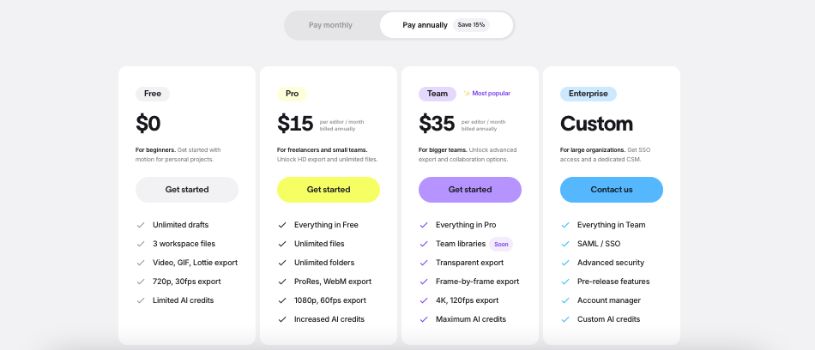
Jitter offers flexible pricing plans built for everyone—from beginners just exploring motion design to large organizations managing complex animation workflows. Below is a breakdown of each plan and what it includes.
1. Free Plan – $0/month
Perfect for individuals starting out with motion design or testing Jitter’s core features.
Key Highlights:
- 3 workspace files
- Unlimited drafts
- Export to Video, GIF, or Lottie
- 720p resolution at 30fps
- Limited AI credits
Use it if:You’re working on personal or school projects and don’t need HD exports or advanced collaboration.
2. Pro Plan – $19/month per editor (billed monthly)
Ideal for freelancers and small creative teams looking for more flexibility and better output quality.
Everything in Free, plus:
- Unlimited files and folders
- 1080p resolution at 60fps
- ProRes and WebM export formats
- Increased AI credits
| Feature | Free | Pro |
| Max resolution | 720p | 1080p |
| Max frame rate | 30fps | 60fps |
| No watermark | ❌ | ✅ |
| Export formats | Basic | Pro + Custom |
| AI credits | Limited | Increased |
Use it if:You need watermark-free, high-quality exports for client work or content publishing.
3. Team Plan – $49/month per editor (billed monthly)
Best for growing teams managing multiple projects and needing more collaboration and export power.
Everything in Pro, plus:
- Team libraries (coming soon)
- Transparent background exports
- Frame-by-frame export control
- 4K resolution at 120fps
- Maximum AI credits
| Feature | Pro | Team |
| Max resolution | 1080p | 4K |
| Max frame rate | 60fps | 120fps |
| Transparent export | ❌ | ✅ |
| Frame-by-frame control | ❌ | ✅ |
| Team libraries | ❌ | Coming Soon |
Use it if:Your team is producing advanced animations and needs real-time collaboration and high-performance exports.
4. Enterprise Plan – Custom Pricing
Tailored for large companies needing security, customization, and dedicated support.
Everything in Team, plus:
- SAML/SSO integration
- Advanced security features
- Pre-release features access
- Dedicated account manager
- Custom AI credit limits
| Feature | Team | Enterprise |
| Single Sign-On (SSO) | ❌ | ✅ |
| Advanced security | ❌ | ✅ |
| Pre-release features | ❌ | ✅ |
| Account manager | ❌ | ✅ |
Use it if:You require advanced security, onboarding support, or are scaling animation across departments.
My Personal Tip for You:
- Start Free: Try all core features with no cost or time limits.
- Upgrade for Power: Unlock HD exports, unlimited storage, and AI enhancements with Pro and Team.
- Scale with Confidence: Use Enterprise for security, support, and premium control.
- Flexible Billing: Pay monthly or annually and cancel anytime.
Which Plan is Right for You?
Choosing the right Jitter plan depends on your creative goals and where you are in your motion design journey. Each plan is built for a specific type of user, so let’s break it down.
Free Plan
This is the best place to begin if you’re new to motion design or just exploring animation. It lets you test Jitter’s tools without any commitment. You can experiment, learn, and export basic content, but it’s not built for client work or high-res output.
Pro Plan
If you’re a freelancer, content creator, or solo designer, Pro unlocks serious value. With HD exports, watermark-free videos, and unlimited storage, it’s built for professional use. You can count on it for daily projects without creative limitations.
Team Plan
This plan is ideal for small design teams or marketing squads working together. Shared libraries, 4K exports, and team-ready collaboration tools make it efficient for group workflows. If you manage multiple creators or fast-paced content output, Team fits well.
Enterprise Plan
Large companies and agencies needing control, security, and support will find Enterprise essential. It includes SSO, advanced permissions, and access to pre-release features. If your team has compliance requirements or works at scale, this is the plan to choose.
Student & Educator Access
If you’re a student or educator, Jitter offers free Pro access through its education program. You get nearly all Pro features at no cost, which is perfect for learning or teaching motion design in a real-world setting.
Also Read:
Boba AI Pricing Explained
A complete guide to Replit pricing in 2026
Final Thoughts
Jitter’s pricing is designed to grow with you. Whether you’re testing the waters with the Free plan or managing a full creative team on Enterprise, there’s a tier that fits your workflow and budget.
Start free to explore the basics, then upgrade when you need more power, better exports, or team collaboration. No pressure, no lock-in. Just flexible tools built for motion designers at every level.
Frequently Asked Questions
1. Does Jitter offer discounts for students, veterans, or nonprofits?
Jitter offers free access to the Pro plan for verified students and educators through its education program. There’s no public mention of discounts for veterans or nonprofits at this time.
2. Can Jitter be used for free?
Yes. Jitter offers a free plan with unlimited drafts, 3 workspace files, and basic exports. It’s great for testing the platform or working on small personal projects.
3. Is Jitter’s payment process secure?
Yes. Jitter uses Stripe for payment processing—the same provider trusted by companies like Figma, Notion, and Twitter. Jitter does not store or manage your credit card data directly.
4. How can someone cancel their Jitter subscription?
Subscriptions can be canceled at any time from the workspace billing settings. Once canceled, the workspace will revert to the Free plan at the end of the billing cycle.
5. Why should someone upgrade to Pro, Team, or Enterprise?
Upgrading unlocks HD and 4K exports, removes watermarks, and adds features like unlimited files, ProRes export, team libraries, and advanced collaboration tools. It’s ideal for professionals, agencies, and growing teams.
6. When does a Jitter subscription renew?
Subscriptions renew automatically at the end of each billing period—monthly or annually—based on the selected plan.
7. Does a paid plan apply to all workspaces linked to the same account?
No. Paid plans are applied per workspace. If a user manages multiple workspaces, each one needs its own plan if premium features are required across all.
8. How does workspace billing work on Jitter?
Each workspace has its own billing plan. If you’re part of multiple workspaces, only the one with a paid plan will have premium features. Other workspaces remain on the Free plan unless upgraded individually.