Boba Video is an AI-powered content creation platform that turns text prompts into short, viral-ready videos in seconds. Designed for creators, marketers, and teams, it simplifies video production without the need for editing skills or heavy software. But when it comes to pricing, things can get a little confusing.
Is the free plan enough for casual creators? What do you actually get at higher tiers, and is it worth the upgrade? In this guide, we’ll break down Boba Video’s pricing so you can choose the right plan without wasting a cent.
What is Boba AI?
Boba AI is a text-to-video platform that turns your ideas into short, high-quality anime and normal videos using artificial intelligence. It’s built for creators, marketers, and teams who want to generate content fast without editing skills. Just type a prompt, and Boba handles the rest.
Also Read:
Best 7 Free AI Animation Tools in 2026
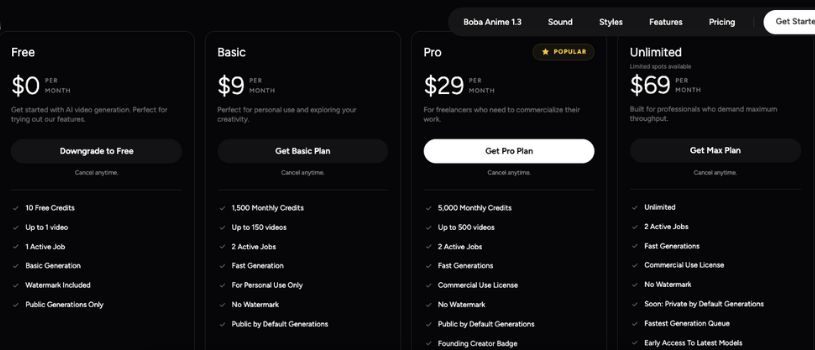
Boba Video Pricing Plans at a Glance
Whether you’re just getting started or scaling up your content production, Boba Video offers flexible plans that match your creative goals.
Free Plan
Price: $0 per month
Best for: Trying out Boba Video features for the first time
The Free plan helps you test the platform without spending anything. It works well for quick experiments and basic exploration.
What you get:
- 10 free credits
- Up to 1 video
- Basic generation speed
- 1 active job at a time
- Watermark included
- Public generations only
Basic Plan
Price: $9 per month
Best for: Personal use and casual content creation
The Basic plan removes key limitations and gives you room to create consistently. It suits creators posting regularly on social platforms.
What you get:
- 1,500 credits per month
- Up to 150 videos
- Fast generation speed
- 2 active jobs
- No watermark
- Public by default generations
Pro Plan
Most Popular
Price: $29 per month
Best for: Freelancers and creators monetizing content
The Pro plan unlocks commercial rights and higher output. It fits creators working with clients or earning from videos.
What you get:
- 5,000 credits per month
- Up to 500 videos
- Fast generation speed
- 2 active jobs
- Commercial use license
- No watermark
- Founding Creator Badge
Max Plan
Limited Spots
Price: $69 per month
Best for: High-output creators and professionals
The Max plan removes usage limits and prioritizes speed. It works best for teams, agencies, and daily video production.
What you get:
- Unlimited credits
- Unlimited videos
- Fastest generation queue
- 2 active jobs
- Commercial use license
- No watermark
- Early access to new models
- Private generations coming soon
- Founding Creator Badge
Feature Comparison: What You Get with Each Plan
| Feature | Free | Basic | Pro | Max |
| Monthly Credits | 10 | 1,500 | 5,000 | Unlimited |
| Max Videos | 1 | 150 | 500 | Unlimited |
| Active Jobs | 1 | 2 | 2 | 2 |
| Generation Speed | Basic | Fast | Fast | Fastest |
| Watermark | Included | None | None | None |
| Generation Privacy | Public only | Public default | Public default | Private (soon) |
| Commercial License | No | No | Yes | Yes |
| Founding Creator Badge | No | No | Yes | Yes |
| Early Access to Models | No | No | Yes | Yes |
How to Choose the Right Boba AI Plan?
Not sure which Boba plan fits your workflow? Here’s a simple guide to help you decide based on how often you create, your goals, and your budget.
1. Just Getting Started? Try the Free Plan
If you’re new to AI video generation or want to test Boba’s features before committing, the Free plan is the way to go. You’ll get 10 credits to experiment with and create one video. It’s great for seeing how the platform works without spending a dime.
2. Creating for Fun or Social Content? Go with Basic
The Basic plan is ideal for solo creators, influencers, or hobbyists producing casual content. With 1,500 monthly credits, you can create up to 150 videos — enough for regular posting on platforms like TikTok, Instagram, or YouTube Shorts.
3. Freelancing or Monetizing Content? Pro is Your Best Bet
The Pro plan was built for creators making content for clients or monetized channels. You’ll get 5,000 credits monthly, commercial rights, and no watermark. It’s the best value if you’re turning content into income.
4. Scaling Production? Max Plan Delivers Maximum Output
The Max plan is built for high-volume creators, agencies, or studios. You get unlimited credits, the fastest generation speeds, and early access to new models. It’s a powerhouse plan with room to scale.
Watch Boba AI in Action
Below is my YouTube Shorts video where I walk through a real-life demo of Boba AI and show exactly how it works.
Final Thoughts
Choosing the right Boba Video plan comes down to how often you create and what kind of content you’re making. Whether you’re experimenting, freelancing, or producing at scale, there’s a plan that fits your needs. Start small or go big. Boba makes it easy to grow as you go.
From free trials to unlimited access, every tier is designed with creators in mind. Pick a plan that matches your goals, not just your budget. And remember, you can always upgrade or cancel anytime.
Frequently Asked Questions About Boba.video’s Pricing
What are Boba Video credits?
Credits are used to generate media inside Boba. The number of credits used depends on the video length, model type, and settings. On average, each video generation uses around 50 credits.
How can I get more credits?
To get more credits, you can either upgrade to a higher monthly plan or buy additional credit packs if available. Both options let you continue creating without interruption.
Do unused credits carry over each month?
No, credits from your monthly subscription do not roll over. Your credit balance resets at the start of each new billing cycle based on your current plan.
Can I change or cancel my plan anytime?
Yes, you can switch plans whenever you like. Upgrades take effect right away with prorated billing. Downgrades apply from your next billing cycle.
Is Boba Video free to use?
Yes, Boba offers a free plan with 10 credits to help you try out the platform. It’s great for testing the features before deciding to upgrade.
Can I use Boba Video for commercial content?
Yes, but only if you’re on the Pro or Max plans. These plans include a commercial license that lets you use your content for client work, monetized channels, or ads.
Will my videos have a watermark?
Only videos generated on the Free plan include a watermark. All paid plans remove the watermark for cleaner, professional output.
Where can I get support if I need help?
You can join the official Boba Video Discord community to ask questions, get support, and connect with other creators using the platform.
How do I choose the right plan for me?
If you’re creating casually, the Basic plan offers great value. For commercial or high-volume use, go with Pro or Max. You can also start free and upgrade later as your needs grow.